そうだ、, Synthesiaは試す価値がある 俳優や撮影クルー、ナレーターを雇うことなく、洗練された研修動画、オンボーディング用コンテンツ、社内向けコミュニケーション資料、製品解説動画、あるいは多言語対応のプレゼンター形式の動画を作成したい場合。. すべての動画用途に最適というわけではありません。特に、感情に訴えるストーリーテリングや、リアルなUGCスタイルの広告、複雑な実演、あるいはナレーターの解説だけでは教育的な価値が生まれない学習コンテンツなどが必要な場合には、適していません。.
私のユーザー調査から、明確な傾向が浮かび上がりました。Synthesiaの最大の価値は「人間に取って代わる」ことではありません。その真の価値は、ビジネス動画の制作をより迅速にし、更新を容易にし、拡張性を高めることにあります。最も効果的な活用例としては、社内研修、人事関連動画、コンプライアンス情報の更新、新入社員研修、FAQ、ソフトウェアの操作解説、そして繰り返し活用できる社内コミュニケーションなどが挙げられます。.
Synthesiaは現在、AIアバターやAIナレーション、160以上の言語に対応した、ビジネス向けAI動画プラットフォームとして位置づけられています。 公開されている価格表によると、Starterプランは月額$29または年額$264、Creatorプランは月額$89または年額$804となっています。 また、Synthesiaは自社のプラットフォームに240種類以上のアバターと160以上の言語が含まれていると述べており、これがビジネス動画、学習・開発、および企業研修のワークフローで頻繁に利用されている理由となっています。.
結論として: Synthesiaは、定期的に再現性のあるビジネス動画を制作するチームにとって、強く推奨できるツールです。一方、動画が1~2本しか必要ない場合、ソーシャルメディア向けの広告クリエイティブを必要とする場合、あるいはAIアバターが学習成果を自動的に向上させると期待している場合には、それほど魅力的ではありません。.
| 質問 | 短答 |
|---|---|
| Synthesiaは買う価値があるでしょうか? | はい、トレーニング、新入社員研修、社内コミュニケーション、製品解説、多言語コンテンツなど、繰り返し活用できるビジネス向け動画を作成する場合です。. |
| 最適な活用例 | 企業向け研修、新入社員研修、コンプライアンスに関する最新情報、SaaSの解説動画、社内向けコミュニケーション動画。. |
| 最も弱いユースケース | UGC風の広告、感情に訴えるストーリーテリング、顧客の声、複雑なデモンストレーション、そして信頼性の高い経営陣からのメッセージ。. |
| 主なメリット | 撮影や俳優、スタジオ、従来の撮り直しを必要とせず、より迅速に動画を制作できます。. |
| 主な懸念事項 | AIアバターは、使いすぎると不自然に見えたり、学習者の集中を妨げたりする可能性があります。. |
| 最良の買い手 | L&Dチーム、人事チーム、SaaS企業、顧客教育チーム、代理店、およびグローバル企業。. |
| 小規模なチームでもこれを使うべきでしょうか? | はい、定期的に動画を制作する場合です。いいえ、動画が1~2本だけで済む場合は違います。. |
| 総合評価 | Synthesiaは優れたビジネス向け動画制作ツールですが、コンテンツ戦略の代わりとなるのではなく、それを支えるものであるべきです。. |
Synthesiaのレビュー:Synthesiaはどんな人に最適か?
Synthesiaは、従来の動画制作ワークフローを構築することなく、プロ並みのクオリティのプレゼンター動画が必要なチームに最適です。.
| チームタイプ | Synthesiaの主な活用事例 | なぜうまくいくのか |
|---|---|---|
| 学習と能力開発 | 社員研修、新入社員向け研修モジュール、コンプライアンス解説資料 | プレゼンターを撮影することなく、チームが繰り返し利用できるトレーニング動画を作成できるよう支援します。. |
| 人事チーム | ポリシーの更新、福利厚生の解説、新入社員オリエンテーション | ポリシーや規制が変更された際、スクリプトの更新が容易になります。. |
| SaaS企業 | 製品の操作ガイド、機能解説、ヘルプセンターの動画 | 製品説明の台本を、プロがナレーションを担当する動画に変換します。. |
| カスタマーサクセス | 新規顧客の導入、よくある質問、更新に関する説明 | すべてのトピックについて個別に電話対応を行うことなく、拡張性のある顧客教育を実現します。. |
| 社内コミュニケーション | 会社の最新情報、経営陣からの発表、業務プロセスの変更 | チームや地域を問わず、一貫性のあるビジネスコミュニケーションを実現します。. |
| 代理店 | 顧客向け解説資料、研修パッケージ、多言語版 | 標準化された動画フォーマットでの配信を高速化します。. |
| アフィリエイトマーケター | 製品レビュー解説動画、比較ページ用動画、メールによる解説コンテンツ | 教育用ファネル資産には有用ですが、ソーシャル広告そのものにはあまり適していません。. |
| グローバル・エンタープライズ | 地域向けにローカライズされた研修・コミュニケーション動画 | 多言語動画の生成により、ローカライゼーションの障壁が低減されます。. |
最適なユーザーは以下の通りです:
- 社員研修を企画・実施する学習・人材開発チーム
- オンボーディング、コンプライアンス、および社内規定に関する動画を制作する人事チーム
- SaaS企業が作成する製品紹介動画やヘルプセンター動画
- クライアント向けに、繰り返し利用可能な解説動画を制作する制作会社
- 自分たちを撮影したくない起業家や小規模チーム
- 多言語版の動画が必要なグローバルチーム
- 頻繁に情報を更新する社内広報チーム
私のユーザー調査において、Synthesiaの最も評価が高かった活用事例には、ある共通点がありました。それは、動画に人間味や感情、映画のような演出が強く求められる必要がなかったという点です。重要なのは、内容が明確で、繰り返し再生でき、更新が容易であり、ビジネス用途にふさわしいプロフェッショナルな仕上がりであることでした。.
そのため、Synthesiaは次のようなコンテンツの作成に特に役立ちます:
- “「入社歓迎」オリエンテーション・モジュール
- “「この方針の変更点は以下の通りです」人事関連の最新情報
- “「この機能の使い方」製品解説
- “「この状況での対応策」コンプライアンス研修
- “「今月の社内向け最新情報です」社内連絡
- “「こちらの動画はローカライズ版です」多言語トレーニング
Synthesiaの弱点は、アバター自体が注目の的になってしまう場合です。 研修に関する議論の中で、繰り返し指摘された懸念の一つは、学習者が実際の授業内容ではなく、AIの顔や口の動き、あるいはロボットのような話し方に集中してしまう可能性があるという点でした。これは、シンセシアが劣っているという意味ではありません。つまり、このツールは、アバターが学習体験全体を担うのではなく、メッセージを補完する役割を果たす場合に最も効果を発揮するということです。.
トレーニング動画の制作にSynthesiaは価値があるでしょうか?
Synthesiaは、明確で再現性が高く、更新しやすい指導コンテンツを作成することを目的としたトレーニング動画制作において、その価値を発揮します。ただし、不十分な指導設計を魔法のように解決してくれるツールというわけではありません。.
これが私の研究における最も重要な発見でした。教育の専門家たちが主に尋ねていたのは、「Synthesiaで動画は作れるか?」ということではなく、「この動画は実際に学習の助けになるのか?」ということでした。“
その違いは重要です。.
Synthesiaを使えば、台本をプレゼンターが進行する洗練された動画に素早く仕上げることができます。しかし、トレーニング動画には依然として以下の要素が必要です:
- 明確な学習目標
- 現実的な職場環境
- 例と反例
- シナリオベースのアプリケーション
- 視覚的な補強
- 理解度確認
- 人間による審査
- そもそも動画が存在する理由
私が見つけた最も厳しい批判の一つは、AI動画が「スライド上のテキストを読み上げて『次へ』をクリックする」という形式を、単に新しいフォーマットで再現してしまう可能性があるという点だ。つまり、Synthesiaは、効果を高めることなく、質の低いトレーニングをより洗練されたものに見せかけることができるのだ。.
だからこそ、私はSynthesiaを教育設計の完全な代替として使うつもりはありません。むしろ、制作を加速させるツールとして活用したいと考えています。.
Synthesiaでの効果的なトレーニングの流れは、次のようになります:
- まずは学習目標から始めましょう。.
- 動画が適切な形式かどうかを判断してください。.
- 簡潔で、会話調の台本を作成してください。.
- アバターを文脈の説明、自己紹介、または解説に活用してください。.
- 画面録画、図解、具体例、またはBロールを追加してください。.
- モジュールは短く保つこと。.
- 動画の外部にクイズ、シナリオ、または業務支援資料を追加します。.
- 拡大する前に、学習者からのフィードバックを確認してください。.
このように活用すれば、Synthesiaは非常に有用です。しかし、ありきたりなトレーニングを大量生産するための近道として使うと、学習効果はほとんど得られないまま、大量のコンテンツを生み出すことになってしまいます。.
Synthesiaの導入事例:大規模な企業向け研修と新入社員研修
Synthesiaのビジネス上のメリットとして最も明確なもののひとつが、企業向け研修コンテンツの制作です。.
調査の結果、ある企業では、研修チームがコンテンツ制作の少なくとも半分をSynthesiaに移行しつつ、その他のモジュールについてはAdobe Captivateなどのツールを引き続き使用しているという事例が見つかりました。その理由は単純明快です。一般的な研修やオンボーディング用のコンテンツは、従来の撮影手法よりもAIアバターを使用する方が、はるかに迅速に制作できるからです。.
興味深い点は、同チームがワークフローの100%をSynthesiaに移行しなかったことだ。主な障壁はコストだった。 調査には、少数のグローバルエンタープライズライセンスの年間コストが100万ドルをはるかに超えると報告された事例も含まれていた。この数字が重要なのは、エンタープライズレベルでの実際の購買決定を如実に示しているからだ。Synthesiaは制作時間を短縮できるが、大企業にとっては依然として、ライセンスコスト、利用量、ガバナンス、そして動画が実際に効果的かどうかを評価する必要がある。.
シンセシア以前
そのワークフローは、従来のトレーニング映像制作に近いものでした:
- 研修資料を作成する
- プレゼンターやナレーションを録音する
- 動画を編集する
- Captivate またはその他のオーサリングツールでモジュールを作成する
- ポリシーが変更された場合は、該当するセクションを再録音してください
- 地域ごとにコンテンツを手動でローカライズする
『シンセシア』の後
ワークフローの拡張性が向上しました:
- スクリプトをアバターが主演する動画に変換する
- 一貫性のあるプレゼンター向けのコンテンツを作成する
- 再撮影せずにスクリプトを更新する
- 複数のバージョンをより迅速に作成する
- 対話やより詳細な設計が必要な場合にのみ、従来のツールを使用してください
実践的な知見
Synthesiaが最も真価を発揮するのは、L&D戦略の完全な代替としてではなく、標準化されたコンテンツのための制作レイヤーとして活用する場合です。.
例えば、私はSynthesiaを次のような用途に使います:
- “「経費規定の仕組み」”
- “「年次コンプライアンス研修の受講方法」”
- “「給付金の受給方法」”
- “「社内チケットシステムの使い方」”
- “「新任マネージャーが必須の事務作業をどのようにこなすべきか」”
以下の点については、Synthesiaだけに頼るべきではありません:
- リーダーシップにおける行動変容
- 安全性が極めて重要な現場での訓練
- 高度な技術的処置
- 顧客向け認定プログラム
- 複雑なシミュレーション
- 対人交流を伴わないソフトスキルの練習
コンテンツが反復可能で、ポリシーに基づいており、頻繁に更新される場合、そのビジネスケースは最も説得力を持つ。.
SynthesiaのROI:実際にコスト削減につながるのか?
Synthesiaは、定期的な動画制作、ナレーション、ローカライズ、および将来的な再収録にかかる費用と比較すると、コスト削減につながります。ただし、必要な動画が数本のみの場合や、高度にカスタマイズされたクリエイティブ作業が必要な場合は、投資対効果(ROI)は低くなります。.
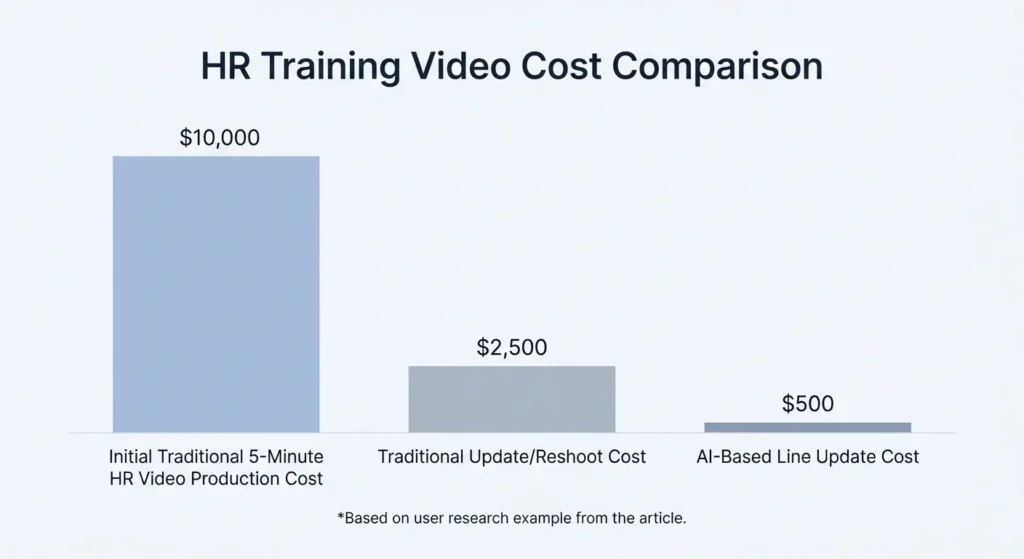
私の研究で参考になった事例として、人事研修ビデオの更新があります。従来のワークフローでは、5分間の人事研修ビデオの脚本作成、撮影、編集にかかる費用はおよそ1万ポンドでした。 翌年に法律や方針が変更され、1行の更新が必要になった場合、チームは当初のセットアップを再現しなければならないため、再撮影には依然として約2,500ポンドの費用がかかっていました。一方、AIアバターを活用したワークフローでは、同じ1行の更新でも、その費用は500ポンド程度に抑えられる可能性があります。.
これが、SynthesiaのROIに関する話を一言で表すとこうなります: 最も大きなコスト削減効果は、多くの場合、最初の動画制作後、コンテンツの修正、更新、翻訳、または再公開が必要になった際に現れます。.
シンセシア以前
従来の人事やコンプライアンスに関する動画の更新では、以下が必要となる場合があります:
- 同じ司会者を探す
- 元の衣装、照明、ロケーションに合わせて
- 1つ以上のセリフを再録音する
- 動画の再編集
- 更新版の再エクスポートとアップロード
- 制作費や編集費を再度支払う
『シンセシア』の後
AIアバターを活用したワークフローにより、チームは以下のことが可能になります:
- スクリプトを編集する
- 動画を再生し直す
- 視覚的な形式はそのままにしておく
- 複数の言語版を更新する
- より早く公開する
ROIが最も高い分野
SynthesiaのROIが最も高くなるのは、以下の場合です:
- あなたは毎月動画を制作しています
- コンテンツを頻繁に更新しています
- 多言語版が必要です
- プレゼンターへの依存を減らしたい
- 現在、外部制作に費用を支払っています
- あなたの動画は、主に情報提供や解説を目的としたものです
- 映画的な独自性よりもスピードの方が重要だ
ROIが最も低いのはどこか
SynthesiaのROIは、以下の場合には低くなります:
- 必要なのは動画1本だけです
- 心に響くストーリーテリングが必要です
- 実写による製品の取り扱いシーンが必要です
- 視聴者はAIアバターを嫌っている
- すでに効率的な社内映像制作チームをお持ちですね
- コンテンツの変更には、スクリプトの更新以上の対応が必要です
Synthesiaの最大のメリットは、他のあらゆる選択肢よりも常に安価であるということではありません。その真価は、反復的なビジネス動画制作における手間を軽減できる点にあります。.
マーケティング動画におけるシンセシア:解説動画には適しているが、UGC広告にはあまり向いていない
Synthesiaはマーケティングにも活用できますが、特に完成度の高い解説動画、製品紹介、FAQ、営業支援動画の制作においてその真価を発揮します。一方、素朴でコンバージョン率の高いUGCスタイルの広告にはあまり適していません。.
マーケティングに焦点を当てた調査の結果、一貫した傾向が明らかになりました。Synthesiaはプロフェッショナルな印象を与える一方で、時として企業色が強すぎると感じられるようです。HeyGen、Synthesia、Veo 3を比較したある調査では、Synthesiaはより洗練されているものの、堅苦しすぎると評されました。そのアバターはプロフェッショナルな印象を与えるものの、ソーシャル広告よりも社内研修に適しているという評価でした。.
だからといって、Synthesiaがマーケティングツールとして劣っているわけではありません。つまり、適切な種類のマーケティング資産に活用すべきだということです。.
Synthesiaのマーケティング活用例
Synthesiaは次のような場合に最適です:
- 製品紹介動画
- SaaS機能の解説
- ウェブサイトのよくある質問(FAQ)動画
- セールス・イネーブルメントの動画
- ウェビナーの紹介
- 創業者がカメラに映りたくない場合の、創業者のスタイルを反映した製品メッセージ
- 各地域向けにローカライズされた製品解説動画
- 顧客オンボーディング用コンテンツ
シンセシアのマーケティングにおける活用法の限界
Synthesiaは通常、以下の点において劣っています:
- TikTok風のユーザー生成コンテンツ(UGC)広告
- 心に響く創業者の物語
- 未編集の体験談動画
- インフルエンサー風のコンテンツ
- 実際に手や小道具を使う製品デモ
- 洗練さよりも「本物らしさ」が重視される広告
私の調査で明らかになった別のアフィリエイトマーケティングの事例が、これを如実に示していました。 ある小規模なアフィリエイト事業者は、SaaSやデジタルツールの短いプロモーション動画を、1本あたり150~250TP4T、納期3~5日で外部委託していました。従来のワークフローでは、月4~5本の動画制作に約600~700TP4Tのコストがかかっていました。 AIを活用したワークフローに移行した後、月額コストは約1,800ポンドに低下し、月間の制作本数は15~18本に増加しました。これは約70%のコスト削減に相当します。.
そのワークフローにおいてSynthesiaをテストしたところ、トーク番組形式のコンテンツには十分使えると判断されましたが、広告スタイルの制作においてはアバターの選択肢が限られていると感じられました。最終的に、プロモーション動画やソーシャルメディア向けクリエイティブに適したツールへとワークフローが移行しました。.
実践的な知見
アフィリエイト・マーケターやパフォーマンス・マーケターにとって、Synthesiaはクリエイティブ制作のすべてを担うツールではなく、ファネルの一部として活用するのが最適です。.
私はSynthesiaを次のような用途に使います:
- レビューページの解説動画
- “「このツールの仕組み」のセクション
- メール配信シリーズの動画
- ランディングページの解説動画
- 比較ページの概要
- 製品教育用資料
有料ソーシャル広告のクリエイティブ素材の唯一のソースとして、これに頼るべきではないと思います。.
Synthesiaの料金プランを検証:高すぎるのか?
Synthesiaは、制作量によって、手頃な価格に感じられることもあれば、高額に感じられることもあります。.
動画が数本しか必要ない個人クリエイターにとっては、Synthesiaは、単純な画面録画やCanva、CapCut、あるいはAIナレーションツールなどと比べると割高に感じられるかもしれません。一方、撮影、ナレーション、編集、ローカライズ、あるいはフリーランサーへの支払いを定期的に行っている企業にとっては、Synthesiaは非常にリーズナブルな選択肢となるでしょう。.
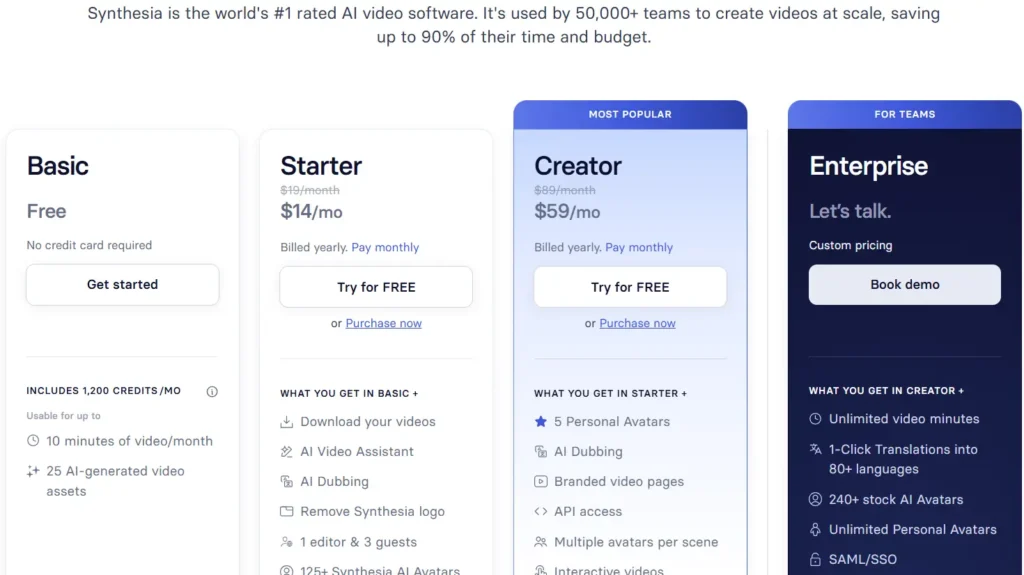
当社の分析レポートで詳述されているように Synthesiaの料金体系について, 公式の価格表によると、Starterプランは月額$29、または年額$264で、Creatorプランは月額$89、または年額$804となっています。無料プランには制限がありますが、本格的に利用を始める前にワークフローを試すには役立ちます。.
本当の疑問は「シンセシアは安いのか?」ということではありません。もっと適切な問いは、
毎月、何本の動画を作成または更新する必要がありますか?
これを考えるための簡単な方法があります。.
次のような場合には、Synthesiaは価格に見合う価値があるでしょう:
- 毎月、複数のビジネス動画を制作しています
- 動画はこまめに更新する必要があります
- コンテンツを複数の言語にローカライズします
- 現在、フリーランサーや代理店に報酬を支払っています
- あなたのチームは、撮影に時間がかかりすぎるため、動画撮影を避けています
- 統一されたプレゼンテーション形式が必要です
- 動画制作の専門家ではない人にも、基本的な動画を作成してもらいたい
次のような場合は、Synthesiaは価格に見合わない可能性があります:
- 動画は1本か2本あれば十分です
- 主にソーシャル広告を作成しています
- 映画のようなコンテンツが必要です
- 御社にはすでに社内での撮影体制が整っています
- 受講生はAIプレゼンターを嫌っています
- コンテンツには実演が必要です
小規模なチームにとって、最適なアプローチは、オンボーディング、FAQ、社内研修、製品解説など、明確なユースケースを1つ選んで始めることです。「AI動画」という言葉に惹かれてSynthesiaを導入するのではなく、繰り返し発生する動画制作のボトルネックを解決するために導入すべきです。.
| Synthesiaはこんな時に活用する価値があります… | 次のような場合は、Synthesiaを利用する価値がないかもしれません… |
|---|---|
| あなたは毎月複数の動画を作成しています。. | 動画は1、2本あれば十分です。. |
| あなたの動画は、繰り返し再生可能で、台本に基づいています。. | あなたの動画には、感情に訴えるストーリーテリングが必要です。. |
| 研修やポリシーの内容は、頻繁に更新する必要があります。. | コンテンツが更新されることはめったにありません。. |
| 多言語版が必要です。. | 1つの言語でのみ公開しており、すでにシンプルなワークフローが確立されています。. |
| 現在、動画制作、編集、またはナレーションの費用を支払っています。. | 御社にはすでに、コストパフォーマンスに優れた社内制作チームが揃っています。. |
| 一貫性のあるプレゼンター形式の動画が必要です。. | 本物のUGC風広告が必要です。. |
| 動画制作専門ではないチームに、基本的な動画を作成してもらいたい。. | 高度な手動編集機能が必要です。. |
| 人事、人材開発、SaaS教育、または社内コミュニケーションに動画を活用しています。. | 実際のデモンストレーションやお客様の声、あるいは製品を実際に手に取って確認できる機会が必要です。. |
シンセシアのアバター品質:真の問題は単なる写実性だけではない
私の研究において、品質面での最大の懸念は、単に「アバターはリアルに見えるか」ということではありませんでした。それは「アバターは役立つのか、それとも邪魔になるのか」ということでした。“
それは重要な違いです。.
Synthesiaのアバターは、見た目は洗練されていても、視聴者が気づいてしまうと違和感を覚えることがあります:
- 少し不自然な表情
- ロボットによる配達
- リップシンクの問題
- 感情の幅が狭い
- ビジネス向けのプレゼンテーションスタイル
- 多くのモジュールにわたるアバターの繰り返し使用
研修の専門家たちは、学習コンテンツ自体がすでに学習者の注意を奪い合っている状況にあるため、この点に特に敏感でした。もし学習者が説明に耳を傾ける代わりにアバターの口元ばかり見てしまうようであれば、その動画には設計上の問題があると言えます。.
AIアバターに対する学習者の反応に関するある議論では、Synthesiaをテストしたあるチームが、アバターに「不気味の谷」を感じたことや、ソフトウェアが他の代替手段ほど直感的ではなかったことから、自社の技術トレーニングのニーズには役立たないと判断したことが明らかになった。 Synthesiaの体験に関する別のスレッドでも、同じ根本的な疑問が提起された。つまり、このツールはコンテンツの作成を迅速化し、質を向上させるのか、それとも学習者がそれを見たときに、依然として偽物のAIのように見えてしまうのか、という点である。
「偽AI」の問題を軽減する方法
実際には、アバターを動画全体で目立たせすぎることは避けたほうがよいでしょう。より良い構成は以下の通りです:
- アバターを使って簡単な自己紹介をしてください
- スクリーンショット、スライド、図表、またはプロセスのビジュアルに切り替える
- トランジション用にアバターを戻す
- 具体的な例を示すために、Bロールや画面録画を活用してください
- 動画は短くしてください
- 感情的になりすぎた台本は避ける
- 対象者に合った声とアバターを選んでください
このアプローチは、映像制作に関する議論で得られた知見と一致しています。つまり、映像の大部分がBロールで構成されている場合、AIアバターによるコンテンツはより説得力があり、有用なものになり得るということです。.
結論は単純だ。Synthesiaは、人間を完全に代替する存在として振る舞うことを強要されないほうが、より効果的に機能する。.
AIナレーション向けSynthesia:アバターよりも声が重要になる場合もある
私の研究から得られた最も興味深い知見の一つは、チームによっては、Synthesiaのアバター機能よりも音声機能の方がより大きなメリットをもたらす可能性があるということだ。.
ナレーションは、研修教材制作における大きなボトルネックとなっています。プロのナレーターを起用するには、費用がかさみ、時間がかかり、修正も困難になりがちです。ある教育設計の議論では、ナレーターの料金について、完成した1分あたり$30~$35、あるいは1語あたり25~30セントという水準で話し合われました。 長編のコースコンテンツの場合、これらの費用はすぐに膨れ上がります。.
そのため、Synthesia、ElevenLabs、WellSaid、Murf、SpeechifyといったAIナレーションツールは、購入を検討する際によく比較対象として挙げられます。私の調査では、Synthesiaはナレーションの品質面で高く評価されていた一方、ElevenLabsとWellSaidは、専門的なナレーションツールとして有力な選択肢として頻繁に検討されていました。.
Synthesiaのボイスオーバーが適している場合
Synthesiaの音声機能は、次のような場合に役立ちます:
- 1つのワークフローでナレーションとアバター動画の両方が必要です
- 声優の起用は避けたい
- 複数の言語版が必要です
- スクリプトが変更されることを想定している
- 各モジュール間で一貫性のあるナレーションが必要です
- 編集者ではない人にも動画を作成してもらいたい
専用音声ツールの方が適している場合
次のような場合には、ElevenLabsやWellSaidのようなツールの方が適しているかもしれません:
- 音声だけで十分です
- 音声操作の制御機能をさらに充実させたい
- アバターは必要ありません
- すでに別のツールで動画編集を行っています
- ナレーションファイルの柔軟性を高めたい
実用的なアドバイスとして、アバター動画とナレーションの両方が必要な場合は、Synthesiaが便利です。ナレーションのみが必要な場合は、アバター動画プラットフォームのフルプランを購入する前に、専用のAIボイスツールと直接比較してみることをお勧めします。.
Synthesia vs HeyGen vs Vyond vs Camtasia vs ElevenLabs
Synthesiaは、単一のツールと競合しているわけではありません。AIアバター動画、研修用動画の制作、ナレーション、アニメーション、編集といった、複数のワークフローの中核に位置しています。.
主な点を比較すると、以下の通りです Synthesiaの代替ツール 私の調査によると。.
シンセシア vs ヘイジェン
よく見てみると HeyGen 対 Synthesia, …彼らは、AIアバター動画分野において最も有力な競合他社です。.
次のような場合は、Synthesiaをお選びください:
- ビジネス向けのプレゼンター動画
- 研修および入社時オリエンテーションのコンテンツ
- 多言語対応の企業紹介動画
- 洗練されたエンタープライズ向けのワークフロー
- 社内向けコミュニケーションおよび解説資料
次のような場合は、HeyGenをお選びください:
- よりソーシャルな雰囲気やクリエイター風の雰囲気を持つアバター動画
- アバターに関する大胆な試み
- 企業色が薄く感じられるトーク形式のコンテンツ
- アバターの品質やリップシンクに関して、よく比較されるツール
AIアバターに関する議論では、特にアバターのリアリティやソーシャルスタイルの出力を重視するユーザーの間で、HeyGenはSynthesiaの直接的な代替手段として位置づけられることがよくあります。その他の選択肢については、以下のリンクからその評価を確認することもできます。 シンセシア対コロッシャン, シンセシア vs D-ID, そして シンセシア対エライ 直接比較レビュー。.
Synthesia 対 Vyond
Synthesiaは、プレゼンターが主導する動画に適しています。Vyondは、解説動画、シナリオ、ビジュアルストーリーテリングに適しています。.
次のような場合は、Synthesiaをお選びください:
- バーチャルプレゼンターは理にかなっている
- スクリプトから動画へのワークフローを迅速に行いたい
- ビジネス向けのナレーションが必要です
次のような場合はVyondをお選びください:
- シーン、キャラクター、そしてアニメーションが必要です
- プロセスを視覚的に説明したい
- 「トーク番組」形式のコンテンツは減らすべきです
- もっと視覚的な変化が欲しい
しかし、Vyondにも限界はある。私の調査によると、アニメーションツールが使いすぎになり、独自のブランド性を打ち出した研修体験を構築できなくなるのではないかという懸念が指摘されている。.
Synthesia 対 Camtasia
CamtasiaはAIアバター作成ツールではありません。画面録画および動画編集ツールです。.
次のような場合は、Synthesiaをお選びください:
- AIの司会者をお探しですか
- 自分の姿を録画したくないでしょう
- アバターが主役の、テンポの良い動画が必要です
次のような場合はCamtasiaをお選びください:
- ソフトウェアのチュートリアルが必要です
- 画面を頻繁に録画します
- 手動での編集をより細かく制御したい
- 技術的な手順書を作成しています
多くの研修チームにとって、最適なワークフローはSynthesiaだけ、あるいはCamtasiaだけではありません。それはSynthesiaとCamtasiaを組み合わせたものです。つまり、プレゼンターの映像にはSynthesiaを、画面録画にはCamtasiaを使用するのです。.
Synthesia 対 ElevenLabs
Synthesiaはアバター動画を作成します。ElevenLabsはAI音声に特化しています。.
次のような場合は、Synthesiaをお選びください:
- 動画と音声を一緒に使いたい
- バーチャルプレゼンターが必要です
- ビジネス向け動画プラットフォームをお探しですか
次のような場合はElevenLabsをお選びください:
- ナレーションだけで十分です
- すでに動画のワークフローをお持ちですね
- オーディオ生成をより細かく制御したい
Synthesia 対 InVideo
InVideoは、ソーシャルメディアやYouTube向けの動画制作、およびテンプレートを使った動画制作に対応した、オールインワン型の動画作成ツールです。.
次のような場合は、Synthesiaをお選びください:
- アバターを活用したビジネスコンテンツが必要です
- あなたの動画はプレゼンター中心のものです
- 一貫性のある企業コミュニケーションが必要です
次のような場合は、InVideoをお選びください:
- テンプレートが欲しい
- ソーシャルメディア向けの動画を作成します
- アバター以外の部分を素早く編集する必要があります
私が調査したアフィリエイトマーケティングの事例では、InVideoは習得が容易でしたが、エクスポートに関する問題や、商品クリップの動画品質にばらつきが見られました。.
Synthesiaのメリットとデメリット
| メリット | なぜ重要なのか |
|---|---|
| 迅速な動画制作 | カメラ、俳優、スタジオ、撮影スケジュールへの依存度を低減します。. |
| スクリプトの更新が簡単 | 人事、コンプライアンス、入社手続き、および頻繁に変更されるポリシー文書などに役立ちます。. |
| 多言語対応 | グローバルチームが、各地域に合わせた研修用およびコミュニケーション用動画を作成するのを支援します。. |
| ビジネス向けの洗練されたスタイル | 企業研修、SaaSの解説動画、社内向け情報共有などに最適です。. |
| プレゼンターへの依存を軽減する | すべての動画で、従業員や経営陣がカメラの前に出る必要はありません。. |
| 映像制作以外のチームにも役立つ | 人事、人材開発、業務、およびカスタマーサクセス各チームは、基本的な動画をより簡単に作成できるようになります。. |
Synthesiaの強みは確かに存在しますが、それは用途によって異なります。.
Synthesiaのメリット
迅速な動画制作
Synthesiaなら、カメラ、スタジオ、俳優、マイク、そして従来の撮影に必要な機材や手配が不要になります。そのため、定期的に動画コンテンツを制作する必要があるチームにとって、非常に魅力的なソリューションとなっています。.
スクリプトの更新が簡単
スクリプトを更新して動画を再生成できる機能は、ビジネス上の最大のメリットの一つです。これは特に、人事、コンプライアンス、およびポリシーに関するコンテンツにおいて有用です。.
多言語コンテンツに適しています
160以上の言語に対応しているSynthesiaは、現地語対応の研修や社内コミュニケーションを必要とするグローバルチームにとって魅力的なソリューションです。.
ビジネス向けの洗練されたスタイル
Synthesiaの洗練されたスタイルは、企業研修、新入社員研修、SaaSの解説動画、社内向け情報発信、製品教育などに最適です。.
プレゼンターへの依存を軽減する
チームは、更新のたびにカメラの前に出てくれる人を探す必要がなくなりました。.
映像制作以外のチームにも役立つ
人事、人材開発、業務、カスタマーサクセスの各チームは、本格的な動画編集者になることなく、基本的な動画を作成することができます。.
シンセシアのデメリット
アバターは不自然に感じられることがある
完成度の高い作品であっても、AIで作られたことに気づく視聴者もいる。.
必ずしも学習には適しているとは限らない
洗練されたインタビュー形式の動画が、必ずしも研修の効果を高めるわけではない。.
マーケティングには堅苦しく感じられるかもしれない
有料のソーシャル広告やUGC形式の広告の場合、Synthesiaは堅苦しすぎる印象を与える可能性があります。.
規模が大きくなると、価格設定が課題となる可能性があります
小規模なチームであれば月額料金は許容範囲内かもしれませんが、エンタープライズ向けライセンスは予算の大きな負担となる可能性があります。.
モデレーションや審査により、遅延が生じる可能性があります
私の調査におけるある事例では、社内研修コンテンツについて、承認に12~24時間かかることや、モデレーションの判断が不明確であることが指摘されていました。.
実演にはあまり適していない
視聴者が実際の製品、実際の道具、実際の人物、あるいは実際の環境を目にする必要がある場合、AIアバターだけでは不十分です。.
最高の結果を得るための、私が推奨するSynthesiaのワークフロー
Synthesiaの最適なワークフローは、「スクリプトを貼り付け、動画を生成し、公開する」というものではありません。最適なワークフローとは、Synthesiaを、綿密に練られたコンテンツ制作プロセスにおける制作効率化ツールとして位置づけるものです。.
私がお勧めするワークフローは以下の通りです。.
ステップ1:適切なコンテンツの種類を選ぶ
まずは、情報性が高く、繰り返し使用でき、台本化しやすいコンテンツから始めましょう。.
初めてのプロジェクトに最適なもの:
- 新入社員のオリエンテーション
- 人事方針の更新
- セキュリティ意識向上研修
- SaaSの機能解説
- 顧客教育
- 社内FAQ
- 標準作業手順書
リスクの高いトレーニングや、感情的になりやすいトレーニング、あるいは複雑なトレーニングから始めるのは避けましょう。.
ステップ2:文書ではなく、音声付き動画向けに書く
ポリシー文書をSynthesiaに直接貼り付けないでください。会話調の文章に書き直してください。.
不適切なスクリプトの書き方:
“「従業員は、組織のコンプライアンス体制に基づき、適用されるすべての内部通報手続きを遵守しなければなりません。」”
より良いスクリプトの書き方:
“「コンプライアンス上の問題に気づいた場合は、24時間以内に社内ポータルを通じて報告してください。これにより、チームが迅速に対応し、記録を明確に残すことができます。」”
ステップ3:アバターのセグメントは短くする
アバターは10分間連続で話すべきではありません。短い区切りごとに使用してください。.
推奨される構成:
- 10~20秒のイントロ
- 図解例
- 30~45秒の説明
- 画面録画または図解
- シナリオ
- まとめ
- 知識確認
ステップ4:視覚的な証拠を追加する
ワークフローを説明するときは、そのワークフローを示してください。ソフトウェアの使い方を教えるときは、画面を表示してください。安全上の問題を説明するときは、現場の様子や図を示してください。.
アバターは視聴者を導くものであって、授業の代わりになるものではありません。.
ステップ5:少人数のテスト対象者でテストを行う
Synthesiaを全社的に導入する前に、実際の視聴者を対象にいくつかの動画をテストしてください。.
質問:
- アバターは役に立ったのか、それとも気が散ったのか?
- メッセージは分かりやすかったでしょうか?
- その動画は信頼できると感じましたか?
- 分かりにくいところはありましたか?
- 画面録画、図解、それとも実写のプレゼンターの方が効果的でしょうか?
ステップ6:再利用可能なテンプレートを作成する
最初の動画が完成したら、以下のテンプレートを作成してください:
- オンボーディング
- コンプライアンス
- 製品の更新情報
- 社内のお知らせ
- よくある質問
- トレーニングの振り返り
こうした点において、Synthesiaは時間の経過とともにその価値を高めていくのです。.
Synthesiaは中小企業にとって価値があるのでしょうか?
動画が繰り返し活用できるコンテンツ戦略の一環であるなら、Synthesiaは中小企業にとって有益なツールとなり得ます。.
例えば、小規模なSaaS企業はSynthesiaを利用して、次のようなものを作成できます:
- 製品の操作ガイド
- ヘルプセンターの動画
- オンボーディングのフロー
- 比較ページの動画
- 販売フォローアップの解説資料
- 内部プロセス文書
- 多言語による顧客教育
個人でアフィリエイトマーケティングやコンテンツ制作を行っている場合は、より慎重にツールを選ぶべきです。もしUGC(ユーザー生成コンテンツ)風の広告のみが必要であれば、Synthesiaは最初の選択肢として最適ではないかもしれません。しかし、アフィリエイトサイトにソフトウェアレビュー、チュートリアル、解説コンテンツ、あるいはメールマガジンなどの教育コンテンツが含まれている場合、Synthesiaを使えば、動画出演者を雇うことなく、よりプロフェッショナルなコンテンツを作成することができます。.
私の研究におけるアフィリエイト事例は、有用なベンチマークとなります。従来のワークフローでは、1本の動画あたり150~250台湾ドルかかり、納期は3~5日かかっていました。 AIを活用したワークフローにより、月間コストは$600~$700から約$180に削減され、月間の制作本数は4~5本から15~18本に増加しました。.
この事例が、すべての中小企業が同じ成果を上げられることを意味するわけではありません。しかし、AI動画ツールが真の威力を発揮する状況――頻繁な制作、定型化されたフォーマット、複数のオファー、そしてスピードが求められる状況――を如実に示しています。.
Synthesiaは企業にとって価値があるか?
Synthesiaが企業にとって特に魅力的である理由は、企業がまさにSynthesiaが解決するために設計された課題を抱えているからです:
- トレーニングコンテンツが多すぎる
- 地域が多すぎる
- 政策の更新が多すぎる
- 関係者が多すぎる
- 製造ベンダーへの依存度が高すぎる
- 一貫したメッセージを必要としている従業員が多すぎる
企業チームにとって、購入の判断は画質だけでなく、ガバナンスやワークフローにも重点を置くべきです。.
企業にとって重要な課題としては、次のようなものがあります:
- 誰が動画を作成できますか?
- 台本の承認は誰が行うのですか?
- ブランドテンプレートの所有権は誰にあるのでしょうか?
- どのようなコンテンツに人間のプレゼンターが必要ですか?
- どのようなコンテンツでAIアバターを活用できますか?
- 動画はどのようにローカライズされるのですか?
- 更新はどのように追跡されますか?
- 学習者のフィードバックはどのように測定されるのでしょうか?
- どのような承認の遅れが出版に影響を与える可能性があるか?
- 予想される販売数量を考慮すると、ライセンス費用は妥当でしょうか?
私の見解としては、Synthesiaは適切に管理されれば、強力な企業向けツールとなり得ると考えています。単に各分野の専門家にツールを渡して、それだけで効果的な研修が自動的に行われると期待すべきではありません。L&D(人材開発)、人事、エンパワーメント、コミュニケーションの各チームが明確なテンプレートと品質基準を定義したときに、その真価が最も発揮されるのです。.
最終的な結論:Synthesiaは購入する価値があるか?
Synthesiaは、プロフェッショナルで再現性が高く、更新も容易な動画を大規模に作成する必要があるビジネスチームにとって、導入する価値のあるツールです。特に、研修、新入社員のオリエンテーション、社内コミュニケーション、製品解説動画、多言語コンテンツの作成においてその真価を発揮します。.
Synthesiaを選ぶ最大の理由は以下の通りです:
- 撮影せずに動画を作成できます
- 再撮影することなくスクリプトを更新できます
- プレゼンター形式のコンテンツを拡大・縮小できます
- 外部制作への依存度を減らすことができます
- 多言語版をより簡単に作成できます
- 動画制作以外のチームがプロ品質のアセットを作成できるよう、ご支援いただけます
躊躇してしまう主な理由は以下の通りです:
- AIアバターには、依然として不自然さを感じる
- 「トーク形式の動画」は、必ずしも学習効果を高めるわけではない
- 規模が大きくなると、コストが大きな問題となる可能性があります
- マーケティングの用途によっては、よりリアルな、あるいはソーシャルメディア風のクリエイティブが必要となる場合があります
- モデレーションや承認の遅れがワークフローに影響を与える可能性があります
- 人間の監視は依然として不可欠である
私の提案は肯定的ですが、具体的なものです: Synthesiaは、映像制作がボトルネックとなっている場合に活用し、指導戦略やクリエイティブ戦略が根本的な問題である場合には使用しないでください。.
研修やビジネスコミュニケーションにおいて、Synthesiaは非常に賢明な投資となるでしょう。コンバージョン率の高い広告、感情に訴えるストーリーテリング、あるいは高度なスキル研修においては、Synthesiaを他のツールの完全な代替としてではなく、それらと併用することをお勧めします。.
Synthesiaに関するよくある質問
Synthesiaは買う価値があるでしょうか?
はい、トレーニング動画、オンボーディングコンテンツ、社内向け情報、製品解説動画、あるいは多言語のビジネス動画を定期的に制作しているなら、Synthesiaは導入する価値があります。一方、動画が1本だけ必要な場合や、主な目的がUGCスタイルのソーシャル広告である場合は、それほど価値はないでしょう。.
Synthesiaは実際にコンテンツ作成をスピードアップしてくれるのでしょうか?
はい、Synthesiaを使えば、撮影や出演者のスケジュール調整、スタジオ設営、そして何度も撮り直す必要がなくなるため、動画制作のスピードを大幅に向上させることができます。特に、既存の動画を更新したり、地域に合わせてローカライズしたりする必要がある場合、大幅な時間の節約につながります。.
Synthesiaは、偽物のAIのように見えますか?
場合によっては。Synthesiaの動画は洗練されていてプロフェッショナルな仕上がりになることもありますが、視聴者の中には、特に表情や話し方、リップシンクなどにおいて、AIアバターの質に気づく人もいます。この問題を軽減する最善の方法は、アバターを短いシーンに限定し、ビジュアルや画面録画、具体例などで補うことです。.
Synthesiaは新入社員の研修に適していますか?
はい、Synthesiaは、コンテンツが標準化され、繰り返し利用可能な場合、新入社員のオンボーディングに非常に適しています。歓迎メッセージ、ポリシーの概要説明、ツールの紹介、社内プロセスの解説などに効果的です。ただし、企業文化を重視するオンボーディングや、リーダーシップを重視したオンボーディングの場合は、実写の動画の方が適している場合もあります。.
シンセシアは本物の司会者の代わりになれるでしょうか?
Synthesiaは、多くの定型的なビジネス動画において、実際のプレゼンターに代わることはできますが、すべての動画に適用できるわけではありません。特に、明確な情報を伝えるコンテンツにおいて最も効果を発揮します。一方、感情に訴えるメッセージ、経営陣による発信、顧客の声、信頼性の高いコンテンツ、複雑なデモンストレーションなどについては、依然として実際のプレゼンターの方が適しています。.
AIアバターは学習効果を高めるのか?
AIアバターは、それだけで学習効果を自動的に高めるわけではありません。トレーニング教材の作成は容易になりますが、学習の質は依然として、指導設計、事例、練習、フィードバック、そして内容との関連性に左右されます。Synthesiaは、学習戦略の代わりとしてではなく、制作ツールとして活用すべきです。.
Synthesiaはマーケティング動画の制作に適していますか?
Synthesiaは、洗練されたマーケティング用解説動画、SaaSの操作ガイド、製品教育コンテンツ、FAQ、営業支援動画などに適しています。一方、素朴なUGC広告、インフルエンサー風のコンテンツ、感情に訴えるストーリーテリング、あるいは高いリアリティが求められるソーシャルメディア向けクリエイティブには、あまり適していません。.
Synthesiaに対する主な不満は何ですか?
私のユーザー調査で最も多く寄せられた不満は、アバターのリアリティ、リップシンクの不自然さ、大規模導入時の高額な価格設定、特定のトレーニング種目における価値の低さ、マーケティング用途としては企業色が強すぎる出力結果、そして時折発生する承認やモデレーションの遅延でした。.
SynthesiaはHeyGenより優れていますか?
Synthesiaは、企業研修、新入社員研修、社内コミュニケーション、ビジネス解説動画などに適していることが多いです。一方、HeyGenは、よりソーシャルな雰囲気やクリエイター風の雰囲気を持つアバター動画を求めているユーザーには適しているかもしれません。どちらが適しているかは、企業としての統一感を重視するか、それともアバターのリアリティや柔軟性を重視するかによって異なります。.
SynthesiaはElevenLabsより優れていますか?
SynthesiaとElevenLabsは、それぞれ異なる課題を解決します。AIアバター動画が必要な場合はSynthesiaが適しています。AIナレーションのみが必要な場合は、ElevenLabsの方が適しているかもしれません。ナレーションとプレゼンター風の動画を1つのワークフローで作成したい場合は、Synthesiaの方が便利です。.
SynthesiaはCamtasiaより優れていますか?
AIプレゼンター動画の作成にはSynthesiaが適しています。一方、画面録画やソフトウェアの実演チュートリアルにはCamtasiaが適しています。多くの研修チームにとって、アバターによる解説にはSynthesiaを、画面を使った実演にはCamtasiaを併用することが有効でしょう。.
Synthesiaは技術トレーニングに適していますか?
Synthesiaは、技術トレーニングの導入部分や要約、簡単な説明に役立ちます。しかし、複雑な技術トレーニングにおいては、画面録画、図解、シミュレーション、実習、実際のデモンストレーションの方が、AIプレゼンターよりも通常は重要です。.
Synthesiaはコスト削減につながるのでしょうか?
はい、Synthesiaは、定期的な撮影、ナレーション、編集、ローカライズ、または再撮影にかかる費用を削減することで、コスト削減につながります。 ある人事向け動画の更新事例では、従来の5分間の動画の場合、制作費が約1万4,000ポンド、更新費が1万2,500ポンドかかるのに対し、AIを活用した更新であれば500ポンド程度に抑えられることが示されました。.
Synthesiaの最適な活用シーンは何ですか?
Synthesiaの最適な活用シーンは、繰り返し利用可能なビジネス向け動画です。具体的には、新入社員研修、人事研修、コンプライアンス教育、社内コミュニケーション、SaaS製品の解説動画、顧客向け教育、および多言語対応の研修コンテンツなどが挙げられます。.
Synthesiaを買ったほうがいいでしょうか?
洗練されたビジネス動画の制作を定期的に必要としており、制作にかかる時間、コスト、手間を削減したい場合は、Synthesiaを購入することをお勧めします。AIアバターが流行っているという理由だけで購入するのは避けてください。このツールは、実際の制作上のボトルネックを解決できる場合にこそ、その真価を発揮します。.