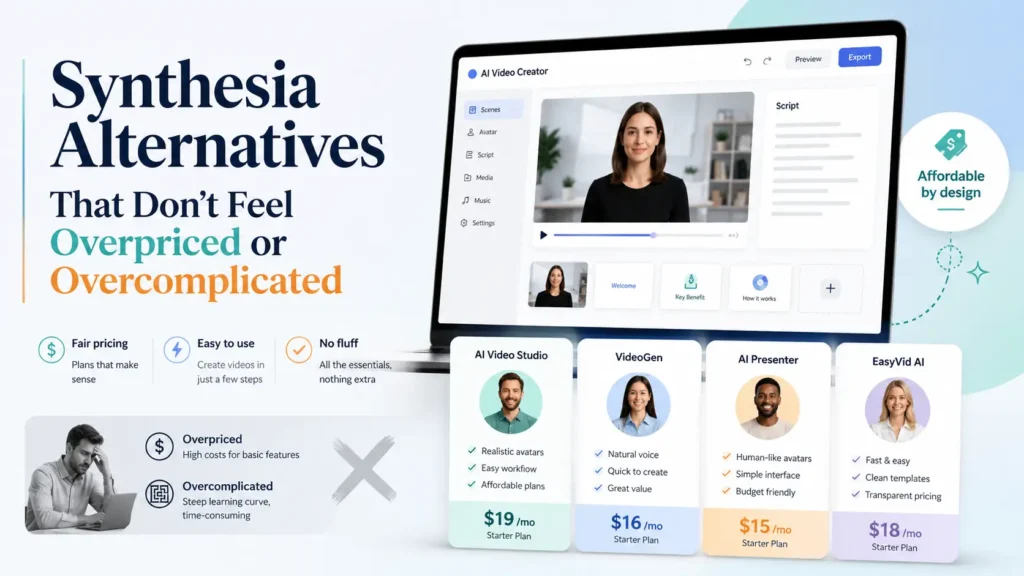
最高のもの シンセシア 代替案が必ずしも安価な模倣品とは限りません。適切な選択は、ワークフローによって異なります。洗練されたAIアバター動画を作成するには、, HeyGen 最も優れた総合的な選択肢です。企業研修やeラーニングには、以下をご検討ください。 コロッシア, 、DeepBrain AI、あるいはHour Oneなどです。UGC広告やマーケティング動画の場合は、通常、CreatifyやArcaddsの方が実用的です。コース制作者にとっては、Pictory、ElevenLabs、Loom、あるいはScreen Studioを使ったアバターを使用しないワークフローの方が、他のトークヘッド生成ツールよりも適しているかもしれません。.
実際のユーザーのワークフローを検討した結果、, 価格設定 苦情、失敗したプロジェクト、長編コースの制作、マーケティング動画の活用事例などを踏まえると、私の結論は単純明快です。ほとんどの購入者は、単に安価なものを求めているわけではないのです。 シンセシア 代替案。彼らが求めているのは、公開や更新が容易で、拡張コストが抑えられ、不自然なAI司会者によって視聴者の注意をそらすリスクが少ないAI動画ワークフローだ。.
「Synthesia」の代替ツール一覧
| 工具 | 最適 | なぜこれを選ぶのか | 主な制限事項 |
|---|---|---|---|
| HeyGen | 洗練されたアバター動画、ローカライズ、ビジネス向けコンテンツ | リップシンクがしっかりしている、アバターが優れている、仕上がりが洗練されている | 費用がかさむ可能性がある。アバターや音声の長期的な安定性が重要だ。 |
| コロッシア | 企業向け研修およびeラーニング | トレーニングを重視したワークフローとシナリオ | クリエイター系のコンテンツにはあまり適していない |
| DeepBrain AI | 教育用解説動画、ニュース形式の動画 | すっきりとした出力で、構造化されたコンテンツに適している | アバターの選択肢が限られているように感じられるかもしれません |
| クリエイティブ | UGCスタイルのマーケティング広告 | 高速、手頃な価格、広告重視 | フォーマルな企業向け動画に比べて、洗練度が低い |
| アーケード | 自然なAI生成のUGC広告 | ソーシャルメディア向けの広告クリエイティブに適している | 編集や録音には追加のツールが必要になる場合があります |
| D-ID | 低予算のインタビュー動画 | 手頃な価格の入り口 | 現実味に欠ける出力 |
| アーギル | パーソナルブランドのアバター | 一貫性のある自己アバターのワークフロー | より限定的なユースケース |
| 第1時間 | 企業内コミュニケーション | プロフェッショナルなビジネス動画のスタイル | 個人クリエイターにとっては、往々にして高すぎる |
| Pictory | アバターを使用しない解説動画 | ビジュアルを重視した講座およびコンテンツ動画 | AIアバターの直接的な代替ではない |
| ElevenLabs + Loom/Screen Studio | チュートリアルと画面操作のトレーニング | 実践的な指導に適している | マルチツールを用いたワークフローが必要 |
なぜ人々はSynthesiaの代替ツールを探すのか
人々がSynthesiaの代替ツールを探す最大の理由は、単に価格だけではありません。私の調査では、同じ5つの問題が繰り返し指摘されていました。.
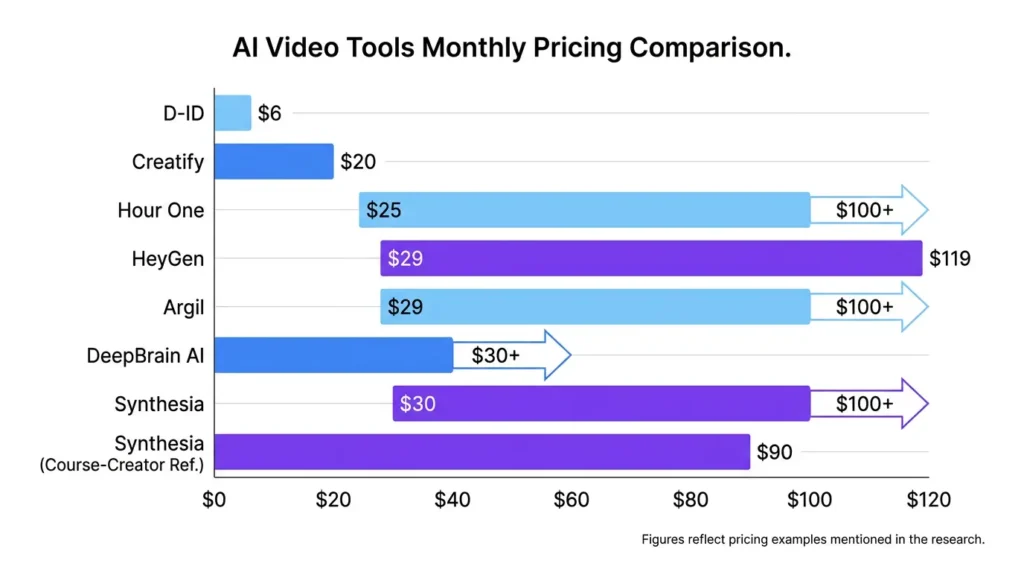
まず、チームが月に数本の動画しか必要としない場合、コストを正当化するのが難しくなります。AIアバターツールの価格例を調べてみたところ、低価格なツールでは月額約$6から D-ID HeyGenのようなツールでは月あたり約$29~$119程度であるのに対し、Synthesia系のプラットフォームでは月あたり$30~$100+程度という数字がよく挙げられています。 あるコース制作者は、Synthesiaの月間利用数を約$90と見積もり、他のコース動画作成ツールと比較した上で、アバターを最優先とするワークフローが それだけの価値がある.
| 工具 | 調査で言及された価格 | 価格設定とポジショニング | コストパフォーマンスが最も高い |
|---|---|---|---|
| D-ID | $6程度/月 | 予算 | 基本的なトークヘッド動画のテスト |
| クリエイティブ | 月あたり約$20 | 手頃な価格のマーケティングツール | UGC広告とショート動画のテスト |
| 第1時間 | $25~$100+/月程度 | 中規模からエンタープライズ向け | 企業広報 |
| HeyGen | $29~$119程度/月 | プレミアム | 洗練されたアバター動画とローカライズ |
| アーギル | $29~$100+/月程度 | プレミアム・ニッチ | パーソナルブランドのアバターに関するワークフロー |
| DeepBrain AI | 月あたり約$30+ | ミドルレンジからプレミアム | 教育・専門分野の解説動画 |
| シンセシア | 月あたり約$30~$100+;あるコース作成者は月あたり約$90と述べている | プレミアム/企業向け | 企業向け研修およびビジネス動画 |
| Vimerse Studio | $299 ライセンスおよびコース動画の比較で言及されている使用状況 | ライセンスベースの | Synthesia以外の選択肢を比較するコース作成者たち |
第二に、審査の遅延やコンテンツの却下は、マーケターにとってリスクとなります。ある事例では、あるクリエイターが 24時間以上 拒否される問題に直面する前に、マーケティング動画を準備しておくこと。もうひとつ繰り返し指摘された懸念点は、手動による承認に時間がかかるという点でした。 12~24時間, そのため、キャンペーンの迅速な制作が難しくなります。.
第三に、AIアバターは使いすぎると学習の妨げになる可能性があります。研修や教育設計のワークフローにおいて、懸念されていたのはAI動画が迅速かどうかということではありませんでした。懸念されていたのは、学習者がコンテンツに集中できるか、それとも人工的なプレゼンターに気を取られてしまうかという点でした。.
第四に、長期的な保守性は隠れたコストとなります。あるeラーニング制作者は、作り直さざるを得なかったのですが、 42本の動画 アバターが削除され、音声が変更された後です。これは、コースライブラリや社内研修カタログを構築しているすべての人にとって、重大な警告となります。.
第五に、多くのユーザーは、また別の独立したツールを求めているわけではありません。彼らは、3つや4つのアプリを無理に組み合わせる必要がなく、アバター、ナレーション、画面録画、テキストアニメーション、編集、更新などを一元的に処理できる実用的なワークフローを求めているのです。.
HeyGen:洗練されたアバター動画制作に最適な、Synthesiaの代替ツール
HeyGen ビジネス、営業、ローカライズ、あるいはプロ向けのコンテンツ制作において、洗練されたAIアバター動画を作成したい場合、これはSynthesiaに代わる最良の選択肢です。必ずしも最も安価な選択肢ではありませんが、出力の品質が重要な場合には、多くの場合、こちらの方が適しています。.
私の調査では、HeyGenは、アバターの品質の高さ、リップシンクの精度の高さ、そして洗練された表現と頻繁に関連付けられていました。価格の例としては、およそ $29~$119/月, 、プランや利用状況によって異なります。そのため、価格帯としてはハイエンドに分類されますが、販売ページ、製品紹介動画、多言語キャンペーン、あるいは経営陣向けの動画などにおいては、その品質の差がコストに見合う価値をもたらします。.
最も注意すべき点は、長期的な一貫性です。私が見つけたeラーニングの最も説得力のある事例は、ある制作者が作り直さざるを得なかったというものでした。 42本の動画 アバターや声の変更後。単発のキャンペーンであれば、それはさほど重要ではないかもしれません。しかし、コースライブラリ、オンボーディングシステム、あるいは研修アーカイブの場合、それは非常に重要な問題となります。.
最適なサイズ: 洗練されたAI広報担当者の動画、販売促進動画、ローカライズ、ビジネスプレゼンテーション。.
以下の場合は避けてください: ちょっとしたテスト用に低コストのツールが必要な場合や、時間の経過に伴うアバターや声の変化のリスクを避けたい場合。.
Colossyan:企業研修に最適なSynthesiaの代替ツール
コロッシア は、企業研修やeラーニング向けの最も有力なSynthesiaの代替ツールの一つです。主にソーシャル動画やUGC広告向けに設計されたツールに比べ、学習・人材開発チームに適しています。.
私の研究から得られたトレーニングに関する最も重要な知見は、AIアバターは選択的に使用した場合に最も効果を発揮するという点でした。実用的な手法としては、アバターを……に活用する方法があります。 10~20秒のイントロ, 、説明や要約、あるいは振り返りを行った後、画面録画、ビジュアル、図表、具体例、またはモーショングラフィックスに切り替えます。アバターが連続して約 1分, 、学習者の注意が散漫になるリスクが高まります。.
これが重要なのは、研修動画がAIプレゼンターの見た目の印象で評価されるわけではないからです。評価されるのは、従業員がその内容を理解し、記憶し、実践できるかどうかです。.
最適なサイズ: オンボーディング、コンプライアンス研修、シナリオベースの学習、社内能力向上。.
以下の場合は避けてください: クリエイター風の広告や、カジュアルなSNS向け動画を素早く作成したい場合。.
DeepBrain AI:教育用解説動画やニューススタイルの動画制作に最適
DeepBrain AI これは、体系的な解説動画、教育コンテンツ、ビジネス関連の最新情報、ニュース形式の動画などにおいて、Synthesiaに代わる有力な選択肢です。私の調査による価格例によると、その価格はおよそ $30以上/月, 、プランや利用状況によって異なります。.
最大のメリットは、洗練されたプロフェッショナルな仕上がりです。DeepBrain AIは、ソーシャルメディアの広告のような印象を与えるよりも、情報を明確に説明する必要がある動画に最適です。教育用解説動画、社内向け最新情報、多言語プレゼンテーション、ニュース形式の動画などに適しています。.
制限となるのは、アバターの種類の少なさです。プレゼンターのライブラリを豊富に揃えたい場合や、ブランドイメージにぴったり合った非常に特定の アバターが必要な場合は、Synthesia や HeyGen の方が選択肢が広いと感じるかもしれません。.
最適なサイズ: 教育用解説動画、業界の最新情報、多言語情報動画。.
以下の場合は避けてください: 非常にカジュアルなUGC風の広告クリエイティブが必要です。.
CreatifyとArcad: UGCマーケティング動画に最適なSynthesiaの代替ツール
マーケティングチームにとっては、, クリエイティブ そして アーケード これらは、エンタープライズ向けアバタープラットフォームよりも、Synthesiaの代替手段として適しているかもしれません。Synthesiaは有料のソーシャルメディア向けには堅苦しく感じられる場合がありますが、これらのツールはUGCスタイルのクリエイティブ制作により適しています。.
Creatifyは、SynthesiaやHeyGenとよく比較されていました。これは、購入者が、同じような機能を謳うAI動画ツールの価格がなぜこれほど大きく異なるのかを理解したかったためです。価格の例を見ると、Creatifyの価格はおよそ $20/月, そのため、クリエイターや小規模ブランド、そして複数のアプローチを試しつつあるマーケターにとって魅力的なプラットフォームとなっています。.
より自然なAI生成ユーザー生成コンテンツ(UGC)広告の選択肢として、Arcadsが浮上してきました。これは特に、TikTok風の動画、短い商品プロモーション、ダイレクトレスポンス型のキャッチコピー、そして創業者スタイルの広告台本に適しています。.
どちらのツールにも共通する最大の利点は、そのスピードです。パフォーマンスマーケティングでは、さまざまなフック、オファー、スクリプト、アバター、コール・トゥ・アクションなど、多くのバージョンをテストする必要があることがよくあります。そのような作業には、企業向けの正式なアバター作成ワークフローでは、時間がかかりすぎたり、洗練されすぎていたりすることがあります。.
ただし、これらのツールだけでは、動画制作に必要な一連の機能をすべてカバーできないという制限があります。画面録画機能や高度な編集機能、あるいは詳細なトレーニング動画の構成が必要な場合は、依然として追加のツールが必要になる可能性があります。.
最適なサイズ: UGC広告、商品プロモーション、有料ソーシャルメディア広告のテスト、ショートフォームのマーケティング動画。.
以下の場合は避けてください: 企業向けの研修、コンプライアンス対応のワークフロー、あるいは正式な社内コミュニケーションが必要である場合。.
D-ID:手頃な価格のSynthesia代替ソフトとして最高
D-ID 基本的な「トーキングヘッド」動画を作成するには、Synthesiaの優れた低コストな代替手段です。私の調査によると、価格例はおよそ $6/月, そのため、有料プラットフォームに投資する前に、AIアバター動画が視聴者に受け入れられるかどうかをテストするのに役立ちます。.
D-IDは、プロトタイプ、社内用草案、シンプルなプレゼンテーション、リスクの低い動画に最適です。一方、高級ブランドのキャンペーンや、リアリズムが信頼度に直接影響する動画には、最適な選択肢とは言えません。.
その代償となるのが出力品質です。D-IDは初心者でも扱いやすいですが、リップシンクやリアリズムの点では、HeyGenやSynthesia、その他のハイエンドなツールに比べて、やや洗練さに欠ける印象を受けるかもしれません。.
最適なサイズ: 低予算のテスト、シンプルなインタビュー映像、社内の試作品。.
以下の場合は避けてください: 動画は高級感があるか、あるいは新規訪問者を顧客に変えるものでなければならない。.
Argil:パーソナルブランドのアバター動画制作に最適
アーギル これは、ありきたりなストック画像のプレゼンターではなく、一貫性のある独自のアバターを求めている起業家、クリエイター、代理店にとって有力な選択肢です。私の調査による価格例によると、Argilの価格はおよそ $29~$100+/月.
最も有力な活用例は、繰り返し利用できるパーソナルブランド向けコンテンツです。具体的には、創業者の動画、LinkedIn用のクリップ、クリエイターによる解説動画、広告代理店のクライアント向け動画、そして短編の教育コンテンツなどが挙げられます。膨大なアバターライブラリから選択するのではなく、一目で誰だか分かる顔や声を軸にコンテンツを構築することに価値があります。.
その一貫性は重要です。視聴者が多くの動画を通じて同じ人物が登場することを期待している場合、何十もの汎用アバターを使うよりも、カスタマイズされたキャラクター制作のワークフローの方が有用かもしれません。.
最適なサイズ: 創業者主導のコンテンツ、パーソナルブランディング、代理店クライアントのアバター。.
以下の場合は避けてください: 幅広いエンタープライズ向けアバターのライブラリが必要です。.
第1部:企業間コミュニケーションに最適
第1時間 は、正式なビジネスコミュニケーションに適したSynthesiaの優れた代替手段です。価格例としては、およそ $25~$100+/月, 、プランや利用状況によって異なります。.
経営陣からの最新情報、人事関連の連絡、社内告知、企業ニュース形式のコンテンツ、および正式な研修メッセージなどに適しています。出力スタイルは、クリエイター向けというよりは、企業向けのものとなっています。.
個人クリエイターやUGCマーケティング担当者にとっては、「Hour One」は堅苦しく感じられたり、料金が高すぎると感じられたりするかもしれません。しかし、代理店への委託業務や社内の定期的な動画制作に代わる手段として導入する企業にとっては、その価値を正当化しやすいでしょう。.
最適なサイズ: 経営陣向けコミュニケーション、社内情報発信、企業向け動画。.
以下の場合は避けてください: あなたにとって重要なのは、迅速かつ低コストなソーシャルコンテンツです。.
Pictory、ElevenLabs、Loom、Screen Studio:Avatar以外のベストな代替ツール
Synthesiaの代替ツールを探している多くのコース制作者は、実際には別のAIアバターツールを必要としているわけではありません。彼らが必要としているのは、よりわかりやすい解説動画なのです。.
チュートリアル、オンボーディング、およびコースコンテンツについては、次のようなワークフローがより適切かもしれません:
- Pictory 解説動画用
- ElevenLabs ナレーション用
- 織機 または スクリーン・スタジオ 画面録画用
- 最終組み立て用の軽量エディタ
これが重要なのは、学生たちは通常、AIプレゼンターが画面に映っているかどうかよりも、説明の明瞭さを重視するからです。特にソフトウェアのチュートリアルでは、視聴者が実際のプロセスを見る必要があるため、画面録画の方がアバターを前面に押し出した動画よりも効果的であることが多いのです。.
制作中のクリエイター1名 30本以上の解説動画 音声、ビジュアル、動画の編集に複数のツールを併用することの苦労について述べました。その手間は確かに存在します。しかし、すべてのレッスンを「トークヘッド」形式のアバターに無理やり当てはめるよりも、最終的なワークフローの方が依然として効率的である可能性があります。.
コース作成に関しては、別の価格比較記事で、Synthesiaの価格はおよそ $90/月 およびVimerse Studioは $299 ライセンスおよび使用状況. 。重要なポイントは、ある特定の価格設定が常に最善であるということではありませんでした。重要なのは、コース作成者が、アバターを最優先とするワークフローがそもそも必要かどうかを判断する必要があるということです。.
最適なサイズ: チュートリアル、オンライン講座、ソフトウェアの操作解説、ビジュアル解説動画。.
以下の場合は避けてください: 具体的には、画面上にリアルなAI司会者が必要なのです。.
Synthesia vs HeyGen vs Creatify:どれを選ぶべきか?
選択 シンセシア 企業研修、社内コミュニケーション、あるいは体系的なビジネス動画制作のために、成熟したエンタープライズ向けアバタープラットフォームをお探しの場合は。.
選択 HeyGen 洗練されたAIアバター動画、正確なリップシンク、そしてプロフェッショナルなビジネス向けコンテンツをお求めなら。.
選択 クリエイティブ 手頃な価格で短期間にUGCスタイルのマーケティング動画を作成したい場合や、多数の広告バリエーションをテストする必要がある場合。.
最も単純な意思決定の枠組みは次のとおりです:
| ユースケース | ベストチョイス |
|---|---|
| 洗練されたAI広報担当者の動画 | HeyGen |
| 企業研修 | コロッシアン、あるいはシンセシア |
| 教育用解説動画 | DeepBrain AI または Pictory |
| UGC広告 | Creatify または Arcads |
| 予算の検証 | D-ID |
| パーソナルブランドに関するコンテンツ | アーギル |
| 企業内コミュニケーション | 第1時間 |
| ソフトウェアのチュートリアル | ElevenLabs + Loom/Screen Studio |
最大の過ちは、ブランドの知名度だけを基準に選ぶことです。デモでは見栄えが良くても、実際のワークフローには適していないツールもあるのです。.
AIアバターツールを購入する前に確認すべき隠れたコスト
Synthesiaの代替サービスを選ぶ際は、月額料金だけにとどまらず、その先を見据えて検討してください。.
最初の隠れたコストは、審査の遅れです。動画が手動による承認を必要とし、その承認に時間がかかる場合、 12~24時間, 、キャンペーンの立ち上げが遅れてしまう可能性があります。.
2つ目の隠れたコストは、コンテンツの却下です。マーケティング担当のクリエイターが 24時間以上 公開できない動画に時間を費やしても、時間の節約にはなりません。.
3つ目の隠れたコストは手直しです。eラーニングに関する事例では、 リメイクされた動画42本 これは、アバターや音声の安定性がなぜ重要なのかを示しています。トレーニング用ライブラリ、コースカタログ、オンボーディングシステムにおいては、長期的な保守性が購入の判断基準となるべきです。.
お支払い前に、以下の点をご確認ください:
- 古い動画は後で更新できますか?
- これまでと同じアバターや声は引き続き利用できますか?
- マーケティングや商業目的での利用は明確に許可されていますか?
- 審査プロセスはありますか?
- 承認にはどれくらい時間がかかりますか?
- コンテンツが却下された場合はどうなりますか?
- プロジェクトは簡単に複製・修正できますか?
安価なツールでも、手戻りを生じさせるようなら、かえって高くつくことになる。.
最終的な推奨:Synthesiaの代替ツールとして、まずどれを試すべきか?
| 決定基準 | なぜ重要なのか | 確認すべき事項 |
|---|---|---|
| アバターのリアリズム | 信頼度と視聴時間に影響を与える | リップシンク、顔の動き、アイコンタクト |
| 声の安定性 | 長期保存用ライブラリにとって重要な点 | その声が引き続き利用できるかどうか |
| アバターの利用状況 | 将来的な手戻りを防ぐ | 選択したアバターを削除したり変更したりできるかどうか |
| レビューに関する方針 | 公開速度に影響する | 手動審査の所要時間、却下基準、異議申し立ての選択肢 |
| 商業利用権 | 広告やクライアント業務において不可欠 | マーケティング、アフィリエイト、有料広告のいずれが許可されているか |
| 編集の柔軟性 | 手戻りを減らす | プロジェクトの複製、スクリプトの更新、シーンの編集 |
| 画面録画の対応 | チュートリアルに関する重要事項 | 内蔵レコーダーまたは外部ツールの連携 |
| 価格設定のスケーラビリティ | 予期せぬ出費を防ぎます | 月間利用上限、データ通信量の上限、追加分 |
| ユースケースとの適合性 | 不適切な工具を購入することを防ぐ | 研修、広告、講座、営業、または社内コミュニケーション |
| 所有権の移転 | 長期的なアクセスを保護します | ダウンロードオプションとプロジェクトアーカイブの管理 |
Synthesiaの代替アプリの中で総合的に最も優れたものを探しているなら、まずは HeyGen.
企業向け研修を作成する場合は、以下を比較してください Colossyan、DeepBrain AI、およびSynthesia.
マーケティング動画やUGC広告を作成する場合は、まず Creatify または Arcads.
コース作成者の方は、必ずしもアバターを主軸としたプラットフォームが必要だとは決めつけないでください。以下のワークフローを使用すれば、 Pictory、ElevenLabs、Loom、またはScreen Studio より低コストで、より分かりやすい授業を実現できる可能性があります。.
Synthesiaに代わる最適なツールとは、実際の制作上の課題――公開スピード、コスト、視聴者の信頼、長期的なアップデート、あるいは学習効果――に合致するものです。.
Synthesiaの代替ツールに関するよくある質問
Synthesiaに代わる最高のアプリは何ですか?
Synthesiaの代替ツールとして総合的に最も優れているのは HeyGen 洗練されたAIアバター動画には。企業向け研修には、, コロッシア 有力な選択肢です。マーケティング動画の場合、, クリエイティブ そして アーケード の方が適しています。コース作成者にとっては、, Pictory あるいは、ナレーションと画面録画を組み合わせたワークフローの方が現実的かもしれません。.
HeyGenはSynthesiaより優れていますか?
洗練されたアバター、リップシンク、ローカライズを重視するなら、HeyGenの方が優れているかもしれません。一方、成熟した企業向けプラットフォームを求める企業研修チームにとっては、Synthesiaの方が依然として適している可能性があります。.
Synthesiaはコース作成に価値があるのでしょうか?
Synthesiaは、短いイントロや要約、多言語のコース更新情報などには役立つ場合があります。しかし、解説動画やチュートリアルについては、ナレーションと画面録画を組み合わせた「映像優先」のワークフローの方が、多くの場合、より分かりやすくなります。.
Synthesiaの代わりに使える、もっと安価なツールにはどのようなものがありますか?
より安価な代替品としては、次のようなものがあります。 D-ID, エライ, 、Creatify、およびPictory、ElevenLabs、Loom、Screen Studioを活用したワークフロー。D-IDは基本的なトークヘッド形式のテストに最適ですが、Creatifyは短いマーケティング動画の作成に適しています。.
企業研修に最適なSynthesiaの代替ツールは何ですか?
コロッシア は、企業研修やeラーニングに最適な選択肢の一つです。研修の形式によっては、DeepBrain AI、Hour One、Synthesiaも比較検討する価値があります。.
マーケティング動画制作に最適なSynthesiaの代替ツールは何ですか?
マーケティング動画については、, クリエイティブ そして アーケード これらは、UGCスタイルの広告や迅速なクリエイティブテストに適しているため、有力な選択肢となります。. HeyGen 洗練された広報担当者の動画には、こちらの方が適しています。.
長編動画制作に最適なAIアバターツールは何ですか?
長編のアバター動画については、, HeyGen そして DeepBrain AI これらは有力な選択肢ですが、動画が長くなると、不自然な語り口になったり、視聴者が飽きてしまったりするリスクが高まります。教育目的では、ナレーションと映像を組み合わせた方が、多くの場合、効果的です。.
説明動画制作に最適なSynthesiaの代替ツールは何ですか?
解説記事については、以下の点を考慮してください。 Pictory、DeepBrain AI、またはElevenLabsのビジュアル付き. 多くの解説動画では、常時稼働するAIアバターは必要ありません。.
AIアバターを使った動画はトレーニングに役立つのでしょうか?
これらは、導入、場面転換、シナリオ、まとめなどに役立ちます。本題の指導においては、視覚資料、具体例、画面録画、短い動画などが通常、より効果的です。.
なぜAIアバターの動画は不気味に感じるのでしょうか?
リップシンクや顔の動き、声のトーン、視線の合わせ方が視聴者の期待と一致しない場合、しばしば不自然さを感じさせてしまいます。アバターが画面に映っている時間が長ければ長いほど、この不自然さはより顕著になります。.
ソフトウェアのチュートリアルで、Synthesiaの代わりに何を使えばいいですか?
用途 織機 または スクリーン・スタジオ 画面録画や ElevenLabs ナレーション用です。視聴者は実際の手順を確認する必要があるため、通常、アバターを主役に据えた動画よりもこの形式の方が有用です。.
大規模なコースライブラリでAIアバターを使用する場合、最大のリスクは何でしょうか?
最大のリスクは保守性の問題です。アバターや声が変更された場合、過去の動画を撮り直す必要が生じる可能性があります。調査対象となったある事例では、あるクリエイターが撮り直さざるを得なかった 42本の動画, これは安定性がなぜ重要なのかを示しています。.