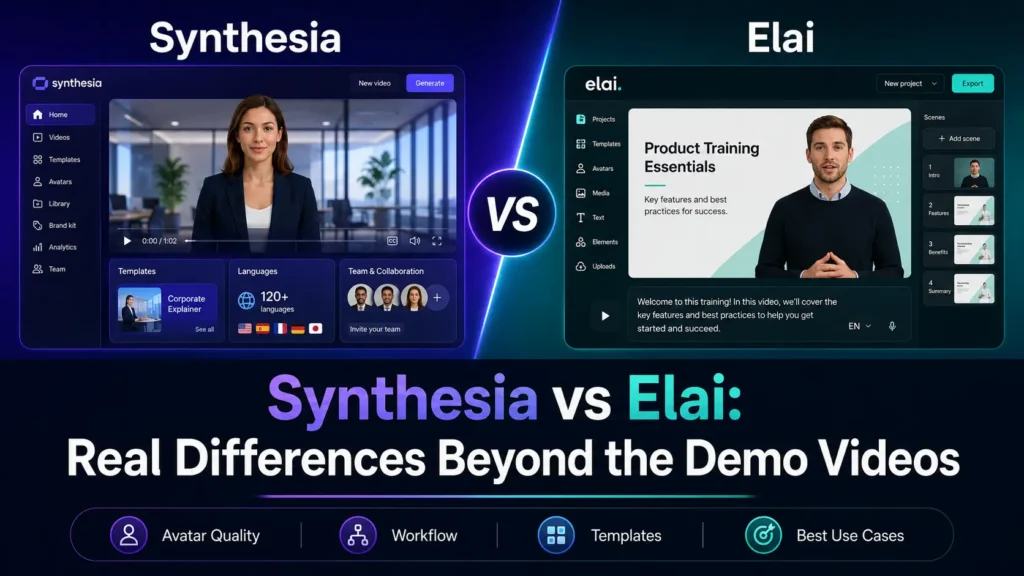
Synthesia est le choix le plus sûr pour des vidéos de formation soignées et de niveau professionnel, en particulier lorsque vous avez besoin d’une gouvernance plus stricte, d’une bibliothèque d’avatars plus étendue, de workflows d’équipe, d’options d’exportation SCORM et d’un positionnement commercial bien établi. Elai est le choix le plus adapté lorsque vos priorités sont la création de contenu de formation et de développement, les workflows de conversion de présentations PowerPoint en vidéos, les quiz et l’interactivité, ainsi qu’un processus de production davantage axé sur l’éducation.
Mais la véritable différence ne réside pas dans ce que montrent les vidéos de démonstration. D’après mes recherches auprès des utilisateurs, les facteurs déterminants étaient bien plus concrets : le réalisme des avatars, les contraintes budgétaires, les coûts de ré-rendu, les risques liés à la modération des contenus, le flux de travail pour les vidéos longues, et la question de savoir si la vidéo finale contribue réellement aux résultats en matière de formation ou de ventes.
Mention relative aux liens d'affiliation : cet article peut contenir des liens d'affiliation. Je peux percevoir une commission si vous effectuez un achat via ces liens, sans que cela n'entraîne de frais supplémentaires pour vous. Ma recommandation repose sur des recherches sur les produits, des études menées auprès des utilisateurs et une analyse des flux de travail, et ne se limite pas à de simples extraits de démonstration.
Synthesia vs Elai : un avis rapide issu d'une étude menée auprès d'utilisateurs réels
Si vous comparez Synthesia contre Elai, commencez par le cas d'utilisation, et non par l'avatar. D'après mes recherches, la plupart des acheteurs ne se contentaient pas de demander : “ Quel avatar est le plus beau ? ” Ils voulaient savoir si ces outils pouvaient les aider à créer Plus de 30 vidéos de cours, mise à jour quelques dizaines de vidéos de formation standardisées, transformer les longs scripts en vidéos de 20 à 30 minutes, ou résumer des propositions commerciales sans paraître mesquin.
Voici le verdict concret :
| Cas d'utilisation | Un meilleur choix | Pourquoi |
|---|---|---|
| Vidéos de formation en entreprise | Synthesia | Un positionnement commercial plus abouti, des fonctionnalités professionnelles plus performantes, un écosystème d'avatars plus vaste |
| Formation et développement (L&D) et flux de travail liés aux vidéos de formation | Elai | Renforcement du positionnement de la formation et du développement des compétences, conversion des présentations PowerPoint en vidéos, quiz, fonctionnalités d'apprentissage interactives |
| Déploiement à grande échelle au sein d'une grande entreprise | Synthesia | Meilleure adaptation à la gouvernance, aux équipes, à la cohérence de la marque et aux exigences de type SCORM/exportation |
| Création de cours à partir de fichiers PPT | Elai | Elai met directement l'accent sur les flux de travail de conversion de présentations PowerPoint en vidéos et de création de contenus pédagogiques |
| Résumés des propositions commerciales | Testez les deux avec soin | La confiance et la “ vallée dérangeante ” comptent davantage que les fonctionnalités |
| Vidéos de longue durée (20 à 60 minutes) | Aucun des deux n'est entièrement automatique | Il te reste encore à définir les chapitres, à faire le montage, à ajuster le rythme et à relire le texte. |
| Créateurs soucieux de leur budget | Elai est peut-être plus facile à démarrer | Les formules payantes d'Elai offrent davantage de minutes mensuelles dans les niveaux d'abonnement inférieurs, mais les réactualisations consomment des minutes. |
| Le meilleur choix global pour une utilisation professionnelle soignée | Synthesia | Un choix globalement plus intéressant si votre budget le permet |
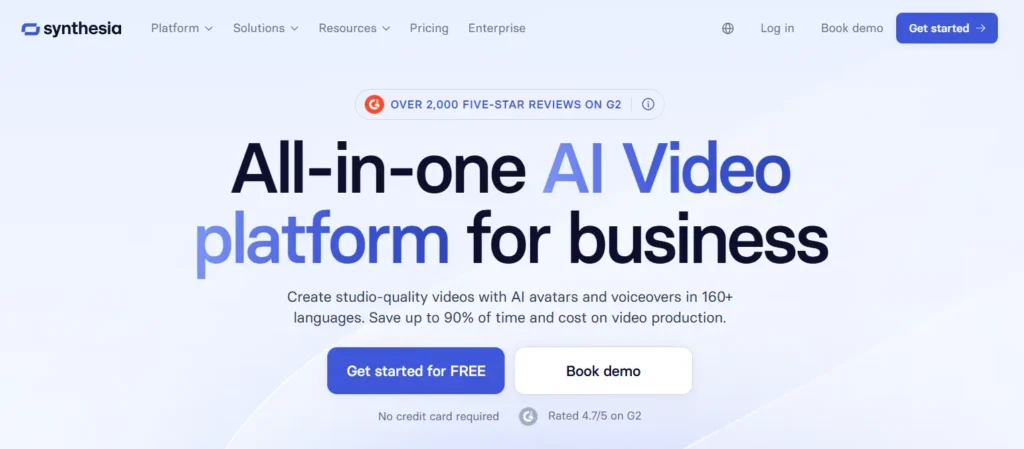
Le positionnement officiel de Synthesia est plus large et davantage axé sur les entreprises : formation et développement, soutien à la force de vente, ressources humaines, marketing, informatique, formation à la conformité, procédures opérationnelles standard (SOP) et vidéos de présentation de produits. La société met également en avant plus de 240 avatars, plus de 160 langues, des outils d'analyse, la collaboration en équipe, des intégrations et une stratégie de sécurité axée sur les entreprises.
Le positionnement d'Elai est davantage axé sur Formation et développement, qui promet des contenus vidéo percutants sans frais de production externalisés, grâce à des fonctionnalités telles que la conversion de texte en vidéo, la conversion de présentations PowerPoint en vidéo, la traduction automatique, le clonage de voix, l'interactivité et le chat vidéo en temps réel basé sur l'IA.

En résumé, voici ma recommandation : Optez pour Synthesia si vous recherchez une solution d'entreprise plus sûre ; choisissez Elai si votre processus de travail s'appuie sur des diapositives de formation, du contenu pédagogique ou des scripts de formation et de développement, et si vous souhaitez disposer d'outils de création davantage axés sur l'enseignement.
Synthesia contre Elai : le réalisme des avatars générés par l'IA
Le réalisme des avatars constitue le premier choix important à faire.
Une bonne vidéo mettant en scène un avatar généré par l'IA n'a pas besoin de faire croire à tout le monde qu'il s'agit d'un être humain. Mais elle ne doit pas détourner l'attention du spectateur.
Dans le cadre de mes recherches auprès des utilisateurs, les critiques les plus virulentes portaient sur la raideur des avatars, la synchronisation labiale maladroite, les mouvements robotiques et l’effet de “ vallée dérangeante ”. Ces aspects revêtent une importance particulière dans les domaines de la formation et de la vente, où la confiance fait partie intégrante du contenu.
Dans le cadre d'une formation, un intervenant dont le comportement semble un peu artificiel peut amener les apprenants à se concentrer sur l'avatar plutôt que sur le cours. Dans le domaine commercial, cela peut donner l'impression qu'une proposition est moins personnalisée, au lieu de la rendre plus captivante.
Synthesia fait l'objet de davantage de retours d'expérience de la part du public, car elle est plus largement utilisée et fait l'objet de plus de discussions. C'est à la fois un avantage et un inconvénient. Cela signifie qu'il existe davantage d'exemples, davantage de signes d'adoption par les entreprises et davantage d'avis concrets. Cela signifie également que ses faiblesses sont plus visibles, notamment en ce qui concerne la raideur des avatars et la qualité de la synchronisation labiale.
On dispose de moins de données comparatives publiques concernant Elai. Je n'irais donc pas jusqu'à affirmer qu'Elai est automatiquement plus réaliste que Synthesia. La conclusion la plus prudente est la suivante : Testez ces deux outils avec votre script avant de les acheter.
Le test que je recommande est simple.
Réalisez une vidéo de 60 à 90 secondes en vous appuyant sur votre véritable script de formation ou de vente. Montrez-la à cinq personnes correspondant au public cible. Posez-leur trois questions :
Avez-vous fait confiance à l'animateur ?
Est-ce que l'avatar t'a déconcentré ?
Préférez-vous regarder cette vidéo, lire un fichier PDF ou visionner un enregistrement d'écran commenté par une personne ?
Si les utilisateurs prêtent davantage attention à l'avatar qu'au message, cela signifie que l'outil n'est pas encore adapté à ce cas d'utilisation.
Synthesia ou Elai : le choix pour les vidéos de formation et l'apprentissage en ligne
La formation constitue le principal cas d'utilisation de ces deux outils.
Synthesia est particulièrement adaptée lorsqu'il s'agit de réaliser des vidéos d'entreprise standardisées. Cela inclut les formations à la conformité, l'intégration des nouveaux collaborateurs, les mises à jour des processus internes, l'accompagnement commercial, les contenus RH et les formations sur les produits.
Elai est plus adapté lorsque l'objectif est d'apprendre à créer du contenu. Son positionnement est davantage axé sur la formation et le développement, avec des fonctionnalités telles que la conversion de présentations PowerPoint en vidéos, l'interactivité, les quiz, le clonage vocal, les traductions et les avatars générés par IA.
L'un des cas étudiés dans le cadre de mes recherches concernait un créateur de cours en ligne qui devait produire Plus de 30 vidéos explicatives. L'ancien processus de travail nécessitait des outils distincts pour la voix off, les éléments visuels, l'animation et le montage vidéo. Le véritable problème ne résidait pas seulement dans la qualité vidéo, mais aussi dans le fait de devoir passer d'un outil à l'autre.
C'est là qu'une plateforme d'avatars basés sur l'IA peut apporter une réelle valeur ajoutée. Si un seul outil permet de remplacer l'enregistrement de voix off, le montage de base, le sous-titrage, la narration de diapositives et la localisation, le gain de temps peut être considérable.
Un autre cas concernait une équipe commerciale chargée de créer quelques dizaines de vidéos de formation standardisées. L'objectif était de donner aux vidéos un aspect professionnel tout en facilitant leur mise à jour. Synthesia semblait parfaitement adaptée à ce type de projet, mais le coût est devenu un sujet de préoccupation à mesure que la bibliothèque de vidéos s'étoffait.
Voici ce qu’est vraiment une formation vidéo : la première vidéo n’est pas la partie la plus difficile. Le plus difficile, c’est de produire 20, 30 ou 50 vidéos et de les mettre à jour lorsque les politiques, les scripts ou les détails des produits changent.
Pour les équipes de formation, j'opterais pour Synthesia lorsque la cohérence de l'image de marque et le professionnalisme de l'entreprise sont prioritaires. J'opterais pour Elai lorsque les flux de travail des formations, la conversion de diapositives en vidéos et les fonctionnalités d'apprentissage interactif sont plus importants.
Synthesia vs Elai : tarifs et limites de crédit
Les informations pouvant évoluer rapidement, vérifiez toujours les dernières Tarifs de Synthesia et Elai se renseigne avant d'acheter.
Au moment de la rédaction de cet article, Synthesia propose son forfait « Starter » au prix de $29/mois ou $264/an, avec 10 minutes de vidéo par mois. Son programme « Creator » est présenté à l'adresse suivante : $89/mois ou $804/an, ce qui correspond à environ 30 minutes de vidéo par mois sur la base de son système de crédits.
L'utilisation de Synthesia est désormais comptabilisée en crédits. Chaque seconde de vidéo utilise 2 crédits, donc une minute correspond à 120 crédits. La formule « Starter » comprend 1 200 crédits par mois, et le plan du Créateur prévoit notamment 3 600 crédits par mois. Les crédits non utilisés ne sont pas reportés sur la période de facturation suivante.
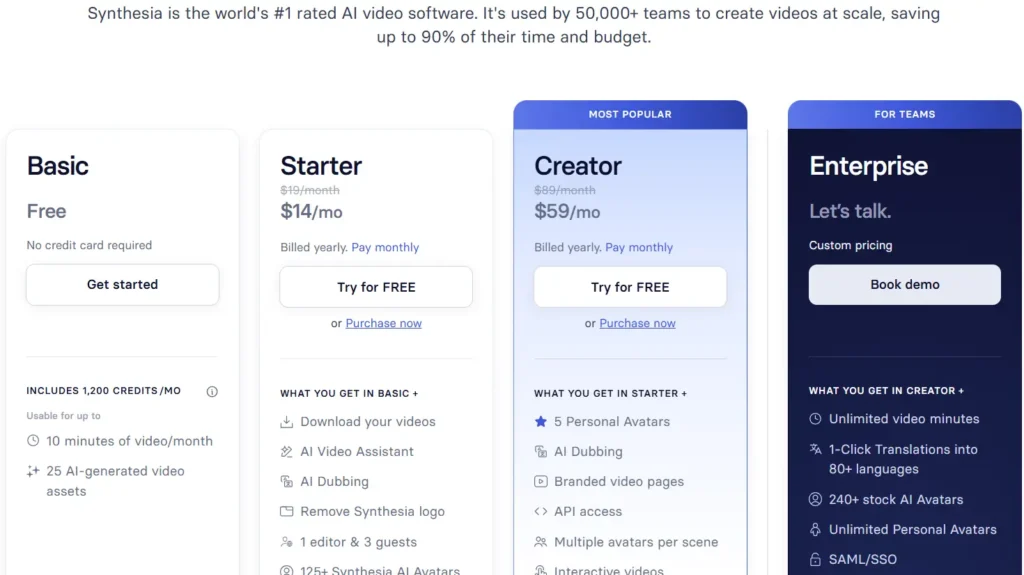
En matière de modifications, Synthesia offre davantage de souplesse qu’un simple modèle de rendu complet. Si vous modifiez une vidéo existante et ne changez que quelques secondes, Synthesia précise qu’elle ne comptabilise que les secondes de vidéo modifiées. Par exemple, si vous modifiez une vidéo d’une minute et ne changez que 3 secondes, seules ces 3 secondes seront facturées.
Elai propose une formule gratuite comprenant 1 minute, un for Creator à $29/mois avec 15 minutes par mois, ainsi qu'un forfait « Team » à $125/mois avec 50 minutes par mois. Elai permet également aux utilisateurs payants de recharger des minutes supplémentaires à $2 par minute.
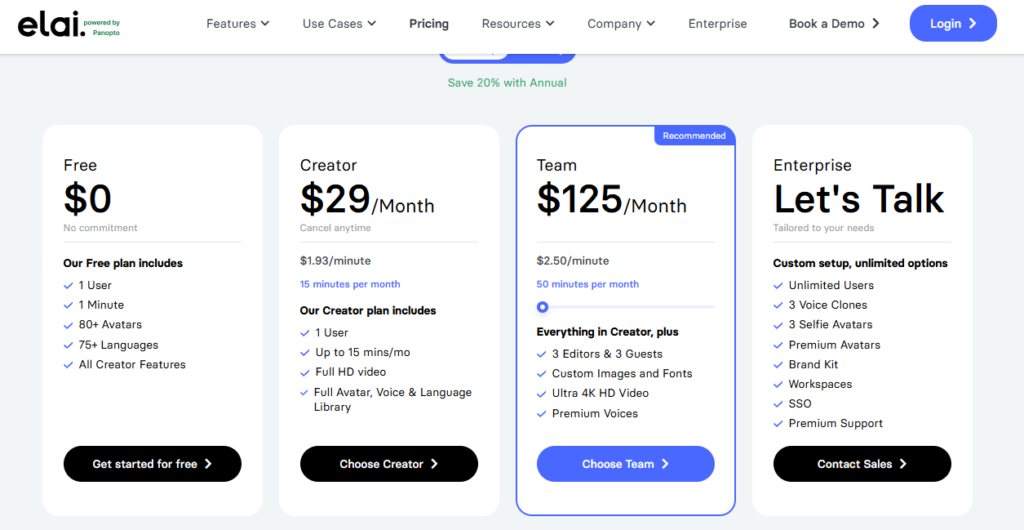
| Facteur de tarification | Synthesia | Elai | Pourquoi c'est important |
|---|---|---|---|
| Plan gratuit | Formule de base avec l'équivalent de 10 minutes de vidéo par mois | Formule gratuite avec 1 minute | Synthesia augmente la capacité mensuelle gratuite de stockage vidéo |
| Formule payante d'entrée de gamme | Forfait de base : $29/mois ou $264/an | Créateur : $29/mois | Le prix d'entrée mensuel est similaire |
| Utilisation payante de base | Équivalent à 10 minutes de vidéo par mois | 15 minutes par mois | Elai accorde davantage de temps de parole au niveau mensuel $29 |
| Formule en libre-service supérieure | Créateur : $89/mois ou $804/an | Équipe : $125/mois | Elai est plus cher à ce niveau, mais offre davantage de minutes |
| Utilisation accrue du forfait | Soit l'équivalent d'environ 30 minutes de vidéo par mois | 50 minutes par mois | Elai propose davantage de minutes mensuelles avec Team |
| Minutes supplémentaires | Mise à niveau requise lorsque la limite est atteinte | $2 par minute supplémentaire | Elai propose une tarification plus claire pour les recharges |
| Réafficher / modifier la règle | Les modifications mineures peuvent ne concerner que les nouvelles secondes de vidéo | Chaque rendu prend quelques minutes, même s'il s'agit de la même vidéo après modification | Cela peut avoir une incidence considérable sur le coût réel de production |
| Meilleur rapport qualité-prix | Les équipes qui prévoient de nombreuses modifications mineures | Les équipes qui ont besoin d'un plus grand nombre de minutes incluses et qui peuvent gérer les cycles de rendu |
La principale différence réside dans la manière dont les modifications influent sur le coût. Elai précise que des minutes sont déduites à chaque fois que vous cliquez Rendu, même s'il s'agit de la même vidéo après montage. Cela signifie qu'un rendu préliminaire, un rendu monté et un rendu final peuvent tous prendre plusieurs minutes.
Cette différence a son importance dans la production réelle.
Une vidéo de formation de 3 minutes peut nécessiter un rendu préliminaire, les commentaires des parties prenantes, une révision du script, une correction de prononciation et un rendu final. Avec Elai, les rendus répétés peuvent augmenter le coût réel. Avec Synthesia, les petites modifications peuvent nécessiter moins de crédits supplémentaires si seules quelques secondes de la vidéo sont modifiées.
Appliquez maintenant cela à la Plus de 30 vidéos explicatives cas.
Si chaque vidéo ne dure que 3 minutes, la bibliothèque finale compte déjà 90 minutes. Ce chiffre n'inclut pas les révisions, les traductions ni les ébauches non retenues. Un forfait mensuel de 10, 15, 30 voire 50 minutes risque de ne pas suffire pour mener à bien le projet, à moins d'étaler la production sur plusieurs mois, de passer à un forfait supérieur ou d'acheter de la capacité supplémentaire.
C'est pourquoi je recommande de calculer les coûts par projet, et non par plan.
Estimez la durée finale de la vidéo. Ajoutez le temps nécessaire aux révisions. Ajoutez les traductions. Ajoutez les coûts liés à la création d'un avatar personnalisé ou d'un clone vocal. Ajoutez les cycles de validation par les parties prenantes. Comparez ensuite Synthesia et Elai en fonction du coût total du flux de travail, et non du prix affiché sur la page d'accueil.
Synthesia ou Elai : quel outil choisir pour les vidéos longues générées par IA ?
C'est justement dans le domaine de la vidéo longue durée que les attentes deviennent souvent irréalistes.
D'après mes recherches, les gens souhaitaient créer Vidéos sur l'IA d'une durée de 20 à 30 minutes à partir de scripts volumineux. Certains workflows visaient même à 20 à 60 minutes vidéos.
La conclusion qui ressortait systématiquement était claire : ni Synthesia ni Elai ne devaient être considérées comme des outils permettant de créer des vidéos longues en un seul clic.
Elles peuvent être utiles. Mais les longues vidéos doivent tout de même être bien structurées.
Une meilleure méthode consiste à diviser le script en modules courts. Par exemple, divisez un script de 30 minutes en six chapitres de 5 minutes chacun. Utilisez l'avatar pour les introductions, les résumés et les explications clés. Pour le reste, utilisez des diapositives, des enregistrements d'écran, des visuels du produit, des schémas ou des exemples de scénarios.
Cela présente trois avantages.
Tout d'abord, la vidéo est plus agréable à regarder.
Deuxièmement, les modifications sont plus faciles à effectuer.
Troisième point : les apprenants sont moins enclins à regarder jusqu’au bout une longue vidéo où un expert parle face à la caméra.
Pour une formation de longue durée, je ne créerais pas un monologue d'avatar de 30 minutes. Je préférerais créer des leçons courtes, structurées en sections claires, accompagnées d'illustrations et de petits tests de vérification des connaissances.
C'est particulièrement important dans le cadre des formations techniques. Un véritable enregistrement d'écran accompagné d'une voix off générée par IA de grande qualité peut s'avérer plus efficace qu'un avatar qui se contente de lire un script.
Synthesia ou Elai : quel choix pour les vidéos de présentation commerciale ?
Les équipes commerciales souhaitent souvent disposer d'outils d'avatar basés sur l'IA pour assurer le suivi des propositions.
Ce cas de figure est tout à fait compréhensible. Un prospect participe à une réunion de présentation, reçoit une proposition au format PDF, puis cesse de répondre. Une courte vidéo récapitulative permettrait d'expliquer plus clairement les tarifs, le périmètre du projet et les prochaines étapes.
Dans l'un des cas concrets liés à la vente que j'ai étudiés, l'objectif était de transformer une proposition en une vidéo personnalisée mettant en scène un avatar généré par IA. L'idée était de réduire le taux d'abandon et de rendre la proposition plus accessible.
Mais il y a un risque. Si l'avatar semble artificiel, la vidéo peut nuire à la confiance.
En matière de vente, j’éviterais d’utiliser des avatars générés par l’IA pour remplacer artificiellement le contact humain. Une approche hybride s’avère plus efficace.
Enregistrez une brève introduction à la voix.
Utilisez des diapositives ou un enregistrement d'écran pour présenter l'offre.
Utilisez un avatar ou une voix générés par l'IA pour les sections standardisées.
Personnalisez les pièces spécifiques au client.
Vérifiez si les prospects regardent réellement la vidéo.
Un autre cas de vente s'est révélé plus convaincant. Le processus consistait à adapter des présentations clients à différents pays d'Asie. Au lieu d'envoyer des collaborateurs à l'étranger, la présentation pouvait être diffusée dans la langue locale grâce à un avatar alimenté par l'IA.
C'est là que les avatars basés sur l'IA peuvent apporter une réelle valeur ajoutée à l'entreprise. Leur intérêt ne réside pas seulement dans leur réalisme, mais aussi dans la localisation, la rapidité et la réduction des déplacements.
En matière de vente, optez pour Synthesia ou Elai lorsque la vidéo présente un message structuré. Faites preuve de prudence lorsque la transaction repose fortement sur la confiance personnelle.
Synthesia vs Elai : alternatives
| Outil | Meilleur pour | La force | Limitation | Quand l'opter |
|---|---|---|---|---|
| Synthesia | Formations en entreprise et vidéos professionnelles | Des processus de production de vidéos d'entreprise bien rodés, la maîtrise de l'image de marque, des cas d'utilisation au sein des équipes | Cela peut s'avérer coûteux à grande échelle ; le réalisme des avatars doit encore être testé | Optez pour cette solution pour la conformité, les ressources humaines, l'intégration des nouveaux collaborateurs, les procédures opérationnelles standard et l'accompagnement commercial |
| Elai | Formation et développement (L&D) et création de vidéos d'apprentissage en ligne | Conversion de présentations PowerPoint en vidéos, quiz, interactivité, processus axés sur l'apprentissage | Des données comparatives publiques moins détaillées que celles de Synthesia | Optez pour cette solution pour vos vidéos de cours, vos formations sous forme de diaporamas et vos modules d'apprentissage interactifs |
| Salut Gen | Marketing et tests de réalisme des avatars | Souvent privilégié pour les vidéos au style plus naturel, à la manière d'un animateur | Le coût et le déroulement des opérations dépendent du cas d'utilisation | Testez-le lorsque le réalisme est la priorité absolue |
| Colossien | Formation par scénarios | Utile pour la formation et les parcours d'apprentissage ramifiés | Peut ne pas convenir à des besoins vidéo simples et peu coûteux | Optez pour cette option lorsque les scénarios d'apprentissage priment sur les vidéos des intervenants |
| Pictory | Production rapide de vidéos à partir de scripts | Efficace pour la génération de vidéos sans avatar | Ne se concentre pas sur des présentateurs dotés d'une IA réaliste | Choisissez cette option lorsque la vitesse prime sur le réalisme de l'avatar |
| Description | Voix off, montage et enregistrement d'écran | Particulièrement adapté à la révision et à la correction de textes à partir d'un script | Ce n'est pas une plateforme axée sur les avatars | Optez pour cette solution pour vos tutoriels, vos démonstrations à l'écran et vos formations techniques |
| ElevenLabs | Voix off générée par l'IA | Génération vocale par IA de haute qualité | Cela ne suffit pas à assurer à lui seul la production vidéo dans son intégralité | Optez pour cette option lorsque la qualité vocale prime sur la présence d'un avatar parlant |
Une comparaison sérieuse entre Synthesia et Elai devrait également préciser dans quels cas aucune des deux solutions n'est la meilleure, et vous orienter vers d'autres Alternatives à Synthesia.
Salut Gen Il vaut souvent la peine de tester cette option si le réalisme de l'avatar et le style vidéo « marketing » sont les priorités. On y recourt généralement lorsque l'objectif est d'obtenir un présentateur plus naturel.
Colossien convient aux équipes de formation qui ont besoin d'un apprentissage basé sur des scénarios ou d'expériences à parcours ramifié.
Pictory Cela peut s'avérer judicieux lorsque vous souhaitez produire rapidement une vidéo à partir d'un script et que vous n'avez pas besoin d'un avatar réaliste.
Description est plus adapté à la voix off, aux enregistrements d'écran, au montage à partir de transcriptions et aux révisions rapides.
ElevenLabs est souvent utile lorsque la qualité de la voix prime sur la présence d'un visage à l'écran.
C'est un point important. De nombreuses équipes commencent par chercher un outil permettant de créer des avatars IA. Mais ce dont elles ont réellement besoin, c'est d'un processus de production vidéo.
Si votre contenu repose sur des éléments visuels, des démonstrations logicielles, des graphiques ou des mises à jour fréquentes, une voix off générée par IA associée à un enregistrement d'écran peut s'avérer plus adaptée qu'un avatar de type « tête parlante ».
Synthesia ou Elai : recommandation finale
Synthesia est le meilleur choix par défaut pour les équipes d'entreprise. Elle s'avère particulièrement performante pour les formations d'entreprise soignées, la gestion de l'image de marque, les contenus de conformité, les vidéos RH, l'accompagnement commercial et les flux de travail impliquant de grandes équipes.
Elai est la solution idéale pour les équipes de formation et de développement, les créateurs de formations et les services de formation qui travaillent à partir de diapositives et souhaitent intégrer des quiz, des éléments interactifs et la conversion de présentations PowerPoint en vidéos.
Pour ces deux outils, je vous recommande de mener un véritable projet pilote avant de souscrire à un abonnement annuel.
Créez une vraie vidéo.
Créer une révision.
Créez une version localisée si nécessaire.
Montrez-le à des apprenants actuels ou à des prospects.
Calculez le coût après les modifications, et non avant.
Si la vidéo inspire confiance, est regardée et plus facile à mettre à jour que votre ancien processus de travail, l'un ou l'autre de ces outils peut valoir le coup d'être acheté.
Si le public trouve que l'avatar le déconcentre, le problème ne vient probablement pas du logiciel. Le problème, c'est le format.