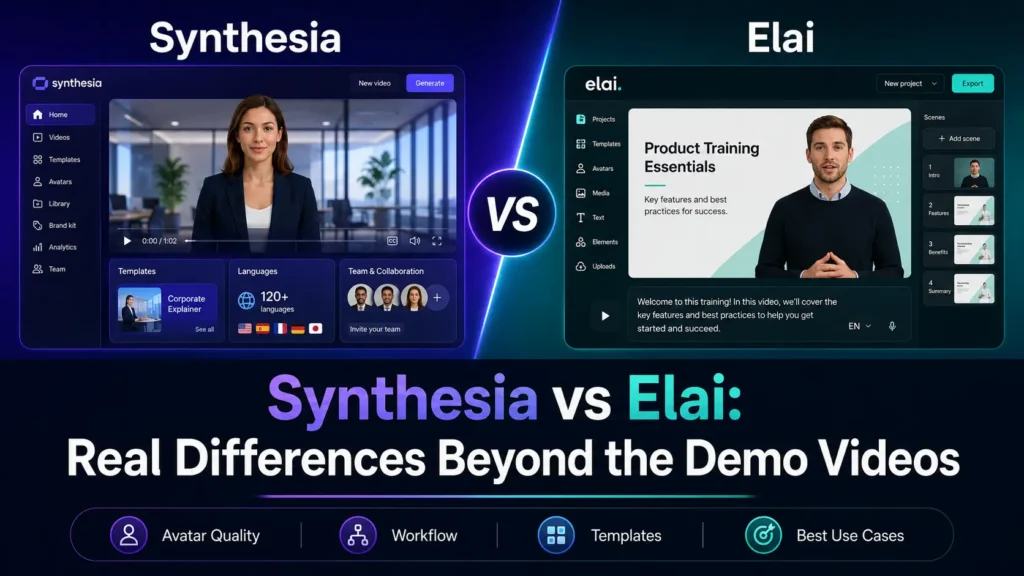
Synthesia is the safer choice for polished, enterprise-style training videos, especially when you need stronger governance, larger avatar libraries, team workflows, SCORM/export options, and mature business positioning. Elai is the better fit when your priority is L&D content creation, PPT-to-video workflows, quizzes/interactivity, and a more education-focused production flow.
But the real difference is not what the demo videos show. In my user research, the deciding factors were much more practical: avatar realism, pricing limits, re-render costs, content moderation risk, long-form video workflow, and whether the final video actually helps training or sales outcomes.
Affiliate disclosure: This article may contain affiliate links. I may earn a commission if you buy through these links, at no extra cost to you. My recommendation is based on product research, public user research, and workflow analysis, not demo clips alone.
Synthesia vs Elai: Quick Verdict from Real User Research
If you are comparing Synthesia vs Elai, start with the use case, not the avatar. In my research, most buyers were not simply asking, “Which avatar looks better?” They were asking whether these tools could help them create 30+ course videos, update a few dozen standardized training videos, turn long scripts into 20–30 minute videos, or summarize sales proposals without looking cheap.
Here is the practical verdict:
| Use case | Better choice | Why |
|---|---|---|
| Enterprise training videos | Synthesia | More mature business positioning, stronger enterprise features, larger avatar ecosystem |
| L&D and course video workflows | Elai | Stronger education/L&D positioning, PPT-to-video, quizzes, interactive learning features |
| Large corporate rollout | Synthesia | Better fit for governance, teams, brand consistency, SCORM/export-style requirements |
| PPT-based course creation | Elai | Elai directly emphasizes PPT-to-video and learning content workflows |
| Sales proposal summaries | Test both carefully | Trust and “uncanny valley” matter more than features |
| 20–60 minute long-form videos | Neither is fully automatic | You still need chaptering, editing, pacing, and review |
| Budget-sensitive creators | Elai may be easier to start | Elai’s paid plans include more monthly minutes at lower tiers, but re-renders consume minutes |
| Best overall for polished business use | Synthesia | Stronger all-around choice if budget allows |
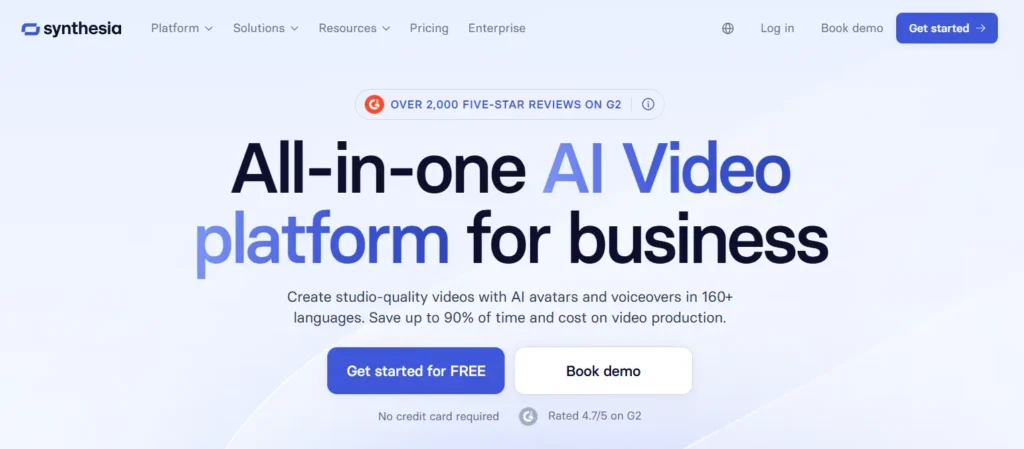
Synthesia’s official positioning is broader and more enterprise-heavy: learning and development, sales enablement, HR, marketing, IT, compliance training, SOPs, and product videos. It also claims 240+ avatars, 160+ languages, analytics, team collaboration, integrations, and a business-focused security posture.
Elai’s positioning is more directly focused on Learning and Development, promising high-impact video content without outsourced production costs, with features such as text-to-video, PPT-to-video, auto translations, voice cloning, interactivity, and real-time AI video chat.

My bottom-line recommendation: choose Synthesia if you want the safer enterprise pick; choose Elai if your workflow starts from training slides, course content, or L&D scripts and you want more education-oriented creation tools.
Synthesia vs Elai for AI Avatar Realism
Avatar realism is the first big decision point.
A good AI avatar video does not need to fool everyone into thinking it is human. But it must not distract the viewer.
In my user research, the most intense complaints were about stiff avatars, awkward lip sync, robotic pacing, and the “uncanny valley” effect. This matters most in training and sales, where trust is part of the content.
For training, a slightly unnatural presenter can make learners focus on the avatar instead of the lesson. For sales, it can make a proposal feel less personal rather than more engaging.
Synthesia has more public feedback because it is more widely used and discussed. That is both good and bad. It means there are more examples, more enterprise adoption signals, and more practical reviews. It also means its weaknesses are more visible, especially around avatar stiffness and lip-sync quality.
Elai has less deep public comparison data. So I would not claim that Elai is automatically more realistic than Synthesia. The safer conclusion is this: test both tools with your actual script before buying.
My recommended test is simple.
Create a 60–90 second video using your real training or sales script. Show it to five people who match the target audience. Ask three questions:
Did you trust the presenter?
Did the avatar distract you?
Would you rather watch this, read a PDF, or see a human-recorded screen share?
If people notice the avatar more than the message, the tool is not ready for that use case.
Synthesia vs Elai for Training Videos and E-Learning
Training is the strongest use case for both tools.
Synthesia fits better when the goal is standardized corporate video. This includes compliance training, onboarding, internal process updates, sales enablement, HR content, and product training.
Elai fits better when the goal is learning content creation. Its positioning is more L&D-focused, with features such as PPT-to-video, interactivity, quizzes, voice cloning, translations, and AI avatars.
One case from my research involved an online course creator who needed to produce 30+ explainer videos. The old workflow required separate tools for voiceover, visuals, animation, and video assembly. The real pain was not just video quality. It was tool-switching.
That is where an AI avatar platform can create real value. If one tool can replace voiceover recording, basic editing, captioning, slide narration, and localization, the time savings can be meaningful.
Another case involved a business team creating a few dozen standardized training videos. The goal was to make the videos look professional and keep them easy to update. Synthesia was seen as a strong fit for this type of work, but cost became a concern as the video library grew.
This is the real training-video lesson: the first video is not the hard part. The hard part is producing 20, 30, or 50 videos and updating them when policies, scripts, or product details change.
For training teams, I would choose Synthesia when brand consistency and enterprise polish matter most. I would choose Elai when course workflows, slide-to-video production, and interactive learning features matter more.
Synthesia vs Elai Pricing and Credit Limits
Because details can change quickly, always verify the current Synthesia pricing and Elai plans before buying.
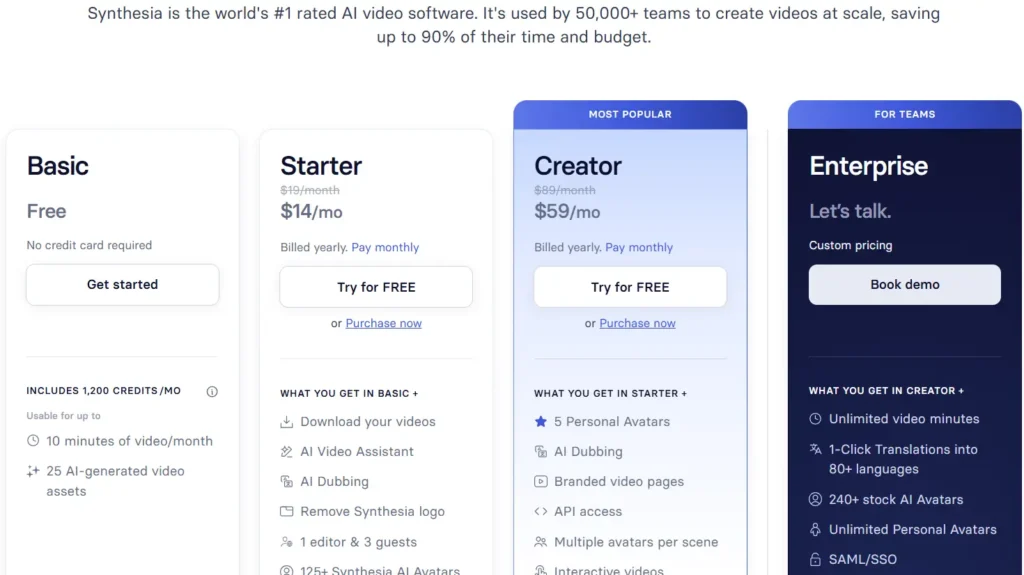
At the time of review, Synthesia lists its Starter plan at $29/month or $264/year, with 10 video minutes per month. Its Creator plan is listed at $89/month or $804/year, with usage equivalent to about 30 video minutes per month based on its credit system.
Synthesia’s usage is now tracked in credits. Each second of video uses 2 credits, so one minute uses 120 credits. The Starter plan includes 1,200 credits per month, and the Creator plan includes 3,600 credits per month. Unused credits do not roll over to the next billing period.
For edits, Synthesia is more revision-friendly than a simple full re-render model. If you edit an existing video and only change a few seconds, Synthesia says it only counts the new video seconds. For example, if you edit a 1-minute video and change 3 seconds, only those 3 seconds are charged.
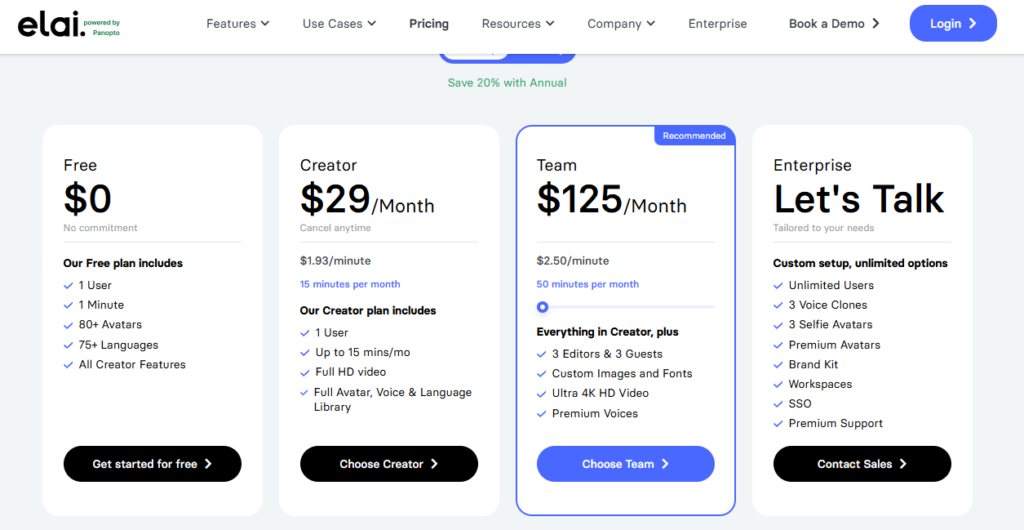
Elai lists a Free plan with 1 minute, a Creator plan at $29/month with 15 minutes per month, and a Team plan at $125/month with 50 minutes per month. Elai also allows paid users to top up extra minutes at $2 per minute.
| Pricing Factor | Synthesia | Elai | Why It Matters |
|---|---|---|---|
| Free plan | Basic plan with 10 video minutes/month equivalent | Free plan with 1 minute | Synthesia gives more free monthly video capacity |
| Entry paid plan | Starter: $29/month or $264/year | Creator: $29/month | Monthly entry price is similar |
| Entry paid usage | 10 video minutes/month equivalent | 15 minutes/month | Elai gives more minutes at the $29 monthly level |
| Higher self-serve plan | Creator: $89/month or $804/year | Team: $125/month | Elai costs more at this tier but includes more minutes |
| Higher plan usage | About 30 video minutes/month equivalent | 50 minutes/month | Elai offers more monthly minutes on Team |
| Extra minutes | Upgrade required when capped | $2 per extra minute | Elai has clearer top-up pricing |
| Re-render / edit rule | Small edits may only count new video seconds | Every render uses minutes, even the same video after edits | This can strongly affect real production cost |
| Best pricing fit | Teams that expect many small revisions | Teams that need more included minutes and can control render cycles |
The key difference is how edits affect cost. Elai states that minutes are deducted every time you click Render, even if it is the same video after edits. That means a draft render, an edited render, and a final render can all consume minutes.
This difference matters in real production.
A 3-minute training video may need a draft render, stakeholder feedback, a script edit, a pronunciation fix, and a final render. With Elai, repeated renders can increase the real cost. With Synthesia, small edits may consume fewer additional credits if only new video seconds are changed.
Now apply that to the 30+ explainer video case.
If each video is only 3 minutes, the final library is already 90 minutes. That does not include revisions, translations, or failed drafts. A 10-minute, 15-minute, 30-minute, or even 50-minute monthly allowance may not cover the project cleanly unless you spread production across months, upgrade, or buy extra capacity.
This is why I recommend calculating cost by project, not by plan.
Estimate final video length. Add revision time. Add translations. Add custom avatar or voice clone costs. Add stakeholder review cycles. Then compare Synthesia and Elai based on total workflow cost, not the homepage price.
Synthesia vs Elai for Long-Form AI Videos
Long-form video is where expectations often become unrealistic.
In my research, people wanted to create 20–30 minute AI videos from long scripts. Some workflows even aimed for 20–60 minute videos.
The consistent finding was clear: neither Synthesia nor Elai should be treated as a one-click long-form video machine.
They can help. But long videos still need structure.
A better workflow is to divide the script into short modules. For example, turn a 30-minute script into six 5-minute chapters. Use the avatar for introductions, summaries, and key explanations. Use slides, screen recordings, product visuals, diagrams, or scenario examples for the rest.
This creates three benefits.
First, the video is easier to watch.
Second, revisions are easier.
Third, learners are less likely to sit through a long AI talking head.
For long-form training, I would not make a 30-minute avatar monologue. I would create short lessons with clear sections, supporting visuals, and quick knowledge checks.
This is especially important for technical training. A real screen recording with a strong AI voiceover may outperform an avatar that simply reads the script.
Synthesia vs Elai for Sales Proposal Videos
Sales teams often want AI avatar tools for proposal follow-up.
The use case is understandable. A prospect attends a review meeting, receives a PDF proposal, and then stops replying. A short video summary could explain pricing, scope, and next steps more clearly.
In one sales case from my research, the goal was to turn a proposal into a personalized AI avatar video. The hope was to reduce ghosting and make the proposal feel easier to consume.
But there is a risk. If the avatar feels fake, the video can reduce trust.
For sales, I would avoid using AI avatars as a fake replacement for personal connection. A stronger workflow is hybrid.
Record a short human intro.
Use slides or screen recording to explain the offer.
Use AI avatar or AI voice for standardized sections.
Personalize the client-specific parts.
Track whether prospects actually watch the video.
Another sales case was more compelling. The workflow involved localizing client presentations for different countries in Asia. Instead of sending people overseas, the presentation could be delivered in the local language with an AI avatar.
This is where AI avatars can create clear business value. The benefit is not only realism. It is localization, speed, and reduced travel.
For sales, choose Synthesia or Elai when the video explains a structured message. Be careful when the deal depends heavily on personal trust.
Synthesia vs Elai Alternatives
| Tool | Best For | Strength | Limitation | When to Choose It |
|---|---|---|---|---|
| Synthesia | Enterprise training and business videos | Polished corporate video workflows, brand control, team use cases | Can become expensive at scale; avatar realism still needs testing | Choose it for compliance, HR, onboarding, SOPs, and sales enablement |
| Elai | L&D and e-learning video creation | PPT-to-video, quizzes, interactivity, learning-focused workflows | Less deep public comparison data than Synthesia | Choose it for course videos, slide-based training, and interactive learning |
| HeyGen | Marketing and avatar realism testing | Often considered for more natural presenter-style videos | Cost and workflow depend on use case | Test it when realism is the top priority |
| Colossyan | Scenario-based training | Useful for training and branching learning experiences | May not fit simple low-cost video needs | Choose it when learning scenarios matter more than presenter videos |
| Pictory | Fast script-to-video production | Efficient for non-avatar video generation | Not focused on realistic AI presenters | Choose it when speed matters more than avatar realism |
| Descript | Voiceover, editing, and screen recording | Strong for transcript-based editing and revisions | Not an avatar-first platform | Choose it for tutorials, screen demos, and technical training |
| ElevenLabs | AI voiceover | High-quality AI voice generation | Does not solve full video production alone | Choose it when voice quality matters more than a talking avatar |
A serious Synthesia vs Elai comparison should also explain when neither is the best option, pointing you toward other Synthesia alternatives.
HeyGen is often worth testing if avatar realism and marketing-style video matter most. It is commonly considered when the goal is a more natural presenter.
Colossyan is relevant for training teams that need scenario-based learning or branching experiences.
Pictory can make sense when you want fast script-to-video production and do not need a realistic avatar.
Descript is a better fit for voiceover, screen recordings, transcript-based editing, and fast revisions.
ElevenLabs is often useful when voice quality matters more than having a face on screen.
This is an important point. Many teams start by shopping for an AI avatar tool. But what they really need is a video production workflow.
If your content depends on visuals, software demos, charts, or frequent updates, an AI voiceover plus screen recording may be better than a talking-head avatar.
Synthesia vs Elai: Final Recommendation
Synthesia is the better default choice for enterprise teams. It is stronger for polished corporate training, brand control, compliance content, HR videos, sales enablement, and large-team workflows.
Elai is the better choice for L&D teams, course creators, and training departments that work from slides and want quizzes, interactivity, and PPT-to-video production.
For both tools, I recommend running a real pilot before buying an annual plan.
Create one real video.
Create one revision.
Create one localized version if relevant.
Show it to actual learners or prospects.
Calculate the cost after edits, not before.
If the video is trusted, watched, and easier to update than your old workflow, either tool can be worth buying.
If the audience finds the avatar distracting, the problem is probably not the software. The problem is the format.