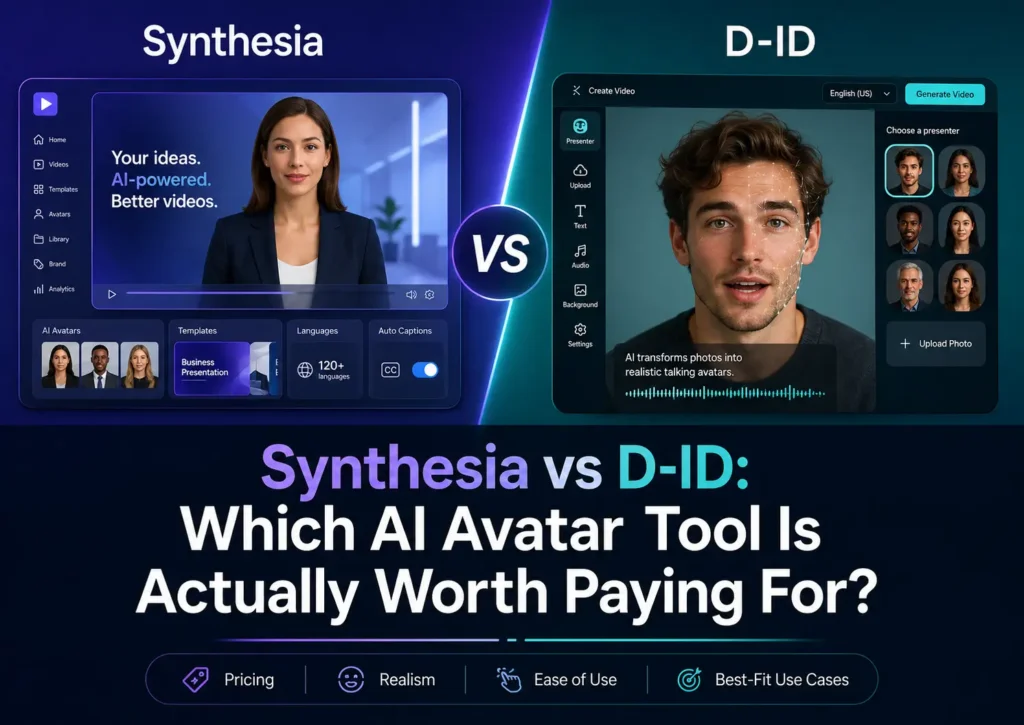
Synthesia is het geld zeker waard als je gepolijste bedrijfsvideo’s nodig hebt voor trainingen, onboarding, interne communicatie, productuitleg of meertalige bedrijfscontent. D-ID is de investering waard als je snel gesproken fotovideo’s, lichtgewicht AI-avatarclips, API-gestuurde avatars of realtime experimenten met conversatie-avatars nodig hebt.
Mijn advies: Kies voor Synthesia voor de productie van gestructureerde bedrijfsvideo’s; kies D-ID voor flexibele avatargeneratie en workflows voor ontwikkelaars en API’s. Geen van beide tools is perfect voor elke toepassing. De beste keuze hangt ervan af of je een kant-en-klaar platform voor bedrijfsvideo’s nodig hebt of een engine voor het genereren van avatars.
Disclosure: Dit artikel kan affiliate-links bevatten. Ik ontvang mogelijk een commissie als je via mijn links iets koopt, zonder dat dit jou extra kosten oplevert. Mijn aanbevelingen zijn gebaseerd op productonderzoek, prijsvergelijkingen, praktische workflowanalyses en echte pijnpunten van gebruikers die via marktonderzoek zijn verzameld.
D-ID versus Synthesia: een korte beoordeling
De eenvoudigste manier om D-ID versus Synthesia vergelijken is dit:
Synthesia is een platform voor bedrijfsvideo’s. D-ID is een AI-avatar-engine.
Synthesia is het meest geschikt voor teams die professionele, reproduceerbare video’s nodig hebben: HR, L&D, sales enablement, interne communicatie, klantvoorlichting, productmarketing en compliance-teams. Het werkt het beste als je al beschikt over scripts, trainingsdocumenten, presentaties of interne kennis die je wilt omzetten in strakke videocontent.
D-ID komt het best tot zijn recht wanneer de avatar zelf de productervaring vormt. Het is bijzonder geschikt voor video’s met sprekende foto’s, eenvoudige AI-woordvoerderclips, avatar-API’s, realtime demo’s van chatbots en eenvoudige avatarexperimenten.
| Gebruikscasus | Een betere keuze | Reden |
|---|---|---|
| Bedrijfsinstructievideo’s | Synthesia | Een efficiëntere workflow voor bedrijfsvideo’s |
| Inwerken van nieuwe medewerkers | Synthesia | Beter voor hergebruikbare sjablonen |
| Productbeschrijvingen | Synthesia | Een meer verzorgde presentatie |
| Foto- en videoverslagen | D-ID | Snellere workflow voor het omzetten van foto’s naar video |
| Het genereren van avatars via de API | D-ID | Betere aansluiting bij ontwikkelaars |
| Real-time avatar-agenten | D-ID | Meer relevant voor tests met conversatie-avatars |
| Advertenties in UGC-stijl | Probeer ook alternatieven uit | Geen van beide is ideaal voor autochtoon sociaal realisme |
| Training voor lange afstanden | Synthesia, zorgvuldig | Gebruik avatars slechts kort, niet als de hele les |
Als je maar één ding onthoudt: Koop Synthesia als je kant-en-klare bedrijfsvideo’s nodig hebt; koop D-ID als je avatars wilt genereren.
D-ID versus Synthesia: het belangrijkste verschil bij AI-avatarvideo’s
Veel kopers vergelijken D-ID en Synthesia alsof ze hetzelfde probleem oplossen. Dat is echter niet het geval.
Synthesia is ontworpen met het oog op gestructureerde videoproductie. De waarde zit hem niet alleen in de avatar. De echte waarde ligt in de mogelijkheid om scripts om te zetten in gepolijste video’s met avatars, stemmen, sjablonen, merkconsistentie en meertalige opties. Daardoor is het een logische keuze voor organisaties die veel vergelijkbare video’s moeten maken zonder echte presentatoren te filmen.
D-ID is flexibeler en meer gericht op avatars. Het is handig als je een gezicht wilt animeren, een pratende foto wilt maken, een avatar aan een product wilt koppelen of een realtime AI-woordvoerder wilt testen. Het voelt minder aan als een videostudio voor bedrijven en meer als een tool om pratende avatars te genereren of aan te sturen.
Dit onderscheid is belangrijk omdat de meeste teleurstellingen voortkomen uit het aanschaffen van de verkeerde tool voor de verkeerde workflow. Een opleidingsteam verwacht misschien dat een avatar de leerresultaten zal verbeteren. Een marketeer verwacht misschien dat een AI-woordvoerder presteert als een echte UGC-maker. Een ontwikkelaar verwacht misschien dat een realtime-avatar op een goedkope manier kan worden ingezet voor vele sessies. Dit zijn verschillende problemen.
De betere afweging is niet: “Welke avatar ziet er realistischer uit?” De betere vraag is: Welk productieknelpunt probeer ik op te lossen?
Beoordeling van Synthesia: het beste voor trainingen, introductieprogramma’s en bedrijfsvideo’s
Synthesia is vooral de investering waard als de productie van bedrijfsvideo’s je grootste knelpunt is. Het kan de behoefte aan camera’s, presentatoren, studio’s, voice-oversessies en herhaalde opnames verminderen.
De meest veelbelovende toepassingen van Synthesia die ik heb gevonden, zijn:
- inwerken van nieuwe medewerkers
- interne opleiding
- uitleg over naleving
- verkoopondersteuning
- productdemonstraties
- klantvoorlichting
- meertalige interne communicatie
- voorvertoningsvideo’s voor belanghebbenden
Bij trainingsworkflows werkt Synthesia het beste wanneer de AI-avatar wordt ingezet als presentator, en niet als de volledige leerervaring. Een van de meest nuttige bevindingen uit mijn onderzoek was dat avatar-segmenten beter presteerden wanneer ze kort werden gehouden: ongeveer 10–20 seconden voor inleidingen, overgangen en samenvattingen. Toen de avatar eenmaal de hoofdspreker werd voor meer dan ongeveer één minuut, kwam de video vaak kunstmatiger en minder overtuigend over.
Dat is de praktische les: uitzoeken of Synthesia is het zeker waard Het komt erop neer dat je moet beseffen dat het de productie van trainingen weliswaar kan versnellen, maar dat dit niet automatisch betekent dat de trainingen daardoor ook beter worden.
De meest effectieve werkwijze is om Synthesia te gebruiken voor de menselijke presentatie, en dit vervolgens aan te vullen met schermopnames, diagrammen, productdemo’s, bijschriften, quizzen en voorbeelden. Een saai trainingsscript blijft saai, zelfs met een avatar. Een verwarrend proces blijft verwarrend, tenzij je de daadwerkelijke stappen laat zien.
Mijn advies: Synthesia is de aankoop waard voor L&D-, HR- en bedrijfsteams die al weten wat ze willen zeggen en dit sneller willen vastleggen in een verzorgde video.
D-ID-recensie: het beste voor sprekende foto’s, AI-avatars en API-workflows
D-ID is vooral de moeite waard als je snel een avatar wilt genereren, in plaats van een volledig platform voor videoproductie nodig hebt.
De belangrijkste toepassingen van D-ID zijn:
- sprekende fotovideo’s
- korte filmpjes met uitspraken van AI-woordvoerders
- lichtgewicht avatar-inhoud
- Het genereren van avatars via een API-koppeling
- experimenten met realtime conversatie-avatars
- Prototypes voor SaaS-onboarding of productassistenten
D-ID is vooral interessant voor productteams en ontwikkelaars. In een realtime avatar-workflow die ik heb bestudeerd, was het doel om tekst vanuit de backend naar een browsergebaseerde avatar te sturen en deze via TTS te laten spreken. Het project vereiste WebRTC, een continue visuele aanwezigheid, geen vertraging tussen reacties, en ongeveer 10 parallelle sessies.
De oude D-ID-stream werkte wel, maar liep vast bij het laatste frame tussen twee reacties in. D-ID Agents V4 heeft het vastloopprobleem opgelost met een continue stream, maar de kosten werden geschat op ongeveer $11 per sessie, waardoor schaalbaarheid een probleem vormde. In dezelfde evaluatie werd Simli.ai vergeleken met ongeveer $0,05 per minuut, en de cold start van de websocket van HeyGen werd geschat op 300–500 ms.
Dit is waar D-ID zowel krachtig als riskant is. Het kan zeer aantrekkelijk zijn voor demo’s, prototypes en gecontroleerde avatar-ervaringen. Maar voor SaaS-producties moet je rekening houden met latentie, gelijktijdigheid, sessiekosten, inactief gedrag en fallback-toestanden voordat je de knoop doorhakt.
Mijn advies: D-ID is de moeite waard om aan te schaffen voor filmpjes met sprekende foto’s, avatar-prototypes en API-gestuurde avatar-workflows. Het is minder geschikt als je een gepolijst videosysteem voor bedrijfstrainingen nodig hebt.
Prijzen van D-ID versus Synthesia: waar je op moet letten voordat je betaalt
De prijs is een van de belangrijkste redenen waarom mensen D-ID en Synthesia met elkaar vergelijken, maar het goedkoopste abonnement is niet altijd het beste om te kiezen.
Synthesia is voor de meeste zakelijke kopers gemakkelijker te begrijpen omdat het werkt als een videoplatform voor bedrijven op basis van een abonnement.
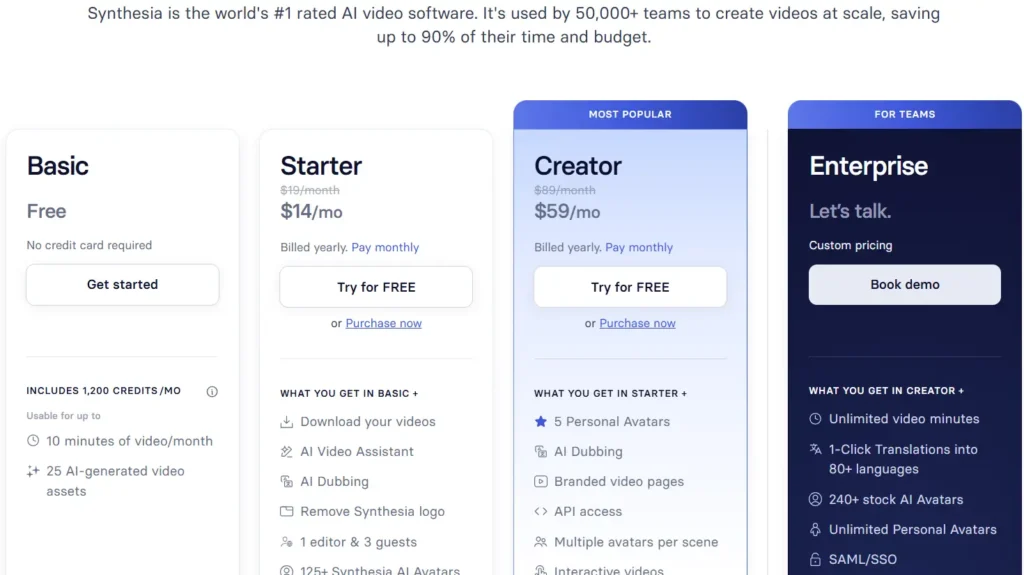
Volgens de huidige prijspagina biedt Synthesia een gratis Basic-abonnement aan, een Starter-abonnement vanaf US$18 per maand bij jaarlijkse facturering of US$29 per maand bij maandelijkse facturering, en een Creator-abonnement van US$64 per maand bij jaarlijkse facturering of US$89/maand bij maandelijkse facturering.
Het Basic-abonnement omvat 1.200 credits per maand, bruikbaar tot maximaal 10 minuten video per maand, terwijl het puntensysteem van Synthesia de volgende kosten in rekening brengt 2 credits per seconde, of 120 credits voor een video van één minuut.
D-ID lijkt op het eerste gezicht misschien goedkoper, vooral voor het genereren van eenvoudige avatars. Volgens de tarieven die ik heb bekeken, begint het Lite-abonnement van D-ID bij $4,7 per maand, jaarlijks gefactureerd, met kredietmogelijkheden zoals 40, 52 en 64 studiepunten. Hogere abonnementen zijn Pro en Advanced, met een groter aantal credits en meer videominuten. De werkelijke kosten hangen echter af van het aantal credits, de maandelijkse videominuten, de regels voor watermerken, het API-gebruik en of je commerciële rechten nodig hebt.
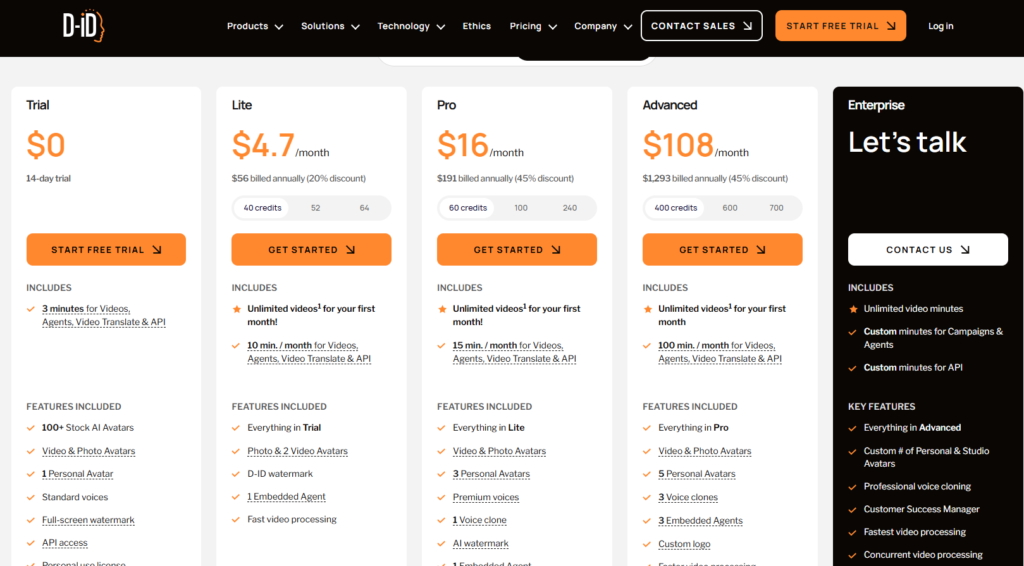
Op dit punt vraagt D-ID om extra aandacht. In het eigen beleid van D-ID inzake commercieel gebruik staat dat De versies Trial, Lite en Build zijn uitsluitend bedoeld voor persoonlijk gebruik, terwijl Pro, Advanced, Enterprise, Launch en Scale zijn beschikbaar voor commercieel gebruik. Dat betekent dat het goedkoopste D-ID-abonnement wellicht niet geschikt is als je video’s wilt gebruiken in advertenties, marketing, opdrachten voor klanten of zakelijke content.
Watermerken vormen een ander belangrijk prijsaspect. De Trial- en Lite-abonnementen van D-ID bevatten een watermerk met het D-ID-logo, waarbij het Trial-abonnement een watermerk over het volledige scherm weergeeft. Gebruikers van de Pro- en Advanced-abonnementen krijgen nog steeds een generiek AI-watermerk te zien, en Enterprise-gebruikers kunnen het AI-watermerk wel aanpassen, maar niet volledig verwijderen. Dit maakt D-ID minder geschikt voor merken die schone, watermerkvrije commerciële beelden nodig hebben.
Het knelpunt bij de prijsstelling van Synthesia ligt elders. De instapabonnementen zijn overzichtelijker, maar voor geavanceerde behoeften zoals teamfuncties, grotere productievolumes, lokalisatie, governance, SSO, SCORM-export en samenwerking binnen de onderneming kunnen kopers genoodzaakt zijn om voor een prijsopgave op maat te kiezen. Uit mijn gebruikersonderzoek bleek dat een bepaalde trainingsworkflow lokalisatie weliswaar waardevol vond, maar aangaf dat het benodigde abonnement begon bij ongeveer 1.000 per jaar. Rond die tijd dook er nog een citaat van een onderneming op £8,300. Deze moeten worden beschouwd als concrete voorbeelden van kopersonderzoek, en niet als officiële, openbaar gemaakte prijzen.
Voordat je een van beide gereedschappen aanschaft, moet je de werkelijke kosten berekenen op basis van:
- kosten per voltooide video
- kosten per voltooide minuut
- tegoed en maandelijkse limieten
- regels voor watermerken
- rechten voor commercieel gebruik
- flexibiliteit bij de export
- goedkeurings- of moderatierisico
- teamstoelen
- taal- en lokalisatiebehoeften
- API-vereisten
- maandelijks productievolume
Mijn praktische aankoopadvies: Sluit geen jaarabonnement af voordat u ten minste drie representatieve video’s hebt gemaakt en de videokwaliteit, de goedkeuringssnelheid, de regels voor watermerken, de rechten voor commercieel gebruik en de werkwijze voor revisies hebt gecontroleerd.
Lip-sync, realisme en het ‘uncanny valley’-probleem
Lipsynchronisatie en realisme vormen de grootste kwaliteitsrisico’s bij video’s met AI-avatars.
Bij D-ID, Synthesia, HeyGen en soortgelijke tools zijn de meest voorkomende problemen:
- de mondbewegingen lopen iets uit de pas
- voordracht met robotstem
- stijve gezichtsuitdrukkingen
- onnatuurlijk tempo
- accentverschuiving
- emotionele discrepantie
- avatar-scènes komen na verloop van tijd onnatuurlijk over
Synthesia komt over het algemeen verfijnder over bij video’s voor zakelijke presentaties. Maar het kan toch afleidend werken als de avatar te lang in beeld blijft. D-ID kan effectief zijn voor korte filmpjes met sprekende foto’s, maar bij realtime-toepassingen of langere workflows kunnen er beperkingen aan het licht komen op het gebied van bediening, vastlopen of flexibiliteit bij het exporteren.
De meest betrouwbare oplossing is niet het kiezen van één “perfecte” avatar-tool. Het is slimmer bewerken.
Een betere werkwijze voor AI-avatars is:
- Houd avatarscènes kort.
- Schakel regelmatig over naar productbeelden, schermopnames, dia’s, diagrammen of b-roll.
- Gebruik natuurlijke teksten met pauzes en een conversatieachtige stijl.
- Vermijd lange, ononderbroken monologen van avatars.
- Zorg ervoor dat de stem, de avatar en de gebruikssituatie goed op elkaar zijn afgestemd.
- Test de uiteindelijke video samen met iemand die de tool nog niet eerder heeft gezien.
Voor opleidingsdoeleinden werken avatars het beste als gidsen. Voor marketingdoeleinden werken ze het beste als blikvangers of uitleggers. Bij advertenties in UGC-stijl mag zonder testen niet worden aangenomen dat D-ID of Synthesia beter presteren dan creatieve uitingen in menselijke stijl.
Casestudies: Praktische AI-avatar-workflows, gegevens en lessen
Casestudy 1: Bedrijfsopleiding met Synthesia
Een afdeling voor bedrijfsopleidingen heeft Synthesia getest om sneller interne instructievideo’s te maken. De tool hielp bij het verpakken van de inhoud in een meer gepolijste vorm, maar leidde niet automatisch tot betere leerresultaten. In één test heeft het team het platform beoordeeld op op een dag en besloot dat het niet de juiste keuze was.
Het belangrijkste inzicht was dat het gebruik van avatars beter werkte in korte stukken: 10–20 seconden voor inleidingen, overgangen en samenvattingen. Langere fragmenten waarin de avatar de hoofdrol speelt, vooral als ze langer duren dan één minuut, zorgde ervoor dat de leerlingen sneller afgeleid raakten.
Vóór: live-training, PowerPoint-voice-over of het zelf maken van video’s.
Na: snellere, door AI gegenereerde trainingsvideo’s, maar de kwaliteit van het leerproces hing nog steeds af van het instructieontwerp.
Les: Synthesia verhoogt de productiesnelheid, maar heeft geen invloed op de leerstrategie.
Casestudie 2: Interne opleiding van medewerkers geblokkeerd door beoordeling
Een intern opleidingsproject voor medewerkers liep vertraging op door moderatie. De opgegeven beoordelingsperiode was 12–24 uur per video, en een verzoek om terugbetaling binnen 48 uur werd afgewezen nadat de video’s niet konden worden gebruikt.
Vóór: de tijd die is besteed aan het maken van trainingsvideo’s voor medewerkers.
Na: geblokkeerde uitbetaling, onduidelijke redenen voor de beoordeling, problemen bij de terugbetaling.
Les: Als je content aan een deadline gebonden is, test dan de goedkeuringsworkflow voordat je opschaal.
Casestudy 3: Marketingvideo voor het genereren van leads afgewezen
Een solopreneur maakte video’s om leads te genereren voor een weggeefactie en een automatiseringsaanbieding. In de video’s werd de kijkers gevraagd hun e-mailadres in te vullen, maar de inhoud werd afgewezen. De maker meldde dat hij meer dan 24 uur van de productietijd.
Vóór: AI-avatarvideo’s voor het genereren van leads.
Na: afgewezen campagnemateriaal en verloren productietijd.
Les: Promotionele, affiliate-, financiële en leadgenererende content moet zorgvuldig worden getest voordat u op grote schaal met Synthesia aan de slag gaat.
Casestudie 4: Training over zorgverzekeringen met inconsistente begeleiding
Een opleidingsworkflow opgesteld 6 video's die betrekking heeft op 3 soorten zorgverzekeringen. Hoewel dezelfde materialen en avatars werden gebruikt, 2 van de 6 video's werden gemarkeerd. De workflow vertoonde ook inconsistenties in de spraak, waaronder onverwachte accentveranderingen.
Vóór: schaalbare trainingsinhoud op basis van hergebruikbare sjablonen.
Na: inconsistente moderatie en problemen met de uitspraak.
Les: Voor gereguleerde of semi-gereguleerde opleidingsonderwerpen zijn voorspelbare beoordelingsregels en kwaliteitscontroles nodig.
Casestudy 5: Contentbureau vervangt fotoshoots door sprekende avatars
Een klein contentbureau maakte in zijn workflow gebruik van AI-avatars om het filmen en de planning te vermijden. Het proces omvatte het schrijven van een script, het genereren van een stem, het selecteren van een personageafbeelding, het kiezen van een emotie en het genereren van korte avatarclips. De gerapporteerde productietijd bedroeg 3–4 minuten per filmpje.
Vóór: het filmen met mensen, de planning, heropnames en de productiecoördinatie.
Na: snelle avatarfilmpjes die zijn gegenereerd op basis van scripts en afbeeldingen.
Les: AI-avatars komen het best tot hun recht wanneer ze de productiedrempels voor korte content wegnemen.
Casestudy 6: realtime SaaS-avatar met D-ID
Voor een SaaS-avatar-experiment was een avatar nodig die in de browser door de backend gegenereerde tekst kon uitspreken. Voor het project was ongeveer 10 parallelle sessies. De oude stream van D-ID liep vast tussen de reacties door, terwijl D-ID Agents V4 de continuïteit heeft verbeterd, maar ongeveer $11 per sessie. Andere benchmarks waren onder meer Simli.ai met ongeveer $0,05 per minuut en de koude start van HeyGen WebSocket bij 300–500 ms.
Vóór: het testen van verouderde D-ID WebRTC-avatarstromen.
Na: een vergelijking van D-ID Agents V4, Simli, Tavus en HeyGen op het gebied van kosten en latentie.
Les: D-ID kan prima werken voor demo’s, maar voor SaaS-productie is een gedegen kostenmodellering nodig.
Casestudy 7: Advertenties in UGC-stijl en lipsynchronisatie
In een advertentieworkflow in UGC-stijl werden AI-avatartools getest voor realistische video’s met woordvoerders. Het grootste probleem was dat de lipsynchronisatie nog steeds niet helemaal natuurlijk overkwam. De oplossing bestond niet alleen uit het wisselen van tools, maar ook uit het aanpassen van de montagestrategie: langzamer spreken, kortere fragmenten, betere camerahoeken, meer overgangen en ondersteunend beeldmateriaal.
Vóór: op zoek naar de perfecte tool voor avatars.
Na: door middel van bewerkingstechnieken de beperkingen van AI te verbergen.
Les: De prestaties van UGC-advertenties hangen af van de creatieve uitvoering, en niet alleen van het realisme van de avatars.
Casestudy 8: Schoonheidsmerk op zoek naar alternatieven voor D-ID
Een beautymerk onderzocht de mogelijkheden van D-ID voor ‘talking-head’-content, maar raakte gefrustreerd door de complexiteit van de naamsvermelding en zorgen over watermerken. Advertentie-eenheden zoals 40, 52 en 64 studiepunten maakte het opstellen van een begroting moeilijker, en werd de afwezigheid van watermerken een belangrijke aankoopfactor.
Vóór: D-ID overwegen voor avatar-content van beautymerken.
Na: op zoek naar duidelijkere prijsstelling, geen watermerk en betere, op advertenties gerichte werkprocessen.
Les: E-commercebedrijven en beautymerken hechten veel waarde aan een strakke uitstraling, prijstransparantie en een authentieke sociale stijl.
D-ID versus Synthesia voor marketingvideo’s en UGC-advertenties
Op marketinggebied is dat geen eenvoudige beslissing.
Synthesia is geschikt voor verzorgde productpresentaties, merkvideo’s en zakelijke marketingcontent. Het is echter wellicht niet ideaal voor agressieve leadgeneratie, affiliatecampagnes, content op financieel gebied of sterk promotionele video’s, omdat de moderatie een risico voor de levering kan vormen.
D-ID is handig voor snelle concepten van AI-woordvoerders en ‘talking-head’-fragmenten. Maar het biedt mogelijk niet de volledige workflow voor advertentieproductie die nodig is voor hoogwaardige UGC: aandachttrekkers, productbeelden, bijschriften, een natuurlijk tempo, scènewisselingen en een menselijke manier van presenteren.
Wat marketing betreft, raad ik het volgende aan:
- Gebruik Synthesia voor professionele merkpresentaties
- gebruik D-ID voor snelle avatarontwerpen
- Test HeyGen, Akool, Creatify, Tagshop AI of soortgelijke tools voor advertenties in UGC-stijl
- Meet altijd de kijktijd, CTR, CPA en conversiepercentage
Beoordeel een advertentie met een AI-avatar niet op basis van hoe indrukwekkend deze er in het voorbeeld uitziet. Beoordeel deze op basis van de vraag of mensen blijven kijken en kopen.
D-ID versus Synthesia: alternatieven
Soms als je rechtstreeks naar Alternatieven voor Synthesia blijkt dat noch D-ID, noch Synthesia het meest geschikte hulpmiddel is voor uw specifieke behoeften.
HeyGen is het de moeite waard om te testen op realisme, vertaling en avatarvideo’s die gebruiksvriendelijk zijn voor makers.
Akool is het de moeite waard om te testen of de inhoud van de woordvoerder realistisch is.
ElevenLabs is waardevol als stemlaag en kan vrijwel elke avatar-workflow verbeteren.
Vyond werkt beter voor animatietrainingen waarbij geen fotorealistische avatars nodig zijn.
Pictory kan visuele videoworkflows ondersteunen waarbij avatars slechts één onderdeel vormen.
Startbaan is geschikter voor uitgebreidere experimenten met AI-video.
API’s in de stijl van Tavus, Simli en Sync zijn het overwegen waard voor realtime of door ontwikkelaars aangestuurde avatarproducten.
Creatify en Tagshop AI is wellicht geschikter voor e-commerce en advertentieworkflows in UGC-stijl.
De beste stack bestaat vaak uit een combinatie van tools: één voor spraak, één voor avatars, één voor bewerking en één voor distributie.
Voor platforms die sterk gericht zijn op specifieke bedrijfsfunctionaliteiten, is het vergelijken van Synthesia tegen Colossyan
of eens een kijkje nemen bij een Synthesia versus Elai Een vergelijking kan de belangrijkste verschillen in functies aan het licht brengen.
Eindconclusie: Is D-ID of Synthesia het geld waard?
Synthesia is voor de meeste zakelijke teams de betere keuze. Het biedt een oplossing voor een duidelijk probleem: het sneller produceren van hoogwaardige video’s voor trainingen, onboarding, uitleg en interne communicatie.
D-ID is de betere keuze voor makers, ontwikkelaars en productteams die behoefte hebben aan flexibele avatargeneratie. Het is beter geschikt voor het maken van foto’s, experimenten met AI-spreekmodellen, avatar-API’s en realtime avatar-prototypes.
Mijn kader voor het nemen van een definitieve beslissing:
| Type koper | De beste keuze |
|---|---|
| HR- of L&D-team | Synthesia |
| Team interne communicatie | Synthesia |
| Productmarketingteam | Synthesia |
| Opleidingsbureau voor bedrijven | Synthesia |
| Ontwikkelaar van pratende foto’s | D-ID |
| Ontwikkelaar die avatar-workflows bouwt | D-ID |
| SaaS-team test AI-agenten | D-ID |
| E-commercebedrijf dat advertenties met door gebruikers gegenereerde inhoud maakt | Probeer ook alternatieven uit |
Als je op zoek bent naar videoproducties die direct inzetbaar zijn voor zakelijke doeleinden, begin dan met Synthesia. Als je op zoek bent naar flexibele AI-avatargeneratie, begin dan met D-ID. Als je hoogwaardige advertenties voor sociale media wilt, test dan beide opties af tegen alternatieven die gericht zijn op UGC voordat je een definitieve keuze maakt.