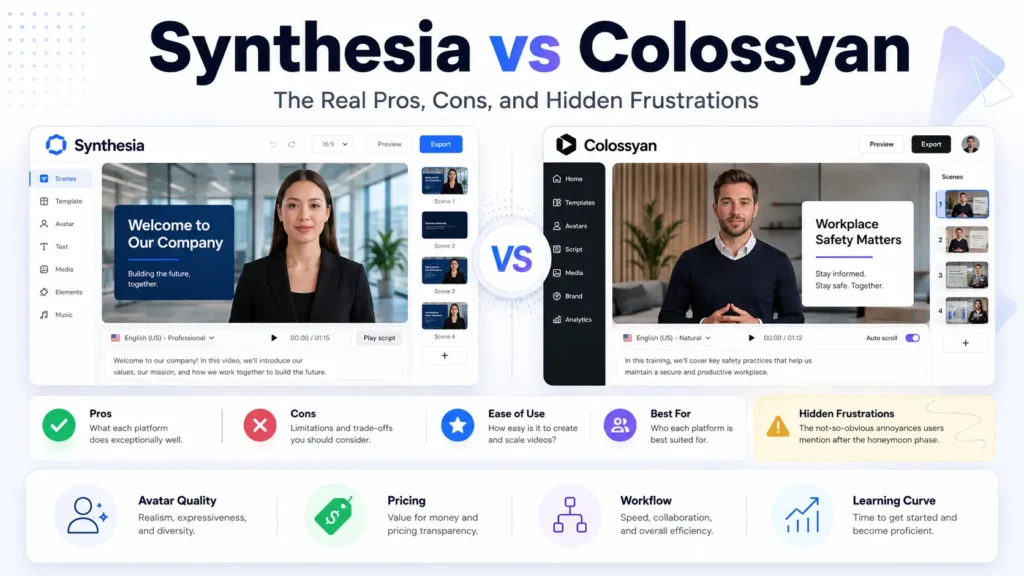
Synthesia es la mejor opción Si buscas vídeos con avatares de IA de alta calidad y aptos para el ámbito empresarial, destinados a la formación corporativa, la incorporación de nuevos empleados y la comunicación interna. Colossyan es la mejor opción si tu prioridad son las actualizaciones de los contenidos formativos, las voces en off editables, el aprendizaje basado en escenarios y unos flujos de trabajo de revisión más rápidos.
Tras llevar a cabo un estudio de usuarios basado en conversaciones reales y flujos de trabajo prácticos con vídeo y IA, mi conclusión es sencilla:
No te decantes solo por el realismo del avatar. Elige en función de tu flujo de trabajo.
Las verdaderas preguntas a la hora de comprar son:
- ¿Con qué frecuencia cambiará el contenido de tu formación?
- ¿Necesitas vídeos con un acabado impecable o actualizaciones sencillas?
- ¿Seguirán los alumnos interesados en los avatares de IA?
- ¿Puede la plataforma aprobar la categoría de tu contenido?
- ¿Vas a producir tres vídeos o unas cuantas docenas?
- ¿Necesitas resultados de formación o simplemente material de vídeo?
Synthesia frente a Colossyan: comparación rápida
| Categoría | Synthesia | Colosiano |
|---|---|---|
| Ideal para | Vídeos corporativos de IA de gran calidad | Vídeos formativos y actualizaciones frecuentes |
| Punto fuerte | Calidad de presentación apta para empresas | Flujo de trabajo editable para la formación y la locución |
| Casos de uso habituales | Incorporación, cumplimiento normativo, actualizaciones internas | Formación y desarrollo, formación técnica, situaciones prácticas |
| Calidad del avatar | En general, más pulido | Está bien, pero se centra más en la formación |
| Actualizar el flujo de trabajo | Bien | Más resistente gracias a las revisiones frecuentes |
| Edición de voz en off | Bien | Mayor valor práctico |
| Formación basada en situaciones hipotéticas | Es posible, pero no es su principal punto fuerte | Mejor ajuste |
| Riesgo | Coste, cansancio con los avatares, rechazo del contenido | Reacciones dispares por parte de los alumnos, menos pruebas públicas |
| El mejor comprador | Comunicación corporativa, Recursos Humanos, formación y desarrollo empresarial | Formación y desarrollo, equipos de formación, diseñadores instruccionales |
Synthesia frente a Colossyan: mi breve valoración
En el contexto más amplio de la evaluación de Synthesia contra Colossyan, compra Synthesia si tu equipo necesita vídeos sobre IA bien elaborados y profesionales, listos para mostrarse a las partes interesadas internas.
Es ideal para la incorporación de nuevos empleados, los vídeos explicativos sobre cumplimiento normativo, las actualizaciones de RR. HH. y la comunicación interna de estilo ejecutivo.
Compra Colossyan si tu equipo actualiza con frecuencia los contenidos de formación.
Resulta especialmente útil cuando los guiones, las voces en off, las políticas, los procedimientos o los contenidos técnicos cambian con frecuencia.
Lo frustrante es que, aunque ambas herramientas pueden agilizar la producción de vídeos, ninguna de ellas mejora automáticamente la formación.
Para los equipos de formación, la velocidad de producción es solo uno de los factores que influyen en la decisión. La atención de los alumnos, la finalización de las tareas, la comprensión y la rapidez de actualización son aspectos más importantes.
Reseña de Synthesia: ventajas, desventajas y mejores casos de uso
Synthesia A menudo se considera la plataforma de vídeos con avatares de IA más sofisticada.
Su mayor ventaja es la calidad de la presentación. Los vídeos pueden transmitir una imagen más corporativa, más homogeneizada y resultar más fáciles de mostrar a las partes interesadas internas.
Ventajas de Synthesia
| Pro | Por qué es importante |
|---|---|
| Salida de vídeo de alta calidad | Ideal para contenidos corporativos profesionales |
| Ambiente propicio para las empresas | Es más fácil de justificar en equipos más grandes |
| Ideal para vídeos estandarizados | Útil para la incorporación de nuevos empleados, el cumplimiento normativo y la formación interna |
| Avatares y plantillas coherentes | Ayuda a mantener la coherencia de la marca |
| Buen atractivo para las partes interesadas | Hace que los resultados de la formación parezcan más completos |
Contras de Synthesia
| Con | Por qué es importante |
|---|---|
| Puede resultar caro a gran escala | Unas pocas docenas de vídeos pueden suscitar preocupaciones en cuanto a los costes |
| Cansancio de los avatares | Es posible que los alumnos dejen de prestar atención |
| Problemas relacionados con el «valle inquietante» | Los movimientos de la boca o la rigidez facial pueden distraer a los usuarios |
| Riesgo de aprobación de contenidos | Los guiones de carácter publicitario, de estilo periodístico o de temática delicada pueden ser rechazados. |
| No es una solución de aprendizaje completa | Una producción de vídeo más rápida no demuestra el impacto de la formación |
Los mejores casos de uso de Synthesia
Synthesia es ideal para:
- Incorporación de empresas
- Guías explicativas sobre el cumplimiento normativo
- Comunicación interna
- Formación en recursos humanos y tecnologías de la información
- Breves resúmenes de estilo ejecutivo
- Vídeos sobre procedimientos operativos estándar
- Materiales de formación bien elaborados dirigidos a las partes interesadas
Resulta menos adecuado para cursos largos impartidos por avatares, tutoriales técnicos, actualizaciones diarias del mercado y vídeos de marketing que puedan dar lugar a problemas relacionados con la revisión de contenidos.
Análisis de Colossyan: ventajas, desventajas y mejores casos de uso
Colossyan resulta más atractivo cuando el flujo de trabajo se asemeja más al diseño instruccional.
Su valor no reside únicamente en el avatar. El verdadero valor radica en una edición más sencilla de los guiones, actualizaciones más rápidas de las voces en off y una mayor facilidad para el mantenimiento de los contenidos formativos.
Ventajas de Colossyan
| Pro | Por qué es importante |
|---|---|
| Un flujo de trabajo de formación más eficaz | Más adecuado para los equipos de formación y desarrollo |
| Actualizaciones de contenido más sencillas | Resulta útil cuando los entrenamientos cambian con frecuencia |
| Sustitución práctica de la voz en off | Reduce el trabajo de grabación repetitivo |
| El aprendizaje basado en situaciones se adapta | Útil para la formación basada en juegos de rol y con ramificaciones |
| Una buena alternativa a Synthesia | Resulta útil cuando Synthesia te parece cara o limitante |
Contras de Colossyan
| Con | Por qué es importante |
|---|---|
| Menos pruebas públicas a partir de datos detallados de los casos | Es más difícil evaluar el rendimiento |
| El realismo de los avatares puede seguir pareciendo artificial | A algunos alumnos puede que les resulte desalentador |
| Reacciones dispares de los alumnos | Funciona mejor con algunos públicos que con otros |
| Aún requiere un diseño didáctico | La herramienta no crea una estrategia de aprendizaje por ti. |
| No siempre es la opción ideal para una estrategia de marketing muy centrada en la marca | Más adecuado para el entrenamiento que para la publicidad |
Los mejores casos de uso de Colossyan
Colossyan es ideal para:
- Formación técnica
- Novedades sobre la formación de los empleados
- Aprendizaje basado en situaciones
- Formación mediante juegos de rol
- Cursos de actualización sobre cumplimiento normativo
- Sustitución de la voz en off mediante IA
- Contenidos de formación y desarrollo que cambian con frecuencia
- Contenidos de capacitación interna
Si tu mayor problema es tener que volver a grabar la narración cada vez que cambia una póliza, elegir esta plataforma como Alternativa a Synthesia puede que sea la mejor opción desde el punto de vista práctico.
Synthesia frente a Colossyan para la formación empresarial
En el ámbito de la formación empresarial, ambas herramientas pueden resultar útiles. Sin embargo, resuelven problemas distintos.
Synthesia contribuye a que la formación tenga un aspecto profesional.
Colossyan ayuda a que sea más fácil actualizar la formación.
La cuestión fundamental es que los vídeos con avatares de IA pueden parecer una actividad formativa sin que, en realidad, mejoren el aprendizaje.
Lo que los equipos de formación realmente necesitan
| Necesita | Por qué es importante |
|---|---|
| Explicaciones claras | Los alumnos necesitan comprender rápidamente |
| Pocas distracciones | El avatar no debe acaparar la atención |
| Actualizaciones sencillas | Los contenidos de formación cambian con frecuencia |
| Seguimiento de la finalización | Los equipos necesitan pruebas de que los empleados han terminado |
| Pruebas de conocimientos | La formación debe evaluar el aprendizaje |
| Accesibilidad | Los subtítulos y la claridad del audio son importantes |
| Aprobación de las partes interesadas | Las pymes y los directivos necesitan un control de revisión |
En mi investigación, una de las quejas más recurrentes fue la distracción que provocaban los avatares.
Los alumnos pueden fijarse en problemas de sincronización labial, expresiones rígidas o la extraña sensación que transmite un presentador digital. Esto puede desviar la atención de la propia lección.
Por lo general, el mejor formato de formación no es una clase impartida íntegramente por un avatar de IA.
Una forma más contundente es:
- Breve presentación del avatar
- Imágenes nítidas
- Grabaciones de pantalla cuando sea necesario
- Ejemplos reales
- Breve resumen
- Prueba de conocimientos
La técnica más útil fue el uso de avatares en Segmentos de 10 a 20 segundos para introducciones, transiciones y resúmenes. Para vídeos de más de un minuto, recurrir al avatar como elemento visual principal puede hacer que los usuarios pierdan interés.
Caso práctico n.º 1: Producción de unas pocas docenas de vídeos de formación corporativa
Uno de los casos estudiados se refería a un equipo que tenía previsto crear unas cuantas docenas de vídeos de formación estandarizados.
El equipo barajó herramientas como Synthesia, Colossyan, Leadde, Descript, Pictory y Creatify. También analizaron detenidamente otras opciones y alternativas del mercado, como HeyGen contra Synthesia, Synthesia frente a D-ID
, y Synthesia contra Elai para ver cómo quedaban en comparación.
| Detalle | Conclusión |
|---|---|
| Caso de uso | Vídeos de formación corporativa estandarizados |
| Tipo de usuario | Formación corporativa o equipo de contenidos |
| Objetivo | Crea vídeos profesionales a gran escala |
| Herramientas consideradas | Synthesia, Colossyan, Leadde, Descript, Pictory, Creatify |
| Datos cuantificables | Unas cuantas docenas de vídeos |
| Datos cuantificables sobre el rendimiento | No se comparten datos mensurables |
| Antes de | La producción tradicional dificultaba la ampliación de la escala |
| En | Las herramientas de vídeo basadas en IA han hecho que la producción repetible sea más realista |
| Conclusión clave | Cuando se trata de grandes volúmenes, el coste y el proceso de actualización son tan importantes como la calidad del vídeo |
Synthesia resultaba atractiva porque el resultado final tenía un aspecto pulido y profesional.
Pero cuando el proyecto creció hasta alcanzar docenas de vídeos, los costes y el mantenimiento se convirtieron en un motivo de gran preocupación.
Este caso demuestra por qué los equipos no deberían evaluar estas herramientas basándose únicamente en un vídeo de demostración. Deberían probar el ciclo de producción completo.
Caso práctico n.º 2: Colossyan para las actualizaciones de la formación técnica
Otro caso se refería al uso de Colossyan para contenidos de formación técnica.
El resultado no fue perfecto. Las opiniones de los alumnos fueron dispares. Algunas personas aceptaron el avatar, mientras que otras lo encontraron menos atractivo.
Pero la ventaja operativa era evidente: Colossyan ayudó a ahorrar tiempo a la hora de actualizar los contenidos formativos.
| Detalle | Conclusión |
|---|---|
| Caso de uso | Formación técnica |
| Tipo de usuario | Responsable de formación y desarrollo (L&D) o creador de contenidos formativos |
| Objetivo | Actualizar la formación técnica con mayor rapidez |
| Herramienta utilizada | Colosiano |
| Datos cuantificables | No se comparten datos mensurables |
| Antes de | Las actualizaciones requerían una revisión más manual |
| En | Las actualizaciones de contenido se han acelerado |
| Conclusión clave | El principal punto fuerte de Colossyan es la rapidez de las actualizaciones, no la participación garantizada de los alumnos. |
Esta es una distinción importante.
Puede que Colossyan no consiga que a todos los alumnos les encanten los vídeos de formación sobre IA. Pero sí puede agilizar el trabajo del equipo de formación cuando el contenido cambia con frecuencia.
En lo que respecta a la formación técnica, eso es importante.
Caso práctico n.º 3: Colossyan con ChatGPT y After Effects
Un flujo de trabajo práctico combinaba ChatGPT, Colossyan y After Effects.
Se utilizó ChatGPT para la redacción del guion. Se utilizó Colossyan para la conversión de texto a audio y las voces personalizadas. Se utilizó After Effects para la producción visual final.
| Detalle | Conclusión |
|---|---|
| Caso de uso | Redacción de guiones, narración con IA, edición de vídeo |
| Tipo de usuario | Diseñador didáctico o creador de vídeos |
| Objetivo | Evita grabar la voz en off varias veces |
| Herramientas utilizadas | ChatGPT, Colossyan, After Effects, ElevenLabs |
| Datos cuantificables | No se comparten datos mensurables |
| Antes de | Los cambios en el guion obligaron a volver a grabar la voz en off |
| En | Las voces personalizadas de IA agilizaron mucho las actualizaciones |
| Conclusión clave | La narración editable es una ventaja oculta muy importante |
Este caso pone de manifiesto uno de los mejores ejemplos de aplicación de Colossyan.
La principal ventaja no era el avatar, sino la posibilidad de actualizar la narración rápidamente sin tener que reservar ni grabar una nueva voz en off.
Eso evitó problemas en la producción y permitió dedicar más tiempo a la edición visual.
Caso práctico n.º 4: Synthesia para la formación en el lugar de trabajo
Un caso de formación en el lugar de trabajo puso de manifiesto un riesgo habitual asociado a los vídeos con avatares al estilo de Synthesia.
El contenido de la formación en sí mismo resultó útil. Sin embargo, el presentador de IA distraía a los espectadores.
| Detalle | Conclusión |
|---|---|
| Caso de uso | Formación en el lugar de trabajo |
| Tipo de usuario | Creador de formación corporativa |
| Objetivo | Haz que los contenidos formativos resulten más atractivos |
| Herramienta utilizada | Synthesia |
| Datos cuantificables | No se comparten datos mensurables |
| Antes de | El contenido de la formación se consideró útil |
| En | El avatar de IA distrajo a los alumnos |
| Conclusión clave | Un avatar realista puede seguir restando atención |
Esta es una de las mayores frustraciones ocultas.
Un presentador de IA bien elaborado puede hacer que un vídeo parezca más moderno. Sin embargo, si los alumnos se fijan en el rostro artificial, los movimientos de la boca o la forma robótica de expresarse, el vídeo pierde eficacia.
En el ámbito de la formación, el avatar debe servir de apoyo a la clase. No debe convertirse en la clase en sí.
Caso práctico n.º 5: Prueba de Synthesia durante un día
Otro caso se refería a un equipo que ya impartía formación presencial y en línea.
Probaron Synthesia para un día porque la dirección quería evaluarlo.
| Detalle | Conclusión |
|---|---|
| Caso de uso | Evaluación de la plataforma de formación |
| Tipo de usuario | Equipo de formación presencial y en línea |
| Objetivo | Decide si Synthesia ha mejorado la producción de la formación |
| Herramienta utilizada | Synthesia |
| Datos cuantificables | Un día de uso |
| Antes de | El equipo ya ha impartido formación presencial y digital |
| En | Synthesia no se adaptaba al flujo de trabajo |
| Conclusión clave | El vídeo de IA no soluciona un diseño de entrenamiento deficiente |
Este caso es importante porque muestra la rapidez con la que un equipo puede detectar una falta de sincronización.
Si tu verdadero problema es la calidad de la enseñanza, la participación, la evaluación o el cambio de comportamiento de los alumnos, es posible que Synthesia no lo resuelva.
Crea vídeos. No sustituye a una estrategia de aprendizaje.
Synthesia frente a Colossyan para vídeos de marketing
Tanto Synthesia como Colossyan pueden utilizarse con fines de marketing, pero ninguna de las dos es siempre la mejor herramienta para la publicidad basada en el rendimiento.
Synthesia es más adecuada para vídeos empresariales pulidos y seguros para la marca.
Colossyan puede resultarte útil si buscas una alternativa a Synthesia que se adapte a un flujo de trabajo de formación o narración.
Pero si tu objetivo principal son los anuncios de TikTok, los anuncios de Meta o los vídeos de productos al estilo UGC, quizá te convenga más una herramienta creativa específica para UGC.
Lista de comprobación para la compra de servicios de marketing
| Pregunta | Por qué es importante |
|---|---|
| ¿Aceptará la plataforma tus reclamaciones? | Evita los vídeos rechazados |
| ¿Puedes revisarlo rápidamente? | El marketing requiere una iteración rápida |
| ¿Esta herramienta se adapta a tu estilo publicitario? | Es posible que los vídeos de avatares no se ajusten a los formatos de contenido generado por los usuarios |
| ¿Es el vídeo apto para la marca? | Importante para el marketing corporativo |
| ¿Se pueden probar varios ganchos? | Requisitos para los anuncios de rendimiento |
| ¿Son claras las normas de aprobación? | Evita la pérdida de tiempo de producción |
El caso del rechazo tras más de 48 horas demuestra por qué la revisión de las políticas no es un detalle sin importancia.
De ello puede depender que la herramienta funcione o no.
Comparativa de precios entre Synthesia y Colossyan
El precio de la suscripción es solo una parte del coste.
El coste real incluye la redacción del guion, la edición, la revisión, los vídeos rechazados, las regrabaciones, las correcciones y el mantenimiento.
| Factor de coste | Por qué es importante |
|---|---|
| Número de vídeos | Unos cuantos vídeos no es lo mismo que unas cuantas docenas |
| Frecuencia de revisión | Los cambios frecuentes favorecen unos flujos de trabajo de actualización más eficaces |
| Duración del vídeo | Los vídeos largos de avatares pueden aumentar los costes y provocar cansancio |
| Retrasos en la aprobación | El contenido rechazado supone una pérdida de tiempo de producción |
| Cambios en la voz en off | La regrabación puede resultar cara |
| Revisión por parte de las partes interesadas | Cuantos más revisores haya, más modificaciones se realizan |
| Localización | Las herramientas de IA pueden ahorrar tiempo cuando se necesita contenido multilingüe |
Para comprender las estructuras que subyacen a estos planes, nuestra guía completa sobre Explicación de los precios de Synthesia destaca que Synthesia ofrece precios más bajos para el uso de pago básico, mientras que Colossyan resulta más atractivo cuando se necesitan minutos de vídeo ilimitados, interactividad en la formación y más funciones integradas de avatares y voz en un plan empresarial estándar.
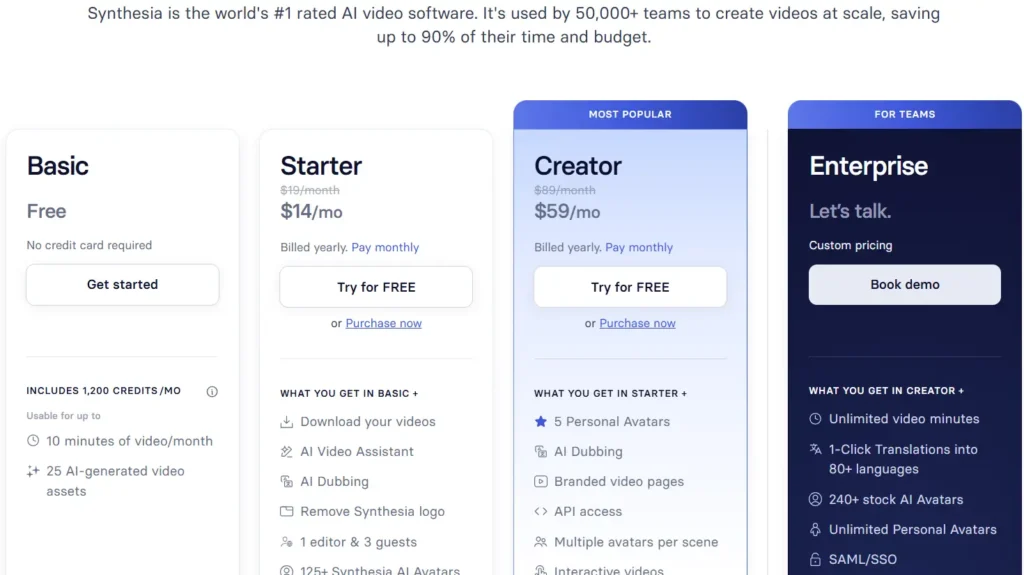
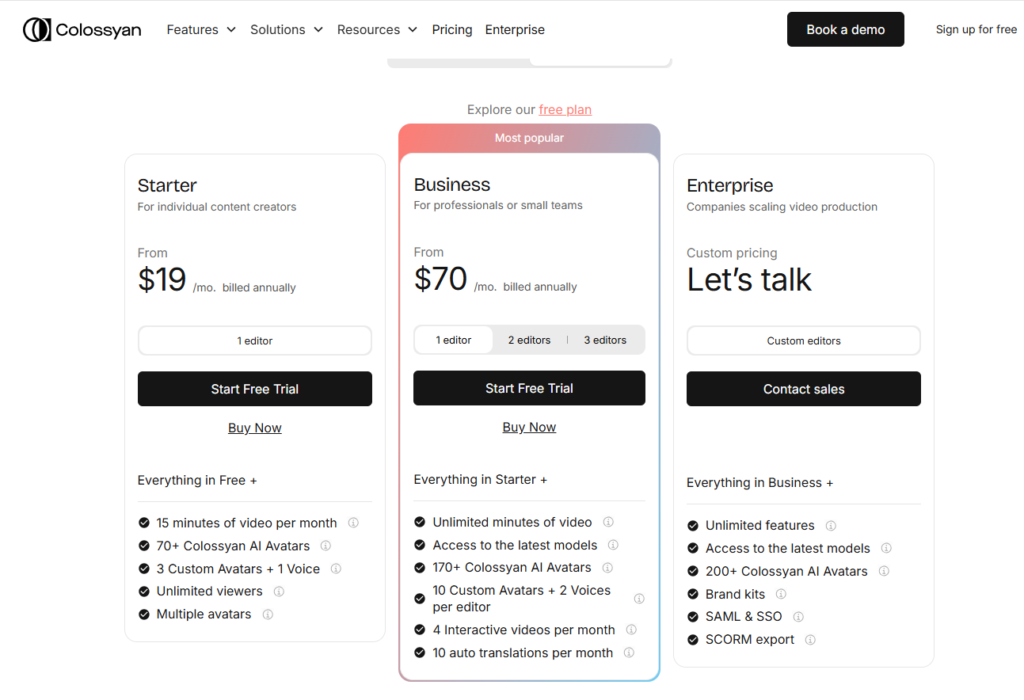
Synthesia se posiciona como una sofisticada plataforma de vídeo basada en IA utilizada por equipos de gran tamaño, mientras que la página de precios de Colossyan se centra más claramente en la creación de vídeos formativos, las actualizaciones, la localización y los flujos de trabajo de aprendizaje interactivo. La página oficial de precios de Synthesia incluye los planes Basic, Starter, Creator y Enterprise, mientras que Colossyan ofrece los planes Starter, Business y Enterprise.
| Nivel del plan | Synthesia | Colosiano | Conclusión práctica |
|---|---|---|---|
| Gratis / Básico | Gratis | Se hace referencia a una prueba gratuita o a un plan gratuito | Synthesia ofrece un nivel de prueba gratuito más claro. |
| Entrante | En $14/mes, facturación anual en la captura de pantalla analizada | En $19/mes, facturación anual | Synthesia es más barato en su versión básica. |
| Gama media / Creador / Empresarial | $59/mes, facturación anual en la captura de pantalla analizada | $70/mes, facturado anualmente | Colossyan es más caro, pero incluye minutos de vídeo ilimitados en el plan Business. |
| Empresa | Precios personalizados | Precios personalizados | En ambos casos se necesita un responsable de ventas para equipos más grandes. |
| Actas en vídeo | Programas de Synthesia Basic 10 minutos al mes; El plan Enterprise ofrece uso ilimitado | El «Colossyan Starter» muestra 15 minutos al mes; El plan Business ofrece datos ilimitados | Colossyan ofrece mayor flexibilidad desde el principio para una producción a mayor escala. |
| Biblioteca de avatares | Synthesia Enterprise muestra Más de 240 avatares de IA de serie | Colossyan Enterprise presenta Más de 200 avatares de IA | Synthesia cuenta con una biblioteca de avatares para empresas más amplia en las páginas de precios analizadas. |
| Idiomas / traducción | Synthesia Enterprise muestra Más de 80 idiomas | Colossyan hace hincapié en la localización y la traducción de vídeos formativos | Ambos admiten la localización, pero Synthesia destaca más de 80 idiomas en su versión Enterprise. |
| Vídeo interactivo | Synthesia Creator incluye vídeos interactivos | Colossyan Business incluye 4 vídeos interactivos al mes | Colossyan hace que la interactividad sea más evidente en el plan Business. |
| SSO / controles corporativos | Synthesia Enterprise incluye SAML/SSO | Colossyan Enterprise incluye SAML y SSO | Ambos reservan la gobernanza empresarial para los planes personalizados. |
Mi recomendación sobre los precios
Para los usuarios que utilizan la aplicación por primera vez, Es más fácil empezar con Synthesia porque tiene un precio de entrada más bajo y un plan Básico gratuito y sin complicaciones.
Para los equipos de formación, Colossyan Business puede ofrecer un mayor valor práctico porque incluye minutos de vídeo ilimitados, vídeos interactivos y una mayor flexibilidad a la hora de actualizar el contenido.
No te limites a comparar solo el precio mensual. Comprueba también los minutos de vídeo, la frecuencia de actualización, los avatares personalizados, las voces personalizadas, SCORM, SSO y los controles de marca.
Conclusión: Synthesia es más adecuada para crear vídeos de IA pulidos y a bajo coste. Colossyan es más adecuada para flujos de trabajo de entrenamiento de gran volumen.
Synthesia o Colossyan: ¿cuál deberías elegir?
Elige Synthesia si necesitas:
- Vídeos corporativos de gran calidad
- Comunicación interna profesional
- Resultados listos para la dirección
- Contenidos estandarizados sobre incorporación o cumplimiento normativo
- Resultados que satisfagan a las partes interesadas
- Coherencia de marca
Elige Colossyan si necesitas:
- Actualizaciones frecuentes sobre formación
- Voz en off generada por IA y editable
- Cambios más rápidos en la narración
- Aprendizaje basado en situaciones
- Apoyo a la formación técnica
- Flexibilidad en los procesos de formación y desarrollo
Plantéate otras opciones si necesitas:
- Un sistema de gestión del aprendizaje (LMS) completo
- Interactividad profunda
- Tutoriales grabados en pantalla
- Anuncios de contenido generado por los usuarios
- Pruebas creativas en redes sociales
- Creación avanzada de cursos
- Análisis de aprendizaje cuantificables
Preguntas frecuentes: Synthesia frente a Colossyan
¿Es Synthesia mejor que Colossyan?
Synthesia es más adecuada para vídeos de avatares con IA pulidos y listos para uso empresarial. Colossyan es más adecuada para flujos de trabajo de entrenamiento, actualizaciones más rápidas y narraciones editables.
¿Es Colossyan mejor que Synthesia para los vídeos de entrenamiento?
Colossyan puede ser más adecuado para formar a equipos que actualizan el contenido con frecuencia o que necesitan un aprendizaje basado en situaciones prácticas. Synthesia es más recomendable cuando prima el acabado de la presentación.
¿Cuál es la mejor opción para la formación empresarial?
Synthesia es más adecuada para crear vídeos de formación corporativa con un aspecto profesional. Colossyan es más adecuada para mantener y revisar los contenidos de formación a lo largo del tiempo.
¿Los avatares de IA mejoran realmente la formación?
No de forma automática. Pueden acelerar la producción, pero el impacto en el aprendizaje sigue dependiendo del diseño didáctico, los elementos visuales, los ejemplos, las evaluaciones y la participación de los alumnos.
¿Por qué a algunos equipos no les gusta Synthesia para entrenar?
Entre los problemas más habituales se encuentran la distracción que provocan los avatares, la forma robótica de expresarse, los problemas de sincronización labial, el coste a gran escala y el riesgo de crear vídeos que parezcan profesionales pero que no mejoren el aprendizaje.
¿Merece la pena el precio de Synthesia?
Synthesia puede merecer la pena para vídeos corporativos de alta calidad y materiales de formación empresarial. Puede resultar caro si necesitas muchos vídeos o solo contenido explicativo sencillo.
¿Es Colossyan una buena opción para los equipos de formación y desarrollo?
Sí. Colossyan es una opción muy recomendable para los equipos de formación y desarrollo que necesitan actualizar guiones, revisar la narración y mantener los contenidos formativos con frecuencia.
¿Qué herramienta es mejor para actualizar los contenidos formativos?
Colossyan parece más adecuado para actualizaciones frecuentes, sobre todo cuando las locuciones y los guiones cambian a menudo.
¿Qué herramienta te parece menos «robótica»?
Depende del avatar, la voz, el guion y la duración del vídeo. En la práctica, los segmentos cortos con avatares resultan menos agotadores que las clases largas impartidas por avatares.
¿Debería utilizar Synthesia para crear cursos?
Utiliza Synthesia solo si el avatar aporta algún valor añadido. Para tutoriales o guías de uso de programas, las grabaciones de pantalla con voz en off pueden resultar más eficaces.
¿Debería utilizar Colossyan para la formación técnica?
Colossyan puede resultar muy útil para las actualizaciones de formación técnica, pero normalmente debería combinarse con diagramas, grabaciones de pantalla y ejemplos claros.
¿Se puede utilizar Synthesia para crear vídeos de marketing?
Sí, pero comprueba primero tus guiones reales. Las afirmaciones de marketing, los contenidos de estilo periodístico o los temas delicados pueden plantear problemas a la hora de obtener la aprobación.
¿Es Colossyan una buena alternativa a Synthesia?
Sí. Colossyan es una de las mejores alternativas a Synthesia para entrenar a equipos, sobre todo cuando la rapidez de las actualizaciones y la edición de la narración son factores importantes.
¿Qué herramienta es mejor para publicar vídeos a diario?
Ten cuidado con los vídeos de estilo «noticias diarias» o de actualizaciones del mercado. Synthesia podría rechazar determinados contenidos. Prueba los guiones reales antes de confiar en ella.
¿Cuál es el mayor error a la hora de elegir entre Synthesia y Colossyan?
El mayor error es basar la elección únicamente en el realismo de los avatares. La adaptación al flujo de trabajo, la velocidad de actualización, el riesgo de aprobación, la implicación de los alumnos y el coste total son factores más importantes.
Veredicto final: Synthesia frente a Colossyan
Synthesia es la mejor opción para vídeos corporativos de IA con un acabado impecable. Colossyan es la mejor opción para formar a equipos que necesitan actualizaciones más rápidas y una narración editable.
Si quieres vídeos internos de calidad profesional, aptos para los directivos, empieza por Synthesia.
Si gestionas contenidos formativos que cambian con frecuencia, empieza por Colossyan.
Si vas a utilizarlo para fines profesionales de formación y desarrollo, pruébalos ambos con guiones reales antes de comprarlos. Utiliza un vídeo de incorporación, una actualización sobre cumplimiento normativo, un módulo de formación técnica, un guión delicado y una lección extensa.
A continuación, mide el tiempo de producción, el tiempo de actualización, los comentarios de los alumnos, las dificultades en el proceso de aprobación y el coste total.
El mejor flujo de trabajo de vídeo con IA no consiste en un monólogo de cinco minutos de un avatar. Se trata de breves instrucciones a cargo de un avatar, imágenes impactantes, ejemplos reales, grabaciones de pantalla cuando sea necesario y resultados de aprendizaje cuantificables.