InVideo AI is worth considering in 2026 if you want a fast, beginner-friendly AI video maker for YouTube videos, YouTube Shorts, social media posts, explainer videos, and simple business content. Its biggest strength is speed: you can turn a prompt or script into a video with stock footage, voiceover, subtitles, music, and transitions without learning complex editing software. Its biggest weakness is cost predictability: credits can disappear quickly when you regenerate clips, use advanced AI models, or keep revising outputs.
My conclusion: InVideo AI is best for creators, marketers, small businesses, and faceless YouTube creators who value speed over frame-by-frame editing control. It is not the best choice if you need cinematic-grade precision, guaranteed prompt accuracy, or unlimited experimentation on a tight credit budget.
In my user research, the most successful InVideo AI users were not treating it as a magic “final video in one click” machine. They used it as a fast production assistant: generate a strong first draft, review every scene, replace weak visuals, tighten the script, then export. When used that way, InVideo AI can save hours. When used as a fully automatic replacement for a skilled editor, expectations can break down quickly.
| Kategorie | Summary |
|---|---|
| Product | InVideo AI |
| Am besten für | YouTube creators, faceless video creators, small businesses, marketers, social media teams, beginners |
| Main Use Cases | YouTube videos, YouTube Shorts, social media videos, explainer videos, faceless videos, business promos |
| Key Benefit | Turns prompts or scripts into video drafts quickly |
| Biggest Strength | Speed and beginner-friendly workflow |
| Biggest Weakness | Credit usage can be hard to predict |
| Best Workflow | Use InVideo AI for first drafts, then manually review and polish |
| Not Ideal For | Complex brand films, cinematic ads, frame-perfect editing, highly specific visual direction |
| Overall Verdict | Worth it for creators and businesses who want faster video production without advanced editing skills |
InVideo AI Review 2026: What Is InVideo AI and Who Is It Best For?
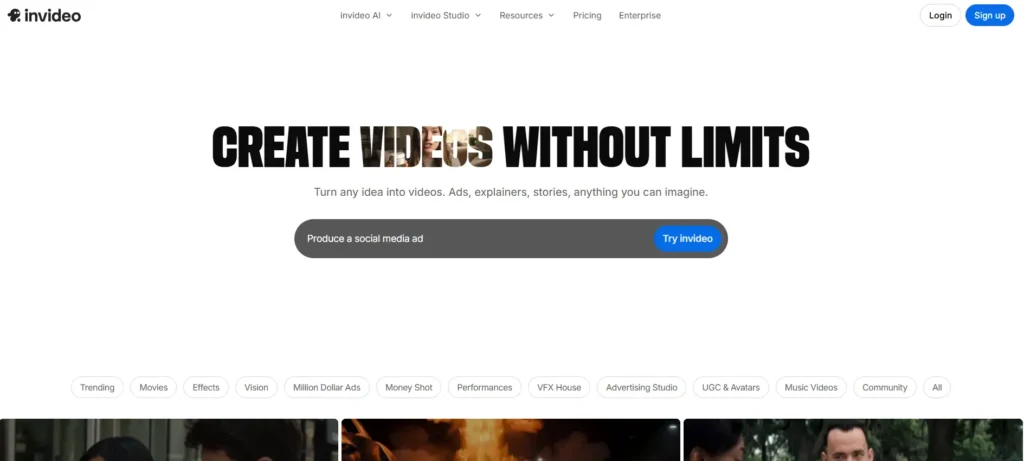
InVideo AI is an AI video generator that turns text prompts, scripts, topics, and creative directions into complete videos. The workflow is designed for people who do not want to start with a blank timeline. Instead of manually importing footage, recording voiceovers, adding subtitles, selecting music, and arranging transitions, you can describe the video you want and let InVideo AI generate a draft.
According to InVideo’s own AI video generator page, the tool can generate scripts, add clips, subtitles, music, and transitions from text prompts. It is web-based and does not require software downloads. InVideo also positions the tool for explainer videos, marketing videos, promo videos, and general AI-generated video creation.
For 2026, the best-fit users are:
YouTube creators who need talking-style, documentary-style, educational, listicle, or faceless content.
Short-form creators who publish YouTube Shorts, Instagram Reels, TikTok-style clips, and repurposed social content.
Small businesses that need quick promotional videos, product explainers, service intros, or website videos without hiring an editor for every asset.
Marketers and content teams that need first drafts, ad concepts, social media variations, and fast creative testing.
Anfänger who want video output without learning Premiere Pro, Final Cut Pro, or DaVinci Resolve.
The tool works best when the video does not require perfect custom cinematography. For example, a “5 tips for improving productivity” video, a “how this service works” explainer, or a “faceless YouTube finance script” is a better fit than a highly specific branded commercial with exact camera angles, detailed typography, and scene-by-scene visual continuity.
| User Type | Is InVideo AI a Good Fit? | Warum |
|---|---|---|
| YouTube Creators | Ja | Useful for turning scripts into full video drafts with voiceover, visuals, music, and captions |
| Faceless Channel Creators | Ja | Helps create videos without appearing on camera or recording your own voice |
| Small Businesses | Ja | Can create social media videos, website videos, service explainers, and promos faster |
| Social Media Managers | Ja | Good for producing multiple content variations for Shorts, Reels, TikTok, and LinkedIn |
| Beginner Creators | Ja | Does not require advanced editing skills |
| Content Agencies | Manchmal | Useful for drafts and concepts, but final client work may need manual polish |
| Professional Video Editors | Manchmal | Better as an ideation or draft tool than a replacement for full editing software |
| Filmemacher | No / Limited | Not ideal for cinematic control, precise camera direction, or frame-by-frame editing |
| Premium Brand Teams | Begrenzt | Complex branded campaigns may still need a professional editor or production team |
InVideo AI Review for YouTube, Shorts, and Social Media: The Main Benefits
The biggest benefit of InVideo AI is that it compresses several video production steps into one workflow.
A traditional short video workflow often looks like this:
Write the script.
Find stock footage.
Voiceover aufnehmen oder erstellen.
Add subtitles.
Choose background music.
Edit clips to match the narration.
Create platform versions.
Export and revise.
With InVideo AI, the starting workflow is much simpler:
Enter the prompt or script.
Choose a direction.
Let the AI generate a draft.
Review scenes, voiceover, subtitles, pacing, and visuals.
Revise and export.
That difference is why InVideo AI feels attractive for creators who need speed. In one user research case, a business owner used InVideo AI by giving it a script, generating a video, revising parts they disliked, and then splicing the result together with other website videos. The user spent about $25 to create two videos, had $25 remaining from a $50 account, and estimated that a shorter 5-minute video could cost around $10–$15 depending on the workflow.
That case shows where InVideo AI is genuinely useful: it can create a workable first version quickly, especially when the user already has a script and knows what the video should say.
For YouTube Shorts and social media, the tool is especially appealing because most creators do not need a cinematic production for every post. They need repeatable output: hooks, captions, b-roll, voiceover, pacing, and a publishable format. InVideo AI can help with that, especially for educational clips, motivational videos, product explainers, trend commentary, and faceless content.
The practical benefit is not just “AI video generation.” The real benefit is workflow compression. InVideo AI helps users move from idea to editable draft faster.
InVideo AI Pricing and Credits 2026: What You Need to Understand Before Paying
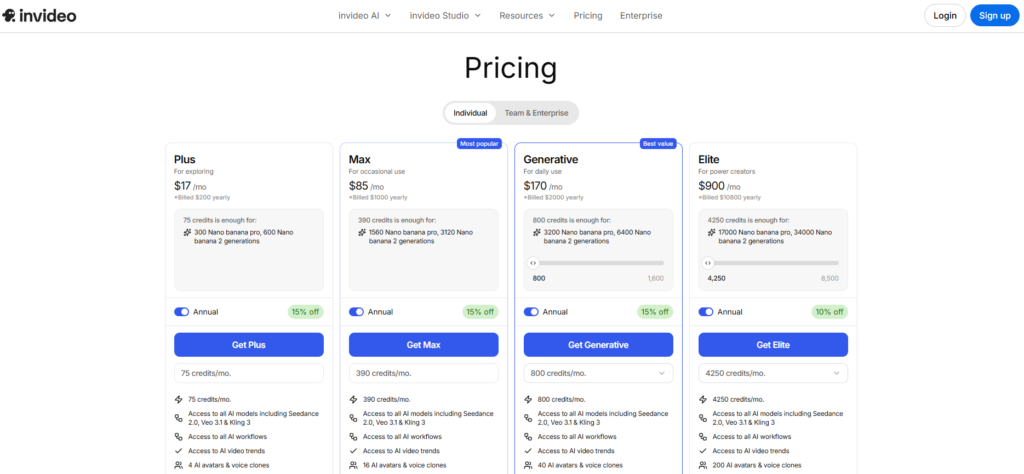
Pricing is the most important part of any InVideo AI review because the experience depends heavily on how you use credits.
InVideo’s current pricing page shows individual plans such as Plus, Max, and Generative, with annual prices shown as approximately $17/month, $85/month, and $170/month when billed yearly. If you want to dive deeper into the specific tiers, hidden costs, and which plan fits your budget, check out our full Preisstruktur von InVideo AI. For a comprehensive walkthrough of what each plan offers, you can also reference our Leitfaden zum InVideo-Abonnement.
InVideo’s help documentation explains why credits can vary so much: different AI models cost different amounts. For example, a quick Kling 2.6 Standard video may cost around 0.5 credits, while a Veo 3.1 4K video with audio can cost 10+ credits. Video models can be priced per second, and resolution, video input, and audio generation can affect the rate. To optimize your usage and understand how these deductions work, read our guide on InVideo AI generative credits.
That means two users can have very different experiences with the same tool. One person using simple stock-based videos may feel the plan is affordable. Another person using premium generative video models, multiple revisions, high-resolution output, and advanced clips may burn through credits much faster.
In my user research, the strongest negative experiences were not about the concept of paying for AI generation. They were about not knowing exactly how quickly credits would be consumed.
One user research case involved a $120/Monat plan with 100 Credits. The creator expected a specific project to consume around 21,4 Kreditpunkte, based on visible credit confirmations, but reported that additional edits and frame-level generation consumed the rest of the credit balance.
Another case involved a creator who paid $20 and received 75 Kreditpunkte, but could not finish one simple YouTube Shorts project before the credits reached zero. That same creator said the older workflow had felt closer to etwa 1 Credit pro Video, making the newer AI workflow feel much less predictable.
The takeaway is simple: InVideo AI can be cost-effective when you plan your generations carefully, but it can become expensive if you use trial-and-error prompting without a clear workflow. If you decide to sign up, make sure to use an InVideo-Gutscheincode to save on your subscription.
My recommendation is to start with a short, low-risk video before using InVideo AI for a client project, ad campaign, or long-form YouTube video. Test how many credits your style actually uses. Do not assume that every video will cost the same.
| Preisfaktor | Warum das wichtig ist | Practical Tip |
|---|---|---|
| Plan Typ | Different plans include different credit amounts and features | Choose based on expected monthly video volume |
| Credit Usage | Credits may vary by model, duration, resolution, and generation type | Test with a short video before making a long project |
| AI Model Choice | Advanced models can cost more credits | Use premium models only for scenes that truly need them |
| Video Length | Longer videos usually require more generation resources | Start with short drafts before scaling to long videos |
| Regenerations | Repeated edits and re-generations can increase cost | Revise scripts before generating to reduce trial and error |
| Auflösung | Higher resolution can cost more depending on model and workflow | Export high resolution only when needed |
| Audio Generation | Voiceover and audio features may affect total usage | Finalize the script before generating narration |
| Stock vs Generative Video | Stock-based videos may be more predictable than advanced AI-generated clips | Use stock footage for general content and generative clips selectively |
InVideo AI Review: Real Use Case for Small Business Video Creation
One of the most practical InVideo AI use cases is small business content creation.
A small business often needs video but does not always have the budget for a full-time editor, videographer, motion designer, voiceover artist, and copywriter. InVideo AI can help create:
Service explainer videos
Homepage videos
Produktdemonstrationen
Social media promos
Founder intro videos
FAQ-style videos
Short ads
Local business content
Lead magnet videos
In one user research case, a business owner used InVideo AI to create videos for a website. The workflow was simple: provide a script, generate a video, revise weak sections, and combine it with other website video assets. The first attempt worked well. Later attempts were less consistent, and the creator had to spend several hours trying to get the output closer to the script. Still, the case showed that InVideo AI can be useful when the goal is to quickly produce web-ready content from a script.
The numbers from that case are important:
Two videos created
About $25 spent
$25 remaining from a $50 account
Estimated $10–$15 for a shorter 5-minute video
This is where InVideo AI has a strong affiliate-friendly value proposition: for many small businesses, even a $10–$25 AI-assisted draft can be cheaper than hiring a freelancer for every simple video.
However, the best workflow is not “prompt once and publish blindly.” The better workflow is:
Write your own script first.
Use InVideo AI to generate the first draft.
Review every scene.
Replace visuals that do not match the brand.
Check subtitles and on-screen text.
Export only after manual quality control.
For small businesses, InVideo AI is most valuable as a speed layer on top of your content strategy. It should not replace judgment, brand review, or basic editing checks.
InVideo AI for YouTube Shorts: Is It Good for Short-Form Content?
InVideo AI can be a strong option for YouTube Shorts, especially for creators who need quick educational, motivational, or faceless videos. The tool can help generate the video structure, narration, b-roll, captions, and music much faster than building everything manually.
Good Shorts use cases include:
“3 mistakes beginners make” videos
Quick product explainers
Finance or business tips
Health and wellness tips
Motivational clips
Book summaries
AI tool roundups
Local business promos
Mini tutorials
Faceless storytelling videos
The biggest advantage for Shorts is speed. You do not need a complex editing timeline to create a short-form draft. You can start with a hook, a few talking points, and a clear target audience.
But Shorts also reveal one of InVideo AI’s biggest risks: when the video is short, every second matters. If the AI chooses weak visuals, slow pacing, mismatched stock footage, or captions with errors, the entire video can feel low quality.
One user research case showed the downside clearly: a creator paid $20 for 75 Kreditpunkte and expected to make a simple Shorts-style video, but the credits ran out before the video was complete. The creator compared this with an older workflow that felt closer to 1 credit per video, which made the newer AI workflow feel unexpectedly expensive.
That does not mean InVideo AI is bad for Shorts. It means the best Shorts workflow should be controlled:
Create a tight script before generating.
Keep the first test video short.
Avoid excessive regeneration.
Use simple visual directions.
Check captions carefully.
Save premium AI model usage for the clips that matter most.
For YouTube Shorts, InVideo AI is best when you need fast volume with acceptable quality, not when you need perfect custom visuals in every frame.
InVideo AI for Faceless YouTube Channels: Can It Help You Publish Faster?
Faceless YouTube is one of the most popular reasons people search for InVideo AI reviews. The promise is attractive: generate scripts, narration, stock footage, subtitles, and music without showing your face or recording your own voice.
InVideo AI can help faceless creators publish faster, especially in niches such as:
Finance explainers
Business education
History summaries
Tech news
Productivity
Health tips
Top 10 lists
Motivational videos
Book summaries
Travel guides
How-to content
In one user research case, a faceless YouTube creator described a workflow using InVideo AI for scripts, stock footage, voiceover, music, subtitles, and transitions. The reported numbers were:
90-day testing period
Monetization reached in month 4
Estimated ad revenue of $300–$600/month in a finance niche
Finished video in under 10 minutes
Started on a plan around $25/month with 100 credits
Later upgraded to a plan around $60/month
This is one of the more positive use cases because it matches InVideo AI’s strengths: fast video assembly, faceless narration, repeatable format, and a niche where educational content can work.
However, there is an important caveat. Faceless YouTube is not only about producing videos quickly. It is about producing videos that viewers actually watch. Generic stock footage, repetitive visuals, robotic pacing, and shallow scripts can hurt retention.
The best InVideo AI faceless YouTube workflow is:
Use AI to draft, not to think for you.
Start with a strong title and viewer problem.
Write or heavily edit the script yourself.
Use InVideo AI to assemble the video.
Replace generic stock clips with more specific visuals when needed.
Check if the voiceover sounds natural.
Improve the intro manually because the first 5–10 seconds matter most.
Use analytics to refine the next video.
For faceless YouTube, InVideo AI is a production accelerator, not a guaranteed monetization system. The tool can help you publish faster, but the channel still needs strong topics, retention-focused scripts, clear packaging, and consistent quality.
InVideo AI for Social Media Marketing: Best Use Cases for Creators and Brands
For social media marketing, InVideo AI works best when you need frequent creative output but do not need every video to be a custom film production.
Strong use cases include:
Instagram Reels for small businesses
TikTok-style educational videos
LinkedIn explainer clips
Facebook ad variations
Product announcement videos
Customer education videos
Event promotion videos
Webinar teaser clips
Short testimonials
Content repurposing from blog posts
The reason InVideo AI fits social media is that social platforms reward consistency and iteration. A small brand may need five different hooks, three ad angles, and multiple versions of the same concept. Manually producing every version can be slow. InVideo AI makes it easier to create draft variations and test messaging.
In my user research, the strongest positive feedback came from people who treated InVideo AI as a way to get from idea to rough video quickly. The strongest negative feedback came from people who expected it to follow complex creative instructions perfectly.
That distinction matters for marketers.
A good InVideo AI marketing prompt might be:
“Create a 45-second Instagram Reel for a local fitness studio targeting busy professionals. Start with the pain point of not having time to work out. Use an energetic but professional tone. Include three benefits: 30-minute classes, beginner-friendly coaching, and flexible evening sessions. End with a call to action to book a free trial.”
A weak prompt might be:
“Make a viral fitness video.”
The more specific your audience, message, structure, tone, and CTA, the more useful the first draft usually becomes.
For social media marketing, InVideo AI is best used for speed, ideation, and repeatable creative production. It is less ideal for highly controlled brand campaigns where every visual element must match a strict creative brief.
InVideo AI Case Study: Startup Promotional Video With High Creative Requirements
The most important cautionary case in my research involved a startup promotional video.
The goal was to create a professional promotional video for a marine technology startup. The project had a detailed production script with around 30 scene descriptions, specific timing, and exact on-screen text requirements. The creator wanted InVideo AI to avoid manually generating clips in Veo 3.1 and editing them in Premiere or DaVinci.
The numbers were striking:
$125 spent
102 credits available before generation
87 credits consumed by one output
0% usable output according to the creator’s assessment
95% of scenes reportedly had spelling errors
About 80% of instructions were reportedly not followed
$0 refund
0 Credits zurückerstattet
The reported output issues included spelling mistakes, incorrect motion, object distortion, typography problems, and poor instruction following.
This case does not mean InVideo AI cannot produce useful videos. It means InVideo AI is not always the right tool for high-stakes, highly specific, brand-sensitive promotional content.
The lesson is practical: the more precise the creative brief, the more you need manual control.
For a startup promo video, InVideo AI may be useful for:
Concept exploration
Script visualization
Storyboard drafts
Internal pitch drafts
Social teaser ideas
Early creative direction
But for a polished flagship brand video, you may still want a manual workflow using tools like Premiere, DaVinci Resolve, or a professional editor.
InVideo AI can help create the starting point. It should not always be expected to deliver the final master file for complex brand storytelling.
InVideo AI Case Study: Credit Planning for Small Business Content
Another important case involved a small business user who subscribed to a higher-cost plan and expected a clear credit usage path.
The case involved:
$120/month subscription
100 credits included
Expected project usage of about 21.4 credits
Full 100-credit balance reportedly consumed after additional generation and edits
The user’s main frustration was not simply that InVideo AI cost money. It was that the credit usage felt difficult to predict.
For affiliate content, this is an important point to handle honestly. Many buyers are not against paid AI tools. They just need to understand how to avoid wasting credits.
A safer InVideo AI credit workflow looks like this:
Finalize your script before generating.
Start with a short test version.
Avoid regenerating the entire video for small issues.
Use manual edits when possible.
Track which actions consume credits.
Use advanced generative models only where they add real value.
Do not experiment heavily inside an important paid project.
This case also shows why InVideo AI is better for people who can plan content ahead of time. If you enter the tool with a vague idea and keep asking the AI to redo everything, the cost can rise quickly.
If you enter with a clear script, target audience, video length, tone, and visual direction, InVideo AI becomes much more practical.
InVideo AI Case Study: Website Video Workflow With Measurable Cost
The most balanced case in my research came from a business owner creating website videos.
This workflow was realistic:
The creator gave InVideo AI a script.
The tool generated a video.
The creator reviewed and revised it.
The final video was spliced with other website video assets.
The user added brand-specific elements such as screenshots and visual details.
The reported numbers were:
Two videos created
About $25 spent
$25 remaining from an initial $50 balance
Estimated $10–$15 for a shorter 5-minute video
This is exactly the kind of use case where InVideo AI can make sense. It does not require perfect cinematic realism. It does not rely on a single AI output being flawless. The creator used InVideo AI as part of a broader workflow, not as the entire production department.
The before-and-after workflow is clear:
Before InVideo AI: The creator would need to manually create or collect footage, record narration, edit clips, add branding, and assemble the final video.
After InVideo AI: The creator could generate a structured video draft from a script, revise it, and combine it with other assets.
The business insight is simple: InVideo AI is valuable when it reduces the “blank page” problem. It gets you to a draft quickly, and then you improve the draft.
For website videos, I would recommend InVideo AI for:
Homepage intros
Produktschulung
Feature walkthroughs
Service explainers
FAQ videos
Internal training clips
Lead generation pages
But I would still manually review every second before publishing it on a brand website.
InVideo AI Case Study: Faceless Channel Workflow and Revenue Potential
The faceless YouTube case is the most interesting from a creator economy perspective.
The workflow was built around speed:
Prompt-based generation
AI script assistance
Stock footage selection
Voiceover generation
Music
Subtitles
Transitions
Fast publishing
The reported results included:
90 days of use
Monetization reached in month 4
$300–$600/month in ad revenue in a finance niche
Video completed in under 10 minutes
Started around $25/month with 100 credits
Upgraded later to around $60/month
These results should not be treated as typical or guaranteed. A finance niche can have higher ad rates than many entertainment or general niches, and channel growth depends on topic selection, retention, packaging, consistency, and audience trust.
Still, the case reveals a real market need: creators want to turn research and ideas into publishable faceless videos quickly.
InVideo AI is a good fit for this type of creator if they are willing to do the strategic work themselves:
Choose topics with demand.
Write strong hooks.
Improve scripts before generating.
Avoid generic stock footage when possible.
Check voiceover quality.
Monitor audience retention.
Improve each video based on analytics.
The tool can help with production speed. It cannot replace niche strategy.
InVideo AI Case Study: Long-Form Script-to-Video Demand
Another recurring use case is long-form script-to-video creation.
The creator need is clear: many people do not want a 5-second AI clip. They want a tool that can take a full script and generate a complete video with relevant visuals, narration, music, and pacing.
This demand shows up especially among:
YouTube educators
Faceless channel creators
Kursersteller
Bloggers repurposing articles
Affiliate marketers
Product reviewers
Business coaches
Content agencies
In this use case, InVideo AI competes less with pure text-to-video models and more with full video assembly tools. The question is not “Can it generate one impressive clip?” The question is “Can it create a complete video from a script?”
There was no consistent measurable performance data in this use case, but the need itself is important: creators want a reliable way to convert scripts into videos that are longer than typical AI clips.
For long-form videos, InVideo AI can be useful, but the workflow should be structured:
Break the script into sections.
Use clear scene instructions.
Keep visuals simple.
Review each section separately.
Replace weak stock footage.
Use manual editing for pacing.
Avoid relying on one long generation to be perfect.
For a 10-minute video, even a small mismatch repeated across many scenes can hurt the final result. That is why InVideo AI is often strongest as a draft generator for long-form content rather than a final editor.
InVideo AI Output Quality: What to Expect in Real Projects
InVideo AI output quality depends on four things:
The quality of your prompt
The complexity of your video
The models or assets used
The amount of manual review you do after generation
For simple explainer videos, the output can be surprisingly useful. For complex videos with exact visual requirements, quality can be inconsistent.
Based on my user research, the most common quality issues were:
Generic stock footage
Weak visual matching
Occasional text or subtitle errors
Prompt instructions not followed perfectly
Unnatural pacing
AI-generated visual artifacts
Scenes that need replacement
Voiceover tone that may need adjustment
The best way to get better InVideo AI output is to control the input. A detailed but practical prompt works better than a vague prompt or an overly complex production script.
A strong prompt includes:
Target audience
Video goal
Plattform
Length
Tone
Script or outline
Scene style
Voiceover preference
Call to action
Brand requirements
For example:
“Create a 60-second YouTube Shorts video for beginner entrepreneurs explaining three mistakes to avoid when launching a service business. Use a confident but friendly voiceover. Start with a strong hook. Use modern business visuals, clean captions, and fast pacing. End with a CTA to download a free checklist.”
That prompt gives InVideo AI a usable structure.
For publishable results, I recommend this quality checklist:
Watch the full video before exporting.
Check spelling in every subtitle and text overlay.
Check whether visuals match the narration.
Replace generic stock footage if it feels repetitive.
Listen to the voiceover for awkward pronunciation.
Verify brand names, numbers, and claims.
Export a short test before committing credits to bigger versions.
InVideo AI can produce good results, but it still needs human review.
InVideo AI Pros and Cons 2026
InVideo AI Pros
Fast script-to-video workflow
InVideo AI helps you move from idea to draft much faster than traditional editing.
Beginner-friendly interface
You do not need advanced editing skills to start creating videos.
Useful for YouTube, Shorts, and social media
The tool fits common creator and marketing workflows.
Good for faceless video creation
It can combine narration, visuals, captions, and music without requiring you to appear on camera.
Helpful for small businesses
It can reduce the cost and complexity of creating simple promotional or explainer videos.
Strong first-draft generator
Even when the final output needs editing, InVideo AI can remove the blank-page problem.
Access to multiple media and AI models
InVideo’s current plans include access to many image, video, audio, and music models, plus stock providers.
InVideo AI Cons
Credits can be hard to predict
Different models, resolutions, durations, and generations can consume different amounts of credits.
Not every output is publish-ready
You still need to check captions, visuals, pacing, and voiceover.
Prompt following can be inconsistent
Complex creative briefs may require multiple revisions.
Generic stock footage can weaken videos
Faceless videos can feel repetitive if you do not customize visuals.
Advanced AI generation can become expensive
Premium models and repeated revisions can use credits quickly.
Not a full replacement for professional editing
For high-stakes brand videos, manual editing may still be necessary.
InVideo AI vs CapCut, Pictory, Runway, Veo, Premiere, and DaVinci
InVideo AI is not the only video tool creators compare in 2026. The best choice depends on your workflow.
InVideo AI vs CapCut
Choose InVideo AI if you want text-to-video generation and a faster AI-assisted draft. Choose CapCut if you want more manual control over short-form editing, trends, effects, and social-native edits.
InVideo AI vs Pictory
Both tools are relevant for script-to-video and content repurposing. InVideo AI feels stronger when you want a broader AI video creation workflow. However, if you are strictly looking for the Die beste Alternative zu InVideo to compare feature sets side-by-side, analyzing InVideo vs. Pictory will show how each handles turning articles or long-form educational scripts into videos.
InVideo AI vs Runway
Runway is more attractive for creators who want advanced generative video experimentation and visual control. InVideo AI is more attractive for people who want a complete video assembled from a prompt or script.
InVideo AI vs Veo
Veo-style tools can be better for generating high-quality individual clips. InVideo AI is more useful when you want a full video workflow with narration, scenes, subtitles, and music.
InVideo AI vs Premiere Pro or DaVinci Resolve
Premiere and DaVinci offer far more control. InVideo AI offers much more speed for non-editors. A practical workflow is to use InVideo AI for drafts and use Premiere or DaVinci when the final project needs professional polish.
InVideo AI vs Avatar Platforms (Synthesia & HeyGen)
When your content strategy relies heavily on AI-generated presenters, reviewing Synthesia vs. InVideo or looking at HeyGen vs. InVideo will help you determine whether you need a deep synthetic avatar specialist or a broader multi-model video aggregator.
The most realistic conclusion is not that one tool replaces all others. InVideo AI is best when speed and simplicity matter most. Traditional editors are still better when precision and polish matter most.
InVideo AI Workflow: How to Get Better Results and Save Credits
The best way to use InVideo AI is to reduce uncertainty before you generate.
Here is the workflow I recommend:
Step 1: Start with a finished script
Do not ask InVideo AI to solve the topic, structure, and visuals all at once. Write or edit the script first. The clearer the script, the better the draft.
Step 2: Define the platform
Tell the tool whether the video is for YouTube, YouTube Shorts, Instagram Reels, TikTok, LinkedIn, Facebook, or a website. Platform affects pacing, aspect ratio, length, and style.
Step 3: Give a clear visual direction
Instead of saying “make it professional,” describe the visual style:
Modern startup visuals
Clean business b-roll
Fast-paced social media captions
Documentary-style stock footage
Minimal corporate explainer style
Energetic fitness visuals
Finance education graphics
Step 4: Generate a short test first
Before creating a long video, test a 30–60 second version. This helps you understand the output style and credit usage.
Step 5: Avoid regenerating the entire video repeatedly
If only one scene is weak, try to fix that scene instead of recreating the whole project.
Step 6: Review captions and on-screen text
AI video tools can make text mistakes. Always check spelling, brand names, numbers, and calls to action.
Step 7: Use manual editing for final polish
Even simple trimming, replacing one clip, or changing the intro can make the video feel much more professional.
This workflow makes InVideo AI more predictable and more cost-effective.
Is InVideo AI Worth It in 2026?
Yes, InVideo AI is worth it in 2026 for creators and businesses who want a fast AI video maker for YouTube, Shorts, and social media content. It is especially useful for beginners, faceless creators, marketers, and small businesses that need repeatable video production without hiring an editor for every project.
It is not worth it if you expect flawless cinematic output from one prompt, if you need exact scene control, or if you plan to experiment heavily without watching credit usage.
The best reason to use InVideo AI is speed. The best way to succeed with it is control.
Use InVideo AI when you need:
Fast first drafts
Faceless videos
Videos in sozialen Medien
YouTube explainers
Short-form content
Website videos
Marketing-Videos
Script-to-video production
Beginner-friendly video creation
Be more cautious when you need:
Complex brand films
High-end product commercials
Exact typography
Precise motion direction
Strict visual continuity
Unlimited revisions
Frame-perfect editing
My verdict: InVideo AI is a strong AI video maker for 2026 when used as a fast production assistant. It can help you create videos much faster, but the best results still come from a clear script, smart credit management, and human review before publishing.