InVideo AI Generative Credits Explained: What They Cost and How Fast They Run Out

目錄

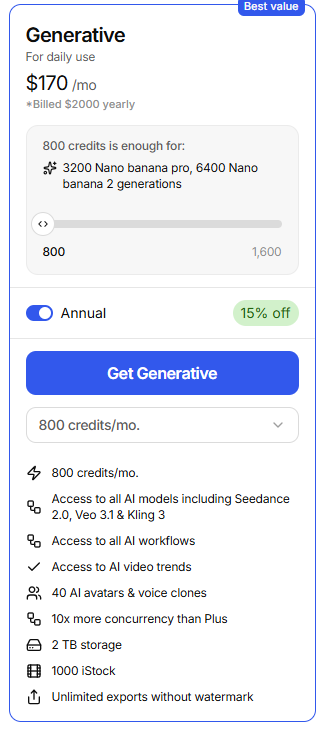
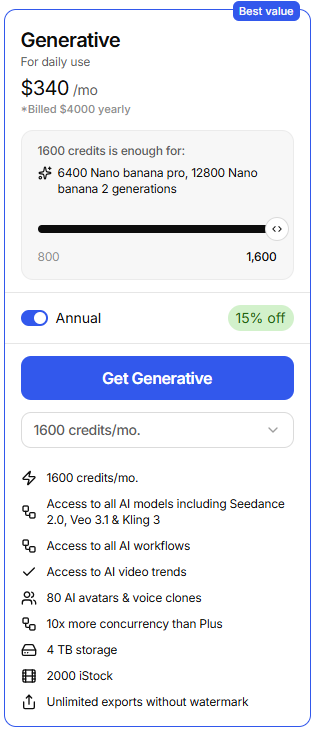
InVideo AI Generative Credits are the usage currency behind InVideo’s generative AI features. On the Generative plan, the two visible annual options are 800 credits/month for $170/month, billed $2,000 yearly, 以及 1,600 credits/month for $340/month, billed $4,000 yearly. Based on the plan card, 800 credits can cover up to 3,200 Nano Banana Pro generations or 6,400 Nano Banana 2 generations, while 1,600 credits doubles that to 6,400 Nano Banana Pro or 12,800 Nano Banana 2 generations.

That sounds generous on paper. In practice, InVideo AI Generative Credits can run out much faster than expected when you generate clips, revise scenes, replace visuals, create image-to-video assets, regenerate poor outputs, or let the AI workflow automatically resize, optimize, or rebuild parts of a video. The biggest issue is not only the price of credits. It is the difficulty of predicting exactly when credits will be consumed and whether failed or unusable generations will be credited back.

invideo home

InVideo AI Generative Credits Pricing: 800 vs 1,600 Credits Per Month

The Generative plan has two main credit tiers shown in the pricing screen:

PlanMonthly PriceAnnual BillingMonthly CreditsExample Generation Capacity
Generative 800$170/month$2,000/year800 credits/month3,200 Nano Banana Pro or 6,400 Nano Banana 2 generations
Generative 1,600$340/month$4,000/year1,600 credits/month6,400 Nano Banana Pro or 12,800 Nano Banana 2 generations
InVideo AI Generative plan pricing comparison: 800 vs 1,600 monthly credits, annual cost, and estimated Nano Banana generation capacity.

Both tiers include access to all AI models listed on the plan card, including Seedance 2.0, Veo 3.1, and Kling 3. Both also include access to AI workflows, AI video trends, unlimited exports without watermark, and iStock access.

The 800-credit tier includes:

The 800-credit tier includes:
  • 800 credits/month
  • Access to all AI models including Seedance 2.0, Veo 3.1, and Kling 3
  • Access to all AI workflows
  • Access to AI video trends
  • 40 AI avatars and voice clones
  • 10x more concurrency than Plus
  • 2 TB storage
  • 1,000 iStock assets
  • Unlimited exports without watermark

The 1,600-credit tier includes:

The 1,600-credit tier
  • 1,600 credits/month
  • Access to all AI models including Seedance 2.0, Veo 3.1, and Kling 3
  • Access to all AI workflows
  • Access to AI video trends
  • 80 AI avatars and voice clones
  • 10x more concurrency than Plus
  • 4 TB storage
  • 2,000 iStock assets
  • Unlimited exports without watermark

The 1,600-credit plan is not just twice the credits. It also doubles the avatar and voice clone allowance, storage, and iStock asset access. For a solo creator or small business making occasional AI clips, 800 credits may look sufficient. For a team, agency, or frequent ad-testing workflow, 1,600 credits becomes more realistic, but only if the workflow is controlled carefully.

How Fast InVideo AI Generative Credits Run Out in Real Workflows

The safest way to understand InVideo AI Generative Credits is this: the headline number shows your theoretical generation capacity, not your guaranteed finished-video output.

On the pricing card, 800 credits can equal 3,200 Nano Banana Pro generations. That implies roughly 0.25 credits per Nano Banana Pro generation in that example. It can also equal 6,400 Nano Banana 2 generations, or roughly 0.125 credits per Nano Banana 2 generation. The 1,600-credit tier simply doubles those capacities.

But finished videos are not made from one clean generation. Real projects often include script generation, image-to-video clips, scene revisions, replacement footage, avatars, voiceovers, AI visual changes, resizing, and regenerations after failed outputs. That is where credits disappear quickly.

In my user research, one small business workflow started with an expected credit spend of 21.4 credits: one confirmed action at 18 credits, followed by two smaller actions at 1.7 credits each. The creator expected the project to remain close to that number. Instead, additional edits and frame-level generations created charges such as 11 credits, 17 credits, and 9.6 credits, eventually draining the full 100-credit balance.

That example matters because it shows the real risk: you may be able to calculate the cost of the first generation, but not the total cost of the finished project.

InVideo AI Generative Credits Case Study: $125 Spent, 87 Credits Used, 0 Percent Usable Output

One of the most important findings from my research was a business promo video project for a marine technology startup. The goal was clear: create a professional promotional video for a boating audience using a detailed production script.

The creator paid $125 and used 87 out of 189 credits. The expected outcome was a usable business video. The actual outcome was 0 percent usable output, with $0 refunded and 0 credits returned.

The workflow before using InVideo AI was straightforward but manual: generate or collect clips, then assemble them in traditional editing software such as Premiere or DaVinci. The estimated manual edit time was 2 to 3 hours, especially if using short Veo-style clips and stitching them together manually.

The workflow after using InVideo AI was supposed to be faster: upload the concept, let the AI create the video, revise scenes, and export. Instead, the time shifted from editing to troubleshooting. The output reportedly had issues such as incorrect visuals, bad text handling, prompt-following problems, and artifacts that made the video unsuitable for a serious business audience.

The lesson is practical: InVideo AI Generative Credits are most valuable when the output can be used with light editing. When the first outputs are unusable, credits become a risk budget. For business videos, brand campaigns, or client-facing work, the real cost is not just the credit price. It is the cost of failed generations, revision time, and the possibility of starting over in another tool.

InVideo AI Generative Credits Case Study: 100 Credits Gone After a 21.4-Credit Expectation

Another case involved a small business owner on a paid InVideo AI plan. The user confirmed credit usage that appeared to total 21.4 credits: 18 credits plus 1.7 plus 1.7.

The project did not stay near that estimate. During continued editing, more credit-consuming actions appeared, including charges around 11 credits, 17 credits, and 9.6 credits. The result was that 100 credits were fully consumed.

This is one of the clearest examples of why InVideo AI Generative Credits feel unpredictable in real production. The initial prompt or generation may be affordable. The expensive part is often the second half of the workflow: fixing scenes, regenerating assets, replacing visuals, and accepting automatic AI adjustments.

Before using the generative workflow, the creator expected a visible confirmation before meaningful credit usage. After using it, the pain point became clear: credit consumption needs to be visible at every stage, not only at the start of a project.

For serious creators, the takeaway is simple: do not start a project assuming the first confirmed credit estimate is the final project cost. Treat every revision as a possible credit event.

InVideo AI Generative Credits Case Study: A Simple YouTube Shorts Workflow Became More Expensive

A separate research case came from a creator who used InVideo for simple YouTube Shorts. The old workflow was basic: use personal images, create a short video, and avoid heavy AI generation. The creator remembered a cost structure closer to about 1 credit per video for simple projects.

After moving into the newer AI-centered workflow, the creator paid $20 for a plan with 75 credits and still could not complete one simple YouTube Short before credits ran out.

This case is important because it separates two different user needs. Some creators want cinematic generative AI. Others only want a fast editor for simple image-based Shorts, Reels, or social posts. When a simple editing workflow is pushed into an AI agent workflow, credits can be consumed by actions the creator did not actually want: automatically generated clips, extra visuals, resizing, replacements, and AI interpretation.

In the same research cluster, another severe report involved a 5-minute video project where the user described a loss of $1,983 without getting the expected finished output. That number should not be treated as a normal cost estimate, but it does show the emotional intensity around failed long-form AI video attempts.

The insight is clear: short-form creators need a low-friction, low-credit workflow for simple edits. If every adjustment becomes a generative action, the credit model starts to feel hostile to basic content creation.

InVideo AI Generative Credits for AI UGC Ads: The Learning Curve Can Cost Money

AI UGC ads are another common use case for InVideo AI. The promise is attractive: create ad-style videos without hiring actors, filming footage, or building a full production workflow.

But the research showed a major friction point: new users may feel blocked by credits before they have even produced a usable first video. One AI UGC marketing case involved a creator who watched two YouTube tutorials, tried to create an AI UGC video ad, and still encountered credit-related confusion before producing a finished asset.

There was no measurable production result shared in that case, but the business lesson is still useful. In AI ad creation, the first few attempts are usually experiments. A marketer may need to test hooks, avatars, product angles, scripts, voice styles, and visual pacing. If the platform asks for credits before the user understands the workflow, the learning curve feels like paid trial-and-error.

For AI UGC ads, InVideo AI Generative Credits work best when you prepare the ad structure before opening the generator. Write the hook, offer, product claim, scene list, CTA, and avatar direction first. The more decisions you make outside the tool, the fewer credits you risk wasting inside the tool.

InVideo AI Generative Credits for Faceless YouTube Channels: Strong Potential, But Credits Scale Fast

The most positive research case involved faceless YouTube automation. The workflow was to generate videos without a camera, microphone, or traditional editing software. The tool handled scripts, stock footage, voiceover, music, subtitles, transitions, and prompt-based editing.

The reported workflow produced a finished video in under 10 minutes. The creator started with a Plus-style plan at $25/month with 100 credits, then upgraded to a $60/month Max plan after the first month because credits were consumed quickly. By the fourth month, the channel reportedly reached monetization and later generated $300 to $600/month in ad revenue.

This case has a different lesson from the negative examples. InVideo AI can make sense when the content does not require perfect product accuracy, brand-level polish, or custom cinematography. Faceless educational, list-based, motivational, explainer, and stock-footage-driven videos are more forgiving than client ads or technical product demos.

The before-and-after change is meaningful:

Before: creating a faceless channel required scriptwriting, voice recording, footage sourcing, editing, subtitles, music, and exports across several tools.
After: one prompt-based workflow could create a complete draft quickly, with editing focused on review and improvement.

The insight is that InVideo AI Generative Credits are easier to justify when speed matters more than precision. If one video can be created in under 10 minutes and the channel eventually earns $300 to $600/month, credits become part of a content production cost. But the model still requires discipline, because scaling output also scales credit consumption.

What Actually Consumes InVideo AI Generative Credits?

Based on the pricing screen and real production cases, the biggest credit-consuming areas are usually generative actions, not basic exporting alone.

Common credit-risk actions include:

  • Creating AI video clips
  • Generating image-to-video assets
  • Regenerating scenes
  • Replacing or modifying visuals
  • Using advanced AI models such as Veo, Kling, or Seedance
  • Creating avatar or voice-based content
  • Asking the AI workflow to revise sections of a video
  • Letting the platform automatically resize, optimize, or reinterpret assets
  • Testing multiple versions of an ad, hook, or scene

The dangerous part is that not every creator experiences these actions as separate “purchases.” Many people think they are still editing the same project, when the platform may treat the action as a new generative request.

That is why the best workflow is to separate editing from generation. Use credits only for moments where AI generation is truly needed. For simple trims, text changes, rearranging, or assembling existing assets, a traditional editor may be more predictable.

Are InVideo AI Generative Credits Worth It?

InVideo AI Generative Credits are worth it when the value of speed is higher than the cost of failed generations. They are harder to justify when accuracy, brand control, or predictable budgeting matters more than automation.

They are more likely to be worth it for:

  • Faceless YouTube channels
  • Fast explainer videos
  • Social media content drafts
  • Product walkthrough drafts
  • Internal training or onboarding drafts
  • Early-stage ad concept testing
  • Creators who can accept imperfect first drafts

They are less ideal for:

  • Client-ready commercial videos
  • Technical product demos requiring accuracy
  • Videos with strict brand guidelines
  • Ads where every frame must be approved
  • Simple image-based Shorts that do not need generative AI
  • Users with a fixed budget and low tolerance for failed outputs

The most important question is not “How many credits do I get?” The better question is: “How many usable finished videos can I create after revisions, failed outputs, and replacements?”

For some creators, 800 credits may be more than enough. For others, 1,600 credits can disappear quickly if every project requires multiple regenerations.

How to Avoid Burning Through InVideo AI Generative Credits Too Fast

The best way to control InVideo AI Generative Credits is to reduce uncertainty before you generate.

Start with a complete creative brief. Before using credits, write the video goal, target audience, structure, tone, scene list, visual references, CTA, and must-avoid details. Vague prompts usually lead to more revisions.

Use low-risk drafts first. Do not start with the most expensive or advanced model unless the project requires it. Test the structure, script, and pacing before generating high-value clips.

Avoid regenerating full videos when only one scene is wrong. If the tool allows scene-level edits, use them carefully. But also check whether the edit itself consumes credits before confirming.

Do not use generative AI for simple editing. If the job is only to place your own images into a Shorts format, add captions, and export, a traditional editor such as CapCut may be cheaper and more predictable.

Track every credit event manually. Keep a simple note of your starting balance, each confirmed generation, each revision, and the ending balance. This is the only way to understand your true cost per finished video.

Set a credit budget per project. For example, if you have 800 credits/month and want to produce 20 videos, your working budget is 40 credits per finished video. If one project reaches 40 credits without a usable draft, stop and reassess.

Export only after review. Unlimited exports without watermark are valuable, but exports do not solve poor generation quality. Review scripts, scenes, text, and visual consistency before spending more credits on revisions.

Should You Choose 800 or 1,600 InVideo AI Generative Credits?

Choose 800 credits/month if you are testing InVideo AI, producing a moderate number of videos, or using it mainly for drafts and experiments. It is the lower-risk option financially, but still costs $170/month billed annually, so it is not a casual plan.

Choose 1,600 credits/month if you are producing at higher volume, working with a team, using more avatars and voice clones, needing more storage, relying heavily on iStock assets, or running frequent AI ad and video experiments. It costs $340/month billed annually, so the total annual commitment is $4,000.

The 1,600-credit plan is better value only if you actually use the extra capacity. Buying more credits does not fix the core problem of wasted generations. If your workflow produces many failed outputs, 1,600 credits simply gives you more room to burn through credits.

A practical decision rule:

If you are still learning the tool, start by calculating your expected cost per usable finished video. If you cannot estimate that number, do not judge the plan by the headline generation count. Judge it by how many completed videos you can reliably produce without restarting.

Final Verdict: InVideo AI Generative Credits Are Powerful, But Only If You Control the Workflow

InVideo AI Generative Credits can be valuable for creators who need fast drafts, faceless YouTube videos, social content, AI UGC concepts, and explainer-style videos. The 800-credit and 1,600-credit Generative plans look powerful on paper, especially with access to models such as Seedance 2.0, Veo 3.1, and Kling 3.

But the real cost is determined by how many usable videos you get after revisions. My research found cases where credits created strong leverage, including a faceless YouTube workflow that reached monetization by month four and earned $300 to $600/month. It also found cases where credits disappeared quickly, including 100 credits consumed after an expected 21.4-credit workflow, 75 credits gone before finishing a simple Short, 以及 $125 spent with 87 credits used for 0 percent usable business output.

The best way to use InVideo AI Generative Credits is to treat them like a production budget, not a feature allowance. Plan before generating, track every revision, avoid using AI for basic edits, and judge the plan by cost per usable finished video.