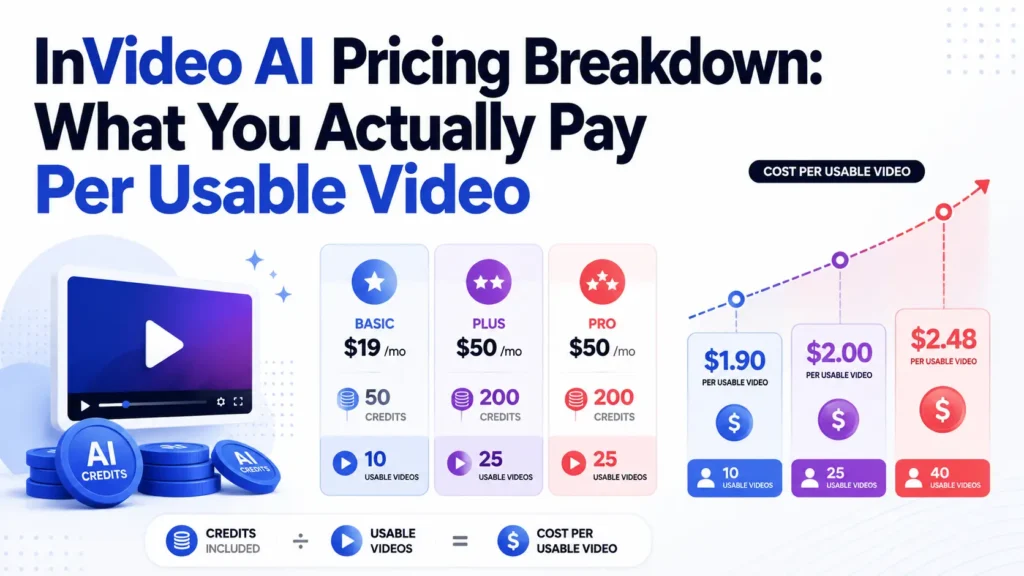
InVideo AI pricing starts at $17/month for Plus, but the real cost depends on how many usable videos you can create before credits, stock media limits, failed generations, and editing time become the bottleneck. Based on my pricing audit and creator workflow research, InVideo AI is most cost-effective for quick drafts, faceless informational videos, and simple social content. It becomes expensive when you need commercial-ready output, frequent regenerations, heavy stock footage, brand control, or guaranteed usable results.
The biggest lesson is simple: do not judge InVideo AI by the monthly subscription price. Judge it by your cost per usable video.
InVideo AI Pricing Plans: What You Get on Each Plan
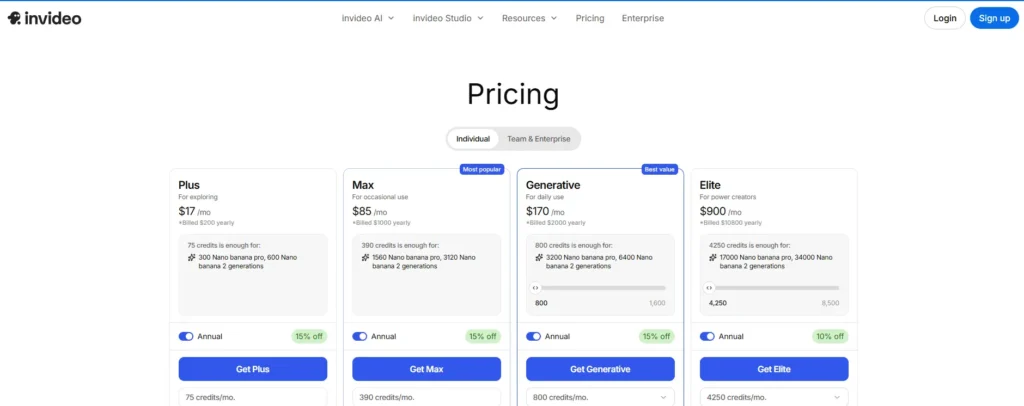
Based on the current InVideo pricing page, the individual plans are structured around monthly credits, annual billing, and generation capacity.
| Plan | Prijs | Annual Billing | Monthly Credits | Beste voor |
|---|---|---|---|---|
| Plus | $17/month | $200/year | 75 credits/month | Exploring |
| Max | $85/month | $ 1.000 per jaar | 390 credits/month | Occasional use |
| Generative | $170/month | $2,000/year | 800 credits/month | Daily use |
| Elite | $900/month | $10,800/year | 4,250 credits/month | Power creators |
InVideo also shows estimated generation capacity inside each plan. For example, the Plus plan says 75 credits are enough for 300 Nano Banana Pro or 600 Nano Banana 2 generations. Max includes 390 credits, Generative includes 800 credits, and Elite includes 4,250 credits.
On paper, this looks straightforward. In practice, the InVideo subscription fee is only one part of the cost. The more important question is: how many videos can you actually publish from those credits?
That depends on five factors:
- How many generations fail or need to be redone
- How much stock footage you use
- Whether your videos need voice cloning, avatars, or higher-end generation
- How much editing you still need after generation
- Whether the final output is good enough to publish without external editing
This is why two people can pay the same $85/month and get very different value from InVideo AI.
InVideo AI Cost Per Usable Video: The Metric That Actually Matters
The best way to evaluate InVideo AI pricing is not:
“Is the plan $17, $85, or $170 per month?”
De betere vraag is:
“How many usable videos can I publish from this plan?”
A simple formula is:
Cost per usable video = monthly subscription cost ÷ number of publish-ready videos

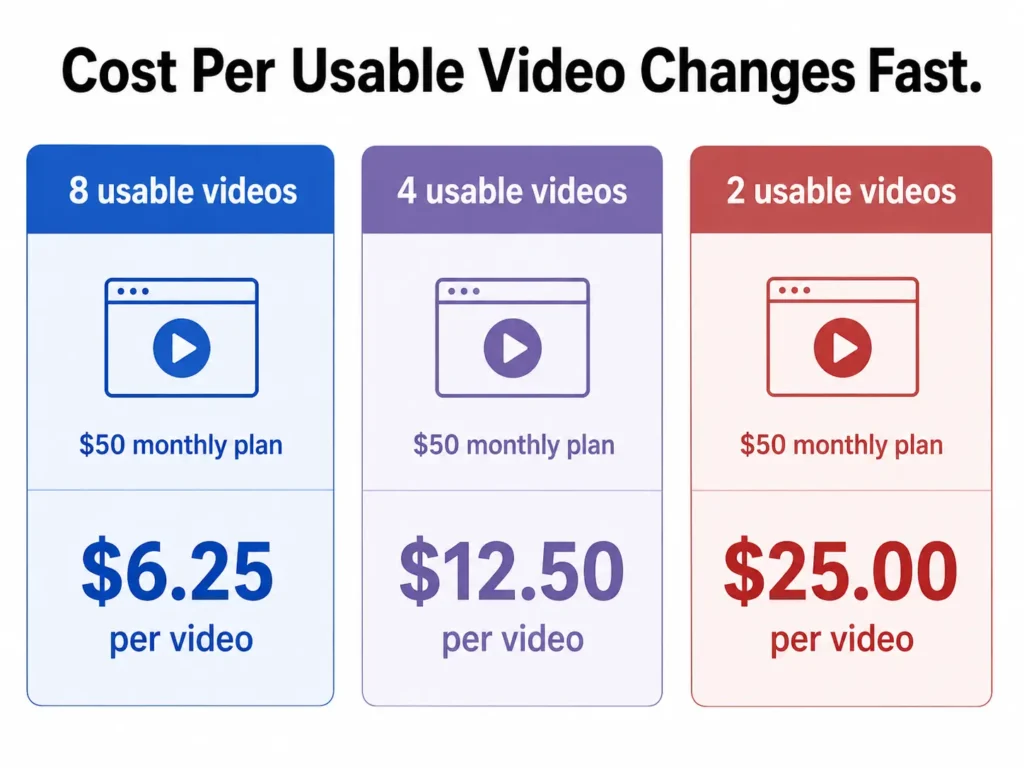
For example, in one workflow test, I compared a long-form faceless video use case using an 8-minute script. On InVideo’s Max annual plan at $50/month in that test, a generated video came out to around 6 minutes and used 40 out of 320 iStock credits. That created an estimated ceiling of about 8 videos per month, or roughly $6.25 per video before counting editing time.
That sounds affordable if the videos are actually usable.
But if half of those outputs need major rework, the real cost changes:
| Maandelijkse kosten | Estimated Videos | Usable Videos | Real Cost Per Usable Video |
|---|---|---|---|
| $50 | 8 | 8 | $6.25 |
| $50 | 8 | 4 | $12.50 |
| $50 | 8 | 2 | $25.00 |
This is the hidden pricing problem with AI video tools. The displayed price tells you what you pay for access. It does not tell you what you pay for a video that is good enough to publish.
For simple faceless content, the cost can be attractive. For brand videos, ads, startup promos, or client work, the cost per usable video can rise quickly because unusable generations still consume time and InVideo AI credits.
InVideo AI Credits Explained: Why the Monthly Price Can Be Misleading
Credits are the most important part of InVideo AI pricing. They determine how much generation activity you can actually perform inside your plan.
The problem is not that credits exist. The problem is that credit-based pricing can be hard to predict during real production.
In my user research, creators repeatedly ran into the same issue: they subscribed to a monthly plan, started generating videos, and realized the real constraint was not the monthly subscription. It was how fast credits disappeared during testing, regenerating, and fixing outputs.
One creator workflow showed this clearly. The user paid $38/month for an AI video tool subscription and felt the included AI credits were closer to about $10 worth of usable generation value. In another short-form workflow, a creator spent $40 on Runway and got only one acceptable 8-second clip after four unusable clips. The lesson applies directly to InVideo pricing: if a tool charges for attempts rather than usable results, the cost becomes unpredictable.
This matters because AI video creation is rarely a one-shot process. A typical workflow looks like this:
- Write a prompt or script
- Generate the first version
- Notice wrong scenes, weak visuals, bad pacing, or incorrect text
- Regenerate sections
- Replace footage
- Fix voiceover, captions, or branding
- Export the final version
Every extra step can add cost, especially when the output is not usable on the first try.
For casual experimentation, this may be acceptable. For business content, it creates budgeting risk.
InVideo AI Stock Footage and iStock Limits: The Hidden Scaling Cost
Stock footage is one of the most important hidden cost drivers in InVideo AI.
Many creators use InVideo for faceless YouTube videos, explainer videos, informational content, and social clips. These formats rely heavily on stock video because there is no human presenter or original camera footage.
A common workflow is:
- Upload or generate a script
- Add a cloned or AI voice
- Let InVideo match stock footage to each section
- Export a 2–3 minute informative video
This workflow can work well. In one case, a creator used InVideo to produce 2–3 minute informational videos with a custom script, cloned voice, and stock footage. The process was useful and efficient, but the stock footage cost became the main concern. The creator’s next priority was finding a similar tool with more generous or unlimited stock video usage.
That reveals an important pricing reality: InVideo can be affordable for occasional use, but stock footage becomes a scaling problem for daily publishing.
For example, if you are producing one video per week, a stock limit may not hurt much. If you are producing daily faceless videos, the same limit can become your main bottleneck.
This is especially important for:
- Faceless YouTube channels
- YouTube automation workflows
- Vastgoedvideo's
- Informatieve uitlegvideo’s
- Product list videos
- News-style social videos
- Short-form content farms
For these use cases, you should calculate not just subscription cost, but also stock footage consumption per video.
InVideo AI for Faceless YouTube: When It Is Worth It
InVideo AI is strongest when the content format is simple, repeatable, and not heavily dependent on perfect realism.
For faceless YouTube, it can be useful when your videos follow a structure like:
- Scripted narration
- Stock footage
- Ondertitels
- Background music
- Minimal brand customization
- Basic visual pacing
This is why InVideo often appeals to beginners who want to create faceless channels without learning traditional video editing. It lowers the barrier to entry. You can move from script to draft much faster than editing manually in Premiere Pro, Final Cut, or DaVinci Resolve.
However, the key word is draft.
As noted in our comprehensive Beoordeling van InVideo AI, the biggest gap was not whether InVideo could create a video. It could. The question was whether the video was good enough to publish without meaningful editing.
For low-stakes content, such as basic informational videos, listicles, internal explainers, or simple social posts, the answer may be yes.
For competitive YouTube niches, the answer is more complicated. You still need to check:
- Whether the visuals match the script
- Whether the pacing keeps attention
- Whether the voiceover sounds natural
- Whether the footage feels generic
- Whether captions are accurate
- Whether the final video feels original enough
InVideo AI can reduce production time, but it does not remove the need for editorial judgment.
InVideo AI for Business Videos: Where the Cost Can Jump
Business videos are where InVideo AI pricing becomes more risky.
One detailed case involved a startup promotional video for a marine tech company. The production input was not vague. It included a detailed script with 30 individual shot descriptions, time markers, on-screen text, and specific visual instructions. The total spend was $125.
The result was not commercially usable. The output reportedly contained widespread spelling mistakes, incorrect scenes, AI artifacts, and visual logic problems such as boats moving incorrectly. Around 95% of the scenes had spelling issues.
This type of case matters because business content has a higher quality threshold than casual social content. A strange visual or misspelled word in a personal test video is annoying. In a startup promo, sales video, real estate ad, or client deliverable, it damages trust.
A similar pattern appeared in real estate marketing workflows. The goal was to generate polished videos from detailed prompts and include photos, logos, and branding. The tool was promising in theory, but the final output still struggled with pronunciation, brand asset integration, and publish-ready quality.
For business users, the practical takeaway is clear:
InVideo AI may be useful for concepting, rough drafts, internal mockups, and fast ideation. But for final commercial assets, you should budget for human review and editing.
That editing time is part of the real price.
InVideo AI vs Pictory vs Fliki: Which Is Actually Cheaper?
Many creators compare InVideo versus Pictory and Fliki because all three are popular for faceless video, script-to-video, and YouTube automation.
The comparison should not be based only on monthly subscription price. It should be based on:
- Uitvoerkwaliteit
- Stock footage allowance
- Voice quality
- Editing control
- Export limits
- Credit consumption
- Kosten per bekeken video
In one direct comparison using an 8-minute script, InVideo created a roughly 6-minute video and consumed 40 out of 320 iStock credits on the tested plan. That suggested about 8 videos per month, or around $6.25 per video under that specific setup.
That is a useful benchmark, but only if your workflow is similar.
Pictory may be attractive when the goal is to turn scripts or articles into stock-footage-based videos with predictable editing. Fliki may appeal more when voice generation and simple faceless narration are the priority. InVideo can be better when you want a more automated prompt-to-video experience. If you discover it doesn’t fit your needs, you can check out a beste alternatief voor InVideo to explore other options on the market.
The cheapest tool is the one that produces the most publish-ready videos with the least rework.
Before You Buy InVideo AI: My Practical Pricing Checklist
Before subscribing, estimate your real cost with a small production test. If you decide to move forward, make sure to look for an InVideo-kortingscode to lower your upfront platform costs.
Use this checklist:
1. Define your video type
Are you making Shorts, YouTube explainers, startup videos, real estate videos, ads, or internal training content?
2. Estimate videos per month
If you need 4 videos per month, InVideo may be affordable. If you need 30 videos per month, credits and stock footage matter much more.
3. Track credits per finished video
Do not track credits per generation. Track credits per usable final video.
4. Count failed generations
If you need three attempts to get one usable output, your real cost is three times higher than it first appears.
5. Include editing time
If a video takes 20 minutes to generate but 2 hours to fix, it is not truly automated.
6. Test brand-specific content early
If you need logos, product names, accurate spelling, custom photos, or exact messaging, test those before committing to a higher plan.
7. Compare against hiring or manual editing
For commercial videos, a human editor may be more cost-effective than repeated AI generations.
FAQ: InVideo AI Pricing and Real-World Cost
Is InVideo AI really just $17/month?
The Plus plan starts at $17/month with annual billing, but your real cost depends on credits, stock usage, regenerations, and how many videos are actually usable.
Why do InVideo AI credits run out so fast?
Credits can be consumed during generation, experimentation, and revisions. If your first output is not usable, the cost of reaching a final version increases.
Does InVideo AI charge for failed generations?
In credit-based AI video workflows, failed or low-quality attempts can still consume resources. That is why you should calculate cost per usable video, not cost per attempt.
What do InVideo AI stock media limits mean?
Stock media limits affect how much third-party or premium footage you can use. For faceless YouTube and informational videos, this can become a major scaling constraint.
Is InVideo AI good for faceless YouTube?
Yes, it can be useful for faceless YouTube drafts, explainers, and simple informational videos. It is less reliable when you need highly original visuals, perfect pacing, or minimal editing.
Is InVideo AI better than Fliki?
InVideo is more focused on automated video generation and stock-based video assembly. Fliki is often considered for voice-driven faceless content. The better choice depends on whether your bottleneck is visuals, voice, editing, or cost.
Is InVideo AI cheaper than Pictory?
It depends on your workflow. In one test, InVideo cost about $6.25 per estimated video under a specific plan and stock-credit setup. But if you need more revisions, the real cost increases.
Can InVideo AI make publish-ready business videos?
Sometimes, but it is safer to treat InVideo as a draft and ideation tool for business content. Brand videos, ads, real estate videos, and startup promos usually need human review.
Can I add my own logo, photos, and brand assets in InVideo AI?
You can work with brand assets, but brand control is one of the areas to test carefully before buying a higher-tier plan.
Why does InVideo AI pricing feel confusing?
Because the monthly fee, credits, stock footage limits, export needs, and failed generations all affect the final cost.
What is the best way to calculate InVideo AI cost?
Use this formula: monthly plan cost divided by the number of videos you can actually publish. That gives you the real cost per usable video.
Should I use InVideo AI or hire an editor?
For simple repeatable videos, InVideo may be cheaper. For commercial videos where accuracy, branding, and quality matter, a human editor may save money by reducing failed attempts and rework.
Final Verdict: Is InVideo AI Worth the Price?
InVideo AI is worth considering if you need fast drafts, faceless videos, simple explainers, or social content and you are comfortable editing the output. It is less predictable if you need polished commercial videos, exact brand control, heavy stock footage, or guaranteed publish-ready results.
The real price of InVideo AI is not the plan you choose. It is the cost of getting one video you can actually use.