A utilizar Seedance 2.0 con eficacia, necesitas dominar su sistema multimodal “Referencia todo en uno”. Para empezar, acceda a una plataforma compatible y cargue hasta 12 activos, incluidas imágenes, clips de vídeo, audio e indicaciones de texto. A continuación, utilice la estructura @mention (por ejemplo, @Image1 como marco inicial, @Video1 para la guía de movimiento) para asignar una función clara a cada entrada.
A diferencia de las herramientas tradicionales de conversión de texto a vídeo, Seedance 2.0 se basa en referencias estructuradas en lugar de indicaciones vagas, lo que le permite generar clips de 4-15 segundos altamente controlados con personajes coherentes, movimientos de cámara precisos y audio sincronizado. Una vez que comprenda este flujo de trabajo, se convertirá en una potente herramienta para la creación de vídeos cortos cinematográficos y la creación de prototipos visuales.
Acceso a Seedance 2.0 puede ser sorprendentemente compleja: entre plataformas fragmentadas, restricciones regionales y modelos de precios poco claros, la experiencia de incorporación suele ser el mayor obstáculo.
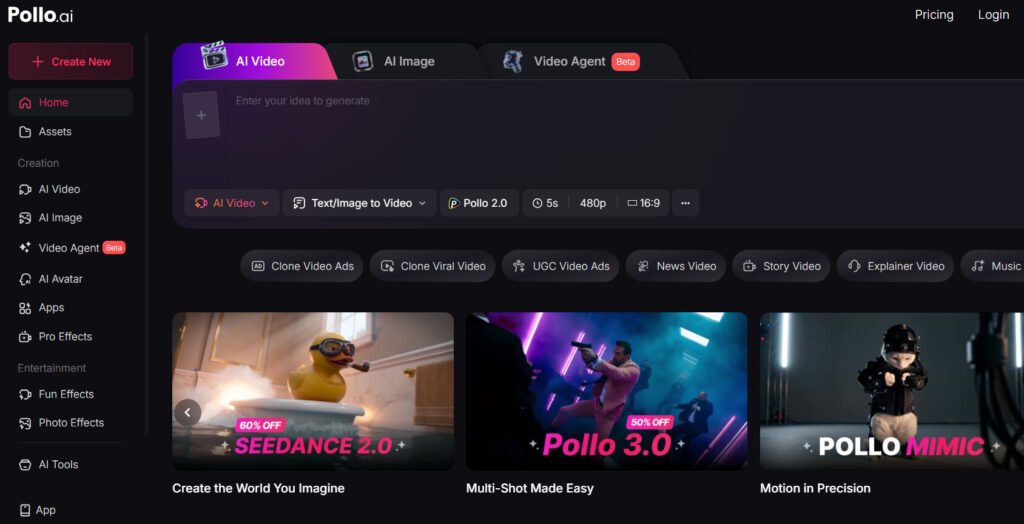
Para simplificarlo, plataformas como Pollo.ai agrega varios modelos de vídeo líderes, incluido Seedance 2.0, Kling 3.0 y Sora 2 en una única interfaz. Según mis pruebas, la principal ventaja no es sólo la comodidad, sino la posibilidad de comparar resultados de distintos modelos, gestionar créditos de forma transparente y ejecutar un flujo de trabajo de vídeo completo sin cambiar de herramienta ni depender de software de edición adicional.
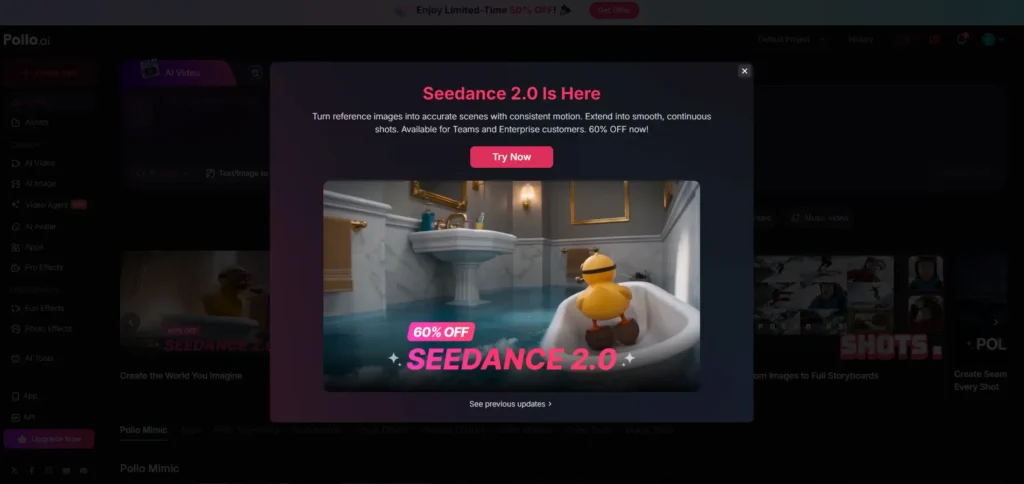
Consigue Seedance 2.0 - Por tiempo limitado 60% Off!
Consigue Seedance 2.0 - Por tiempo limitado 60% Off!
¿Qué es Seedance 2.0? Desglose práctico de su potencia multimodal
Seedance 2.0 es uno de los modelos de generación de vídeo con IA más avanzados que existen en la actualidad, pero llamarlo simplemente “texto a vídeo” sería engañoso.
En mis pruebas, se comporta mucho más cerca de un sistema de dirección multimodal, donde se combinan:
- Imágenes → definir la identidad visual
- Vídeos → controlar el movimiento y el lenguaje de la cámara
- Audio → marcar el ritmo y la emoción
- Texto → orquestarlo todo
El verdadero avance es su “Sistema de referencia todo en uno”, que permite estratificar varias entradas en una sola generación.
Principales limitaciones técnicas (basadas en el uso real)
- Duración: 4-15 segundos por generación
- Entradas máximas: 12 expedientes
- Hasta 9 imágenes
- Hasta 3 vídeos (≤15s en total)
- Hasta 3 archivos de audio (≤15s en total)
Estos límites determinan el uso real de la herramienta (más adelante hablaremos de ello).
Dónde utilizar Seedance 2.0 de forma segura (evitar plataformas falsas y dinero malgastado)
¡Disfrute por tiempo limitado de 50% OFF! 🎉
Declaración de afiliación: Si realizas la compra a través de nuestro enlace, es posible que obtengamos una pequeña comisión sin que ello te suponga ningún coste adicional.
Uno de los mayores puntos de fricción que he encontrado -y que he observado sistemáticamente en la investigación de usuarios- no es cómo utilizar Seedance, sino dónde acceder de forma fiable.
Vías de acceso verificadas
- Dreamina (ecosistema oficial)
- Jimeng / Doubao (con restricciones regionales en algunos casos)
Advertencia crítica: Plataformas falsas o envueltas
En mis pruebas y análisis de los comentarios de los usuarios, muchas plataformas de terceros:
- Reclamar “Acceso Seedance 2.0”
- Exigen una suscripción por adelantado
- Entregar salidas degradadas o filtradas
Casos reales
Un gran consumidor informó:
- Plan $150/mes
- “reclamo comercial ”ilimitado
- Producción real: ~60-220 vídeos/mes dependiendo de la cola
- Tiempos de espera: hasta 3 horas por generación
👉 Conclusión:
Evite los “planes ilimitados”. Elija precios transparentes basados en créditos en los que el coste real de Seedance 2.0 por generación es clara.
Qué hacer si no puede acceder directamente a Seedance 2.0
¡Disfrute por tiempo limitado de 50% OFF! 🎉
Declaración de afiliación: Si realizas la compra a través de nuestro enlace, es posible que obtengamos una pequeña comisión sin que ello te suponga ningún coste adicional.
Para los usuarios que se enfrentan a restricciones regionales o barreras de cuenta, lo más seguro es utilizar plataformas agregadoras de confianza en lugar de sitios desconocidos o no verificados.
Plataformas como Pollo.ai o EnVideo proporcionar una alternativa más fiable:
- Ofrecer acceso a múltiples modelos de vídeo AI (incluidos los flujos de trabajo estilo Seedance)
- Utilizar precios transparentes basados en créditos en lugar de engañosos planes “ilimitados”.
- Velocidades de generación más estables y menos limitaciones ocultas
Por experiencia práctica, estas plataformas reducen significativamente la fricción, especialmente si su objetivo es probar indicaciones, comparar resultados e iterar rápidamente sin tener que lidiar con ecosistemas fragmentados o suscripciones poco fiables.
¿Merece la pena Seedance 2.0? Análisis de costes y resultados
Tras probar varios flujos de trabajo y comparar los patrones de uso comunicados por los usuarios, la respuesta es:
Merece la pena SI:
- Necesitas cortos cinematográficos
- Estás creando vídeos conceptuales, anuncios o guiones gráficos
- Usted valora control de la cámara y calidad del movimiento
NO merece la pena SI:
- Necesitas producción de vídeo de larga duración
- Necesita perfecta coherencia de caracteres
- Usted espera iteración rápida a escala
Coste real Realidad
- Generación 15s: ~120-180 créditos
- Los planes de alto nivel siguen atascados por el tiempo de espera
Ejemplo
Un creador produjo un escena corta de viaje en el tiempo:
- La hora: 1 día
- Presupuesto: bajo $200
👉 Esto pone de relieve su fuerza:
prototipos visuales rápidos y de bajo presupuesto, no sustitución de la producción completa
Cómo utilizar Seedance 2.0 (flujo de trabajo paso a paso)
Paso 1: Utilizar la interfaz “Todo en uno”
Puede utilizar @menciones para generar vídeos seleccionando la Referencia Seedance 2.0 Omni.
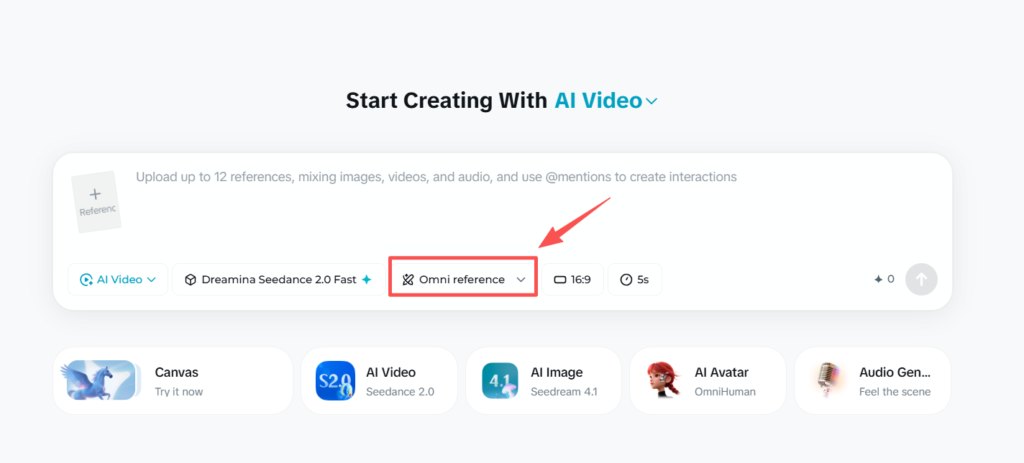
Evita los modos básicos: aquí es donde se produce el verdadero control.
Sube:
- Imágenes (identidad)
- Vídeos (en movimiento)
- Audio (opcional)
Paso 2: Utilizar @Menciones para asignar funciones
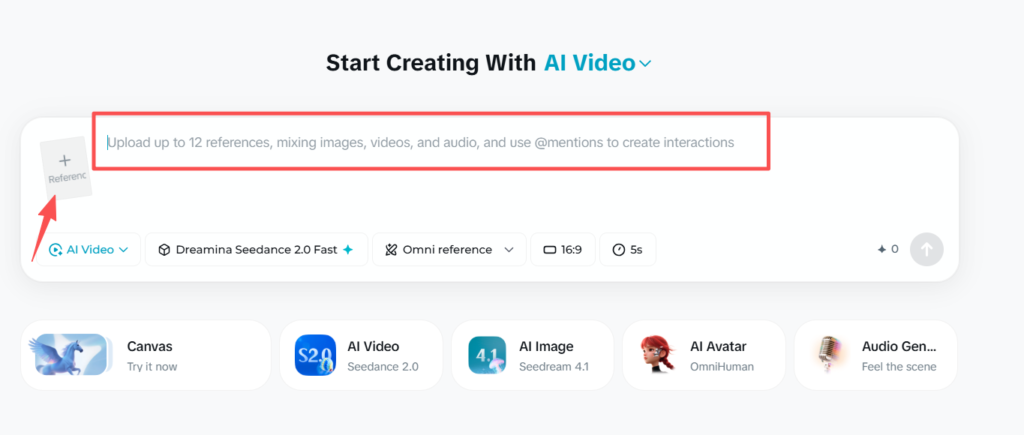
Seedance se basa en gran medida en el estímulo estructurado:
Por ejemplo:
@Imagen1 como marco inicial
@Imagen2 como fotograma final
Personaje sigue movimiento de @Video1
Puede cargar hasta 12 referencias, incluidas imágenes, vídeos o audio.
Paso 3: Configurar los ajustes de salida
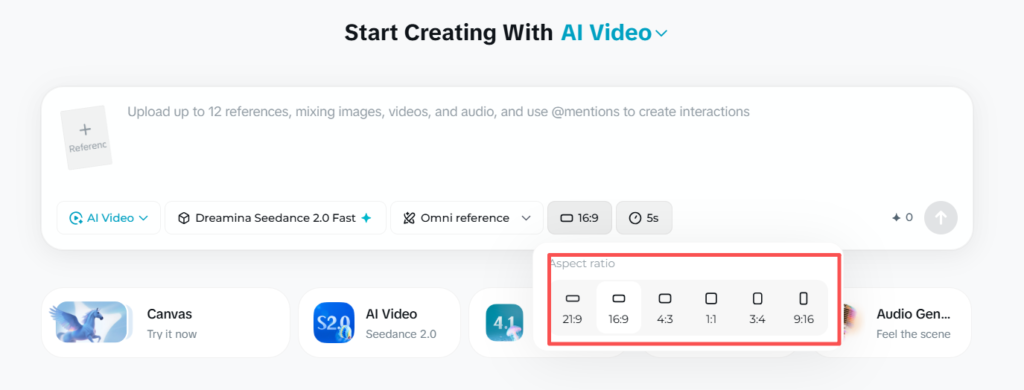
- Relación de aspecto (por ejemplo, 16:9)
- Resolución (por ejemplo, 720p)
- Duración (≤15s)
👉 Importante: Las referencias de vídeo aumentan el coste del crédito.
Cómo escribir prompts de Seedance 2.0 de alta calidad (Pro Framework)
Según mis pruebas en múltiples flujos de trabajo, utilizando sólidos plantillas de avisos y comprender que la calidad de la señal es el principal factor que determina si Seedance 2.0 produce resultados cinematográficos o clips inservibles.
A diferencia de las herramientas tradicionales de conversión de texto en vídeo, Seedance no responde bien a las descripciones vagas: requiere instrucciones estructuradas a nivel de director.
❌ Bad Prompt (Por qué falla)
un hombre bailando en estilo cinematográfico
Por qué falla:
- Sin secuencia de movimiento definida
- Sin instrucciones para la cámara
- Sin restricción de continuidad
- Sin anclaje de referencia
👉 Resultado: movimientos torpes, cortes aleatorios, efectos visuales incoherentes.
✅ Estructura de Prompt de alta calidad (Plantilla Pro).
@Imagen1 como referencia de carácter
@Video1 define el movimiento de la danza Un bailarín realiza una rutina de hip-hop de ritmo rápido,
la cámara sigue lentamente de izquierda a derecha,
movimiento continuo sin cortes,
iluminación cinematográfica, poca profundidad de campo,
mantener la apariencia coherente de los personajes de @Image1
🧠 El marco básico: Piensa como un director, no como un guionista
El patrón de pronóstico más fiable sigue esta estructura:
👉 Tema → Acción → Cámara → Estilo → Restricciones.
Ejemplo de desglose:
- Asunto → Un bailarín
- Acción → realiza una rutina de hip-hop de ritmo rápido.
- Cámara → se desplaza suavemente de izquierda a derecha
- Estilo → Iluminación cinematográfica, poca profundidad de campo.
- Restricciones → toma continua, sin cortes, identidad coherente
👉 Esta estructura produce sistemáticamente salidas más estables y controlables
🎬 Principio clave #1: Asignar una función clara a cada activo (@Sistema de mención)
El mayor punto fuerte de Seedance -y la característica más incomprendida- es el @mencionar sistema de referencia.
✅ Uso correcto
@Imagen1 como identidad del personaje
@Video1 como referencia de movimiento
@Audio1 marca el ritmo
❌ Error común
utilice @Imagen1 y @Vídeo1
👉 Si los papeles no están claros, el modelo mezcla entradas de forma impredecible, lo que conduce a salidas rotas.
🎥 Principio clave #2: Controla la cámara (Esto lo cambia todo).
Las instrucciones de la cámara son uno de los variables de mayor impacto.
Buenas prácticas:
- Utilice un movimiento de cámara por mensaje
- Sea explícito y sencillo
✅ Bueno
la cámara avanza lentamente
❌ Malo
la cámara hace zoom, gira y panea a la izquierda
👉 Múltiples acciones de cámara a menudo causan inestabilidad o movimiento caótico.
🔗 Principio clave #3: Escribe las acciones como movimiento continuo (no como pasos)
Una de las mayores conclusiones de las pruebas:
👉 Seedance interpreta acciones discretas como recortes
❌ Incorrecto
el personaje salta, luego rueda, luego se levanta
✅ Correcto
el personaje salta hacia delante y pasa suavemente a rodar
👉 Esto mejora drásticamente:
- Fluidez de movimiento
- Realismo
- Coherencia de la escena
🧍 Principio clave #4: Forzar la coherencia de caracteres
Sin restricciones explícitas, la deriva identitaria es inevitable.
✅ Añade esta línea:
mantener la apariencia coherente de los personajes de @Image1
Consejo profesional:
Reutilizar el misma imagen de referencia entre generaciones para estabilizar la identidad.
⚠️ Principio clave #5: Eliminar la ambigüedad (ser excesivamente específico)
Recompensas Seedance claridad frente a creatividad en la redacción.
❌ Ambiguo
una escena chula con movimiento dinámico
✅ Específicos
secuencia de carrera rápida con un seguimiento de cámara constante hacia delante
👉 Cuanto más específicas sean tus instrucciones, más predecible será el resultado.
🧪 Técnica avanzada: Prompt como lista de disparos
Los avisos de alto rendimiento se comportan como mini storyboards, no frases.
Por ejemplo:
@Image1 como referencia del personaje El personaje camina hacia delante con confianza,
la cámara le sigue a la altura del pecho,
movimiento constante, sin cortes,
suave iluminación cinematográfica, ambiente nocturno urbano
Piensa:
- Composición de la toma
- Flujo de movimientos
- Tono visual
🚨 Por qué fracasan la mayoría de las promesas de Seedance
A partir de patrones de prueba, la mayoría de los fallos provienen de:
- ❌ Indicaciones imprecisas
- ❌ Falta la lógica de la cámara
- ❌ Referencias contradictorias
- ❌ No hay instrucciones de continuidad
👉 Arreglar sólo estos aumenta la tasa de éxito drásticamente.
✅ Lista de comprobación rápida (antes de generar)
- ¿He asignado funciones a todas las @referencias?
- ¿He definido un único movimiento de cámara?
- ¿Se escribe la acción como un movimiento continuo?
- ¿Hice cumplir el “no cortar” si era necesario?
- ¿He bloqueado la coherencia de caracteres?
Errores comunes que cometen los principiantes en Seedance 2.0 (y soluciones)
Error 1: Escribir prompts cortos
→ Resultado: movimiento torpe
✅ Arreglo: Trata los avisos como descripciones de tomas
Error 2: No hay instrucciones para la cámara
→ Resultado: cortes aleatorios
✅ Fix: solicitar explícitamente “disparo continuo”.”
Error 3: Mezclar referencias
→ Resultado: salidas rotas
✅ Corrección: asignar a cada activo una función clara.
Error 4: Probar directamente vídeos largos
→ Resultado: fallo
✅ Fix: use clip corto + flujo de trabajo de cosido
Por qué sus vídeos de Seedance 2.0 parecen incoherentes (Explicación de la deriva de identidad)
Una limitación importante que he observado es deriva identitaria.
Qué ocurre
Personajes:
- Cambiar la cara
- Perder consistencia en la ropa
- Cambio de estilo entre clips
Por qué ocurre
El modelo optimiza cada generación de forma independiente.
Estrategia de fijación probada
- Utiliza el la misma imagen de referencia repetidamente
- Ancla cada generación con él
- Evitar la sobrecarga con entradas conflictivas
¿Puede Seedance 2.0 crear vídeos largos? La verdadera respuesta
Respuesta corta: No directamente.
Capacidad real
- Generación nativa: ≤15 segundos
- Extensión: ~5-6 segundos por paso
Flujo de trabajo real (utilizado por los creadores)
- Generar múltiples clips de 5-15s
- Mantener las mismas referencias
- Puntada exterior
Casos prácticos
Los creadores que intentan vídeos de 1-3 minutos informan sistemáticamente:
- Éxito sólo a través de montaje multidisparo
- La calidad disminuye si se estira demasiado
Los mejores casos de uso de Seedance 2.0
Basado en patrones de uso del mundo real, Seedance 2.0 destaca:
1. Películas conceptuales - Visualización rápida de escenas antes de la producción
Explorar la los mejores casos de uso de Seedance 2.0, es especialmente eficaz para la previsualización rápida, ya que permite a los creadores convertir ideas abstractas en planos cinematográficos en cuestión de minutos. En lugar de depender de storyboards dibujados a mano o de previsualizaciones en 3D que requieren mucho tiempo, puedes generar múltiples variaciones de una escena y probar el movimiento de la cámara, la iluminación y la composición casi al instante.
En la práctica, un flujo de trabajo habitual consiste en combinar breves indicaciones con vídeos de referencia para guiar el movimiento de la cámara. Esto mejora significativamente la calidad del resultado en comparación con los enfoques basados únicamente en indicaciones. Muchos creadores lo utilizan para crear prototipos de secuencias de acción (por ejemplo, escenas de persecución o revelaciones dramáticas) antes de comprometer los recursos de producción.
La clave: Reduce drásticamente el tiempo y el coste de validar ideas creativas en una fase temprana.
2. Creativos publicitarios - Clips cortos de gran impacto para marketing
Para los equipos de marketing, Seedance 2.0 brilla por producir anuncios cortos (5-15 segundos) diseñado para la velocidad y la iteración. En lugar de invertir en rodajes completos, los equipos pueden generar múltiples conceptos visuales y probarlos en plataformas como TikTok o Instagram.
Un enfoque práctico consiste en crear varias variaciones del mismo concepto (diferentes ángulos, estados de ánimo o ritmo) y utilizarlos para pruebas A/B. Aunque estos clips suelen requerir una edición ligera, reducen considerablemente el tiempo de producción en comparación con los flujos de trabajo tradicionales.
La clave: La mayor ventaja no es el pulido, sino la posibilidad de poner a prueba más ideas creativas y con mayor rapidez.
3. Fragmentos de vídeos musicales: imágenes estilizadas sincronizadas con el ritmo.
Seedance 2.0 funciona especialmente bien en contenidos no lineales y basados en el estilo, por lo que es ideal para fragmentos de vídeos musicales. Los creadores suelen generar varios clips cortos y luego los editan al ritmo de una pista, creando bucles o montajes visualmente atractivos.
Porque los visuales musicales se basan más en humor, movimiento y estética que la narración estricta, las limitaciones de Seedance (como la coherencia de los personajes) pierden relevancia. Esto la convierte en una potente herramienta para producir efectos visuales abstractos y cinematográficos sin necesidad de conocimientos avanzados de animación.
La clave: Reduce la barrera para crear contenidos de vídeo artísticos y de alta calidad.
4. Storyboarding - Sustitución de animatics en bruto
Seedance 2.0 puede actualizar eficazmente el storyboard tradicional convirtiendo los fotogramas estáticos en previsualización dinámica de tomas. En lugar de esbozar escenas, los creadores generan clips cortos (normalmente de 3 a 5 segundos) y los unen para simular el ritmo y la fluidez.
En los flujos de trabajo reales, este enfoque ayuda a los equipos a comunicar mejor la visión, los tiempos y la dirección de cámara. Sin embargo, debido a las limitaciones de coherencia, funciona mejor cuando las escenas se dividen en planos más pequeños que en largas secuencias continuas.
La clave: Transforma el storyboard de planificación estática en una herramienta de comunicación visual más realista.
Cuándo NO utilizar Seedance 2.0 (Limitaciones críticas)
1. Producción de vídeo de larga duración
No es estable más allá de clips cortos
2. Renderizado de texto
IU, señales → a menudo ilegibles
3. Rostros humanos reales
Filtrado estricto → generaciones fallidas
4. Edición de precisión
No sustituye a las herramientas tradicionales
Por qué Seedance 2.0 no genera (Guía de solución de problemas)
Causas comunes
- Rostros humanos reales (bloqueados)
- Demasiadas referencias
- Indicaciones contradictorias
- Filtrado de plataformas
Arregla
- Simplificar las entradas
- Eliminar contenido sensible
- Aclarar la lógica de la solicitud
Seedance 2.0 frente a otras herramientas de vídeo con IA (Sora, Kling, Veo)
Seedance 2.0
✅ Mejor control de la cámara
❌ menor coherencia
Sora
✅ mejor escalabilidad
❌ menos control cinematográfico
Kling
✅ mayor realismo físico
❌ menos precisión en la dirección
👉 Conclusión:
Seedance = herramienta del director, no generador de masa
Cómo evitar las falsas plataformas Seedance 2.0
Banderas rojas
- “Generación ilimitada”
- Sin transparencia crediticia
- Largas colas de espera
- Ninguna prueba oficial de integración
Enfoque seguro
- Comience por las plataformas oficiales
- Pago por uso
- Pruebe antes de comprometerse
PREGUNTAS FRECUENTES: Preguntas reales sobre el uso de Seedance 2.0
¿Puedo subir vídeos largos y generar uno nuevo?
No. Sólo puedes utilizar clips cortos y debes reconstruir los vídeos más largos manualmente.
¿Cómo mantener la coherencia de los caracteres?
Reutilice la misma imagen de referencia en todas las generaciones.
¿Por qué mi vídeo corta escenas aleatoriamente?
No ha especificado la continuidad: pida explícitamente “sin cortes” en los avisos.
¿Existe una versión gratuita?
Existen créditos de prueba, pero suelen ser insuficientes para obtener resultados significativos.
¿Qué plataforma es más segura?
Los ecosistemas oficiales (Dreamina, Jimeng) son más fiables que las envolturas de terceros.
¿Por qué fracasa mi generación?
A menudo debido a restricciones de la cara real o conflictos puntuales.
¿Puede sustituir a los programas de edición de vídeo?
No, complementa los flujos de trabajo tradicionales, no los sustituye.
¿Es Seedance mejor que Sora?
Depende: mejor para el control cinematográfico, peor para la escala y la coherencia.
¿Cuánto dura la generación?
oscila entre minutos y horas en función de la carga de la plataforma.
¿Cuál es el mejor caso de uso?
Cortometrajes cinematográficos y visualización de conceptos.
Veredicto final: ¿Está preparada Seedance 2.0 para el uso profesional?
Seedance 2.0 no es una herramienta de producción completa, pero es una de las más potentes. motores de dirección creativa disponible hoy.
Puntos fuertes
- Calidad cinematográfica
- Control de movimiento avanzado
- Flexibilidad de entrada multimodal
Limitaciones
- Acceso fragmentado
- Salidas largas incoherentes
- Curva de aprendizaje
Conclusión
Si lo enfocas como un herramienta de producción por disparo, no es un generador de un solo clic, se vuelve increíblemente potente.